Pictures written as code: why Keyframe’s shaders are project data
Design note
In After Effects, writing a shader means compiling a plug-in; in Keyframe the program is data in the project, run in a sandbox on your graphics card.
See it first
The water below is a picture program running in your browser right now.
Like the other pieces in the showcase, it was written by hand for this site, not by the Agent. Light on water
In After Effects, your own shader means a compiled plug-in
After Effects once loaded Pixel Bender shaders directly; since CS6 that path is gone.
- 2008 · CS4Pixel Bender shaders can be loaded as effects
- 2012 · CS6Pixel Bender support is removed
- TodayCompile a GPU effect plug-in with the C++ SDK, or install a bridge plug-in such as PixelsWorld
To write your own GPU effect for After Effects today, the proper way is a plug-in written with the C++ SDK, its CUDA, Metal or DirectX code compiled, then installed on every computer that uses it.
The other way is a third-party bridge plug-in such as PixelsWorld: itself a compiled plug-in, inside which you write GLSL-style code.
Why it works that way
After Effects’ core is closed, and custom pictures can only come in through plug-ins.
Effect plug-ins are the way in that After Effects gives outside developers for drawing pixels, and they run compiled native code, so they are compiled per platform and installed per machine. A shader’s source can’t be saved and run as part of the project.
So which effects a project uses depends on which plug-ins each computer has, and an AI can’t safely write one for you and try it on the spot.
In Keyframe: three kinds of program, all project data
The source of a shader, simulation or picture program is stored in the effect and travels with the project.
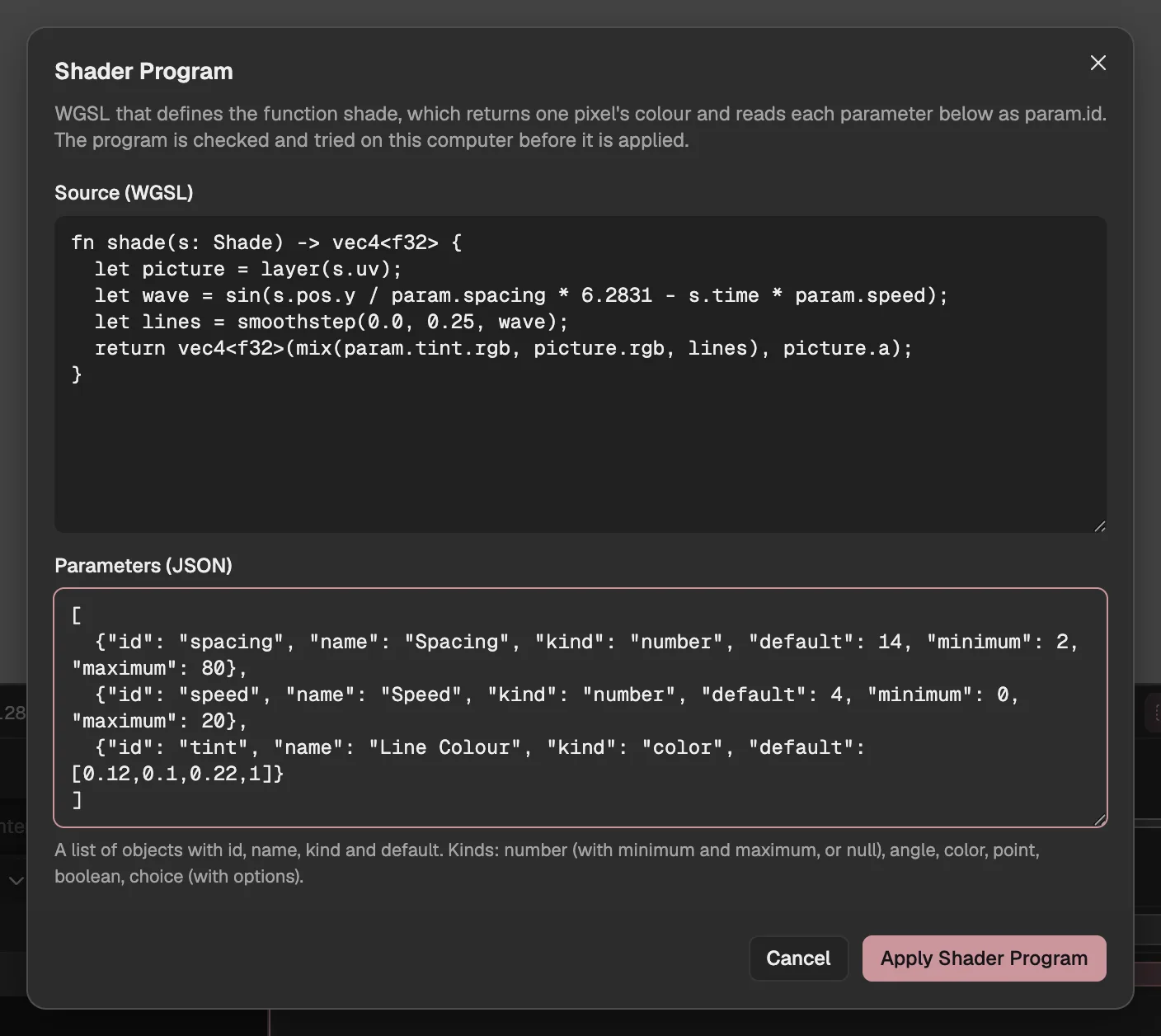
- The program’s source.
- The settings it reads.
- Checks and tries it; it enters the project if it passes.
- Shader: a WGSL (external website, opens in a new tab) program run once for each pixel of the layer, for patterns, colour and distortion.
- Simulation: a set of elements whose state the graphics card keeps from frame to frame, for particles, cloth, ripples and trails; you write how they start, step and draw.
- Picture Program: a JavaScript (external website, opens in a new tab) module that draws the whole layer with WebGPU, for what the other two can’t make.
Picture programs run in a sandbox on another origin
It is told which frame to draw, and can’t reach the editor, your project or the network.
The editor’s page
- Your project and storage
- Your sign-in
- The network
- frame
- parameters
- size
picture
Sandbox (another origin)
- The picture program runs in a worker
- No clock, no chance
Picture programs are the widest kind, so they are shut in the tightest: they run in a worker of a page on another origin, and the editor hands them only the frame number, the parameters and the size. They keep no clock and use no chance, so jumping to a frame and playing up to it give the same result.
Shaders and simulations go the same way in: the editor checks them and tries them on your graphics card, and only then writes them into the project, as one undoable step.
Its settings are properties you keyframe
Each setting a program declares appears in Effect Controls.
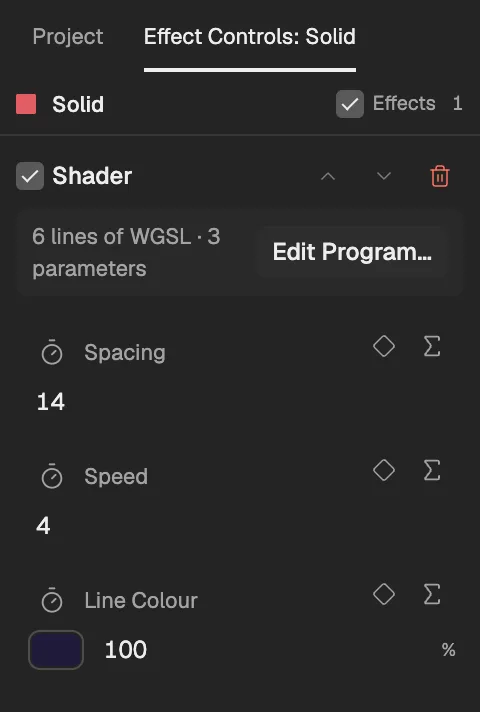
- The program effect.
- Opens the program editor.
- A setting the program declares.
- Keyframe the setting.
Numbers, angles, colours, points on the layer, switches and choices can be dragged, keyframed (opens in a new tab) and driven by expressions. Preview and export run the same program and draw the same frames on the same computer.
Or have the Agent write it
Describe the effect; the Agent writes the program, tries it, looks at the frames, revises it, and hands it to you to review.
This is what making programs project data buys: the Agent (opens in a new tab) writes data, not application code, and it passes the same checks and sandbox as a program you write. Having the Agent write one belongs to the Agent subscription (opening soon); writing your own is free.