Bones without expressions: how Keyframe rigs a character
Design note
In After Effects, bones are pieced together from layers and expressions; in Keyframe a skeleton is a layer, solved by the editor itself.
Pull it first
This fox uses Keyframe’s skeleton, IK and mesh skinning.
Drag its tail or a paw: each handle bends a chain of bones with IK.
In After Effects, bones are pieced together
After Effects has no bone object; character rigs come from third-party scripts such as Duik.
After Effects
- Controller · pawƒ IK
- Bone · lower legƒ expression
- Bone · upper legƒ expression
- Pin · kneeƒ expression
- Art · hind legPuppet pins
Take the open-source Duik Ángela (external website, opens in a new tab): each bone is an ordinary shape layer, and the artwork is parented to the bones. IK is computed by a controller layer and expressions.
The body bends with the Puppet tool (external website, opens in a new tab)’s pins, which follow the bones through pin layers linked by expressions. Puppet has no per-vertex weights: how softly it bends depends only on where the pins are and how many.
Why it has to be that way
Expressions are After Effects’ only general way to tie one property to another every frame.
// An expression remembers nothing from the last frame, so it starts over
const stiffness = 0.2, damping = 0.8;
let x = thisComp.layer("Paw").transform.position.valueAtTime(0)[0];
let v = 0;
for (let f = 1; f <= timeToFrames(time); f++) {
  const goal = thisComp.layer("Paw").transform.position.valueAtTime(framesToTime(f))[0];
  v = (v + (goal - x) * stiffness) * damping;
  x += v;
}
[x, value[1]];- It is the only way in. After Effects’ core is closed: effect plug-ins draw only their own layer’s pixels, and scripts change the project only at the moment they run. To make bones follow a controller on every frame, apart from parenting, you write expressions.
- One expression, one property. An expression’s result is the value of the property it sits on. A leg’s IK needs one on each bone’s rotation, doing the same calculation several times.
- Nothing carries over between frames. An expression starts from scratch on every frame and can’t read the last frame’s result. Motion that depends on history, such as springs and follow-through, has to work through earlier frames again, as above, and gets slower further into the timeline.
What it costs
It is slow, its structure hides in text, and another character means starting over.
- Slower with every bone. Duik’s own performance notes (external website, opens in a new tab) warn that IK and follow-through expressions are complex and slow previews noticeably.
- Structure hidden in text. How bones relate is written in separate expressions, so After Effects doesn’t know which layers make up a leg, and can’t offer bone-level operations such as reparenting without moving the pose or applying an animation to another character.
- AI reads text too. After Effects’ new AI Assistant (external website, opens in a new tab) can read and write expressions, but it still faces separate pieces of text, not a skeleton with a structure.
In Keyframe, a skeleton is a layer
Bones are data in a skeleton layer, and the editor solves a whole chain at once.
Keyframe
- Skeletonone layer
- Upper leg
- Lower legIK
- Paw
- Art · hind legmesh → skeleton, weighted
In Keyframe, a skeleton is a layer type next to images and text. Its bones live inside it, in as many chains as you need; FK and IK are solved by the editor’s own code, with no expressions.
Parts can follow a bone directly, or have their mesh skinned to bones. Drawing bones, reparenting and binding follow dedicated skeletal animation tools such as Spine and Moho.
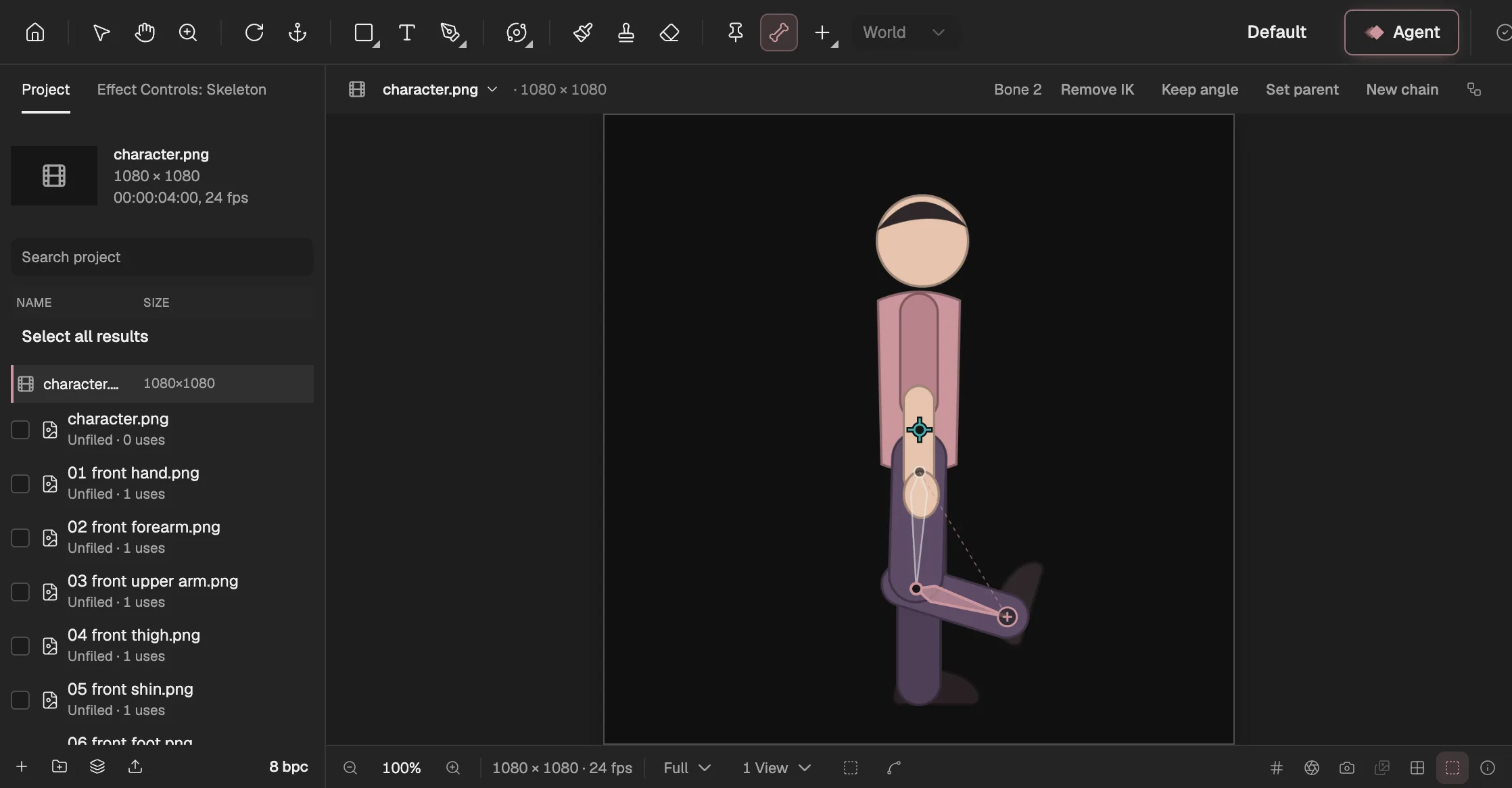
- The Bone tool: draw a bone from joint to joint.
- The selected bone, the lower leg, with IK on.
- Bone options: IK and Keep angle.
- The IK target: drag it and the leg bends.
Mesh skinning and weights
The body bends smoothly at the joints, and you paint where it bends.
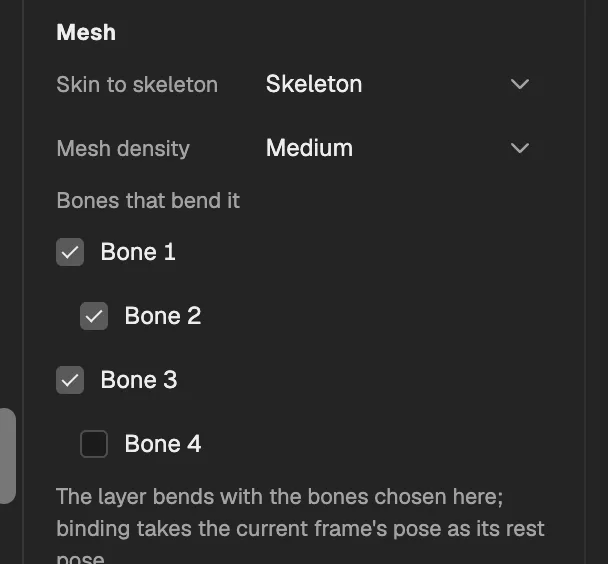
- The skeleton this mesh is skinned to.
- A chain’s root bone.
- A chain’s bones; check the ones that move this part.
- A bone that doesn’t move this part.
A mesh is skinned to the bones it should follow, even from different chains; you paint with the weight brush where each bone pulls and how strongly. Puppet pins can’t do that.
What that makes possible
Because the editor knows the skeleton’s structure, it can work at the level of bones.
- YouDraw bones
- YouAdd IK
- YouSkin the meshpaint weights
- The editorSecondary motiona spring is a behavior
- The editorSave a presetapply it to another character
- Reparent without moving the pose. When a bone gets a new parent, the editor rewrites its base value and every keyframe, so nothing jumps.
- A spring is a behavior. Secondary motion sits on a chain of bones and is integrated in fixed steps; the result depends only on the project and the frame, with no starting over.
- Animation you can reuse. Save a skeletal animation as a preset and apply it to another character by the shape of its chains; where they don’t match, you decide instead of a guess.
- The Agent understands it. Building a skeleton, skinning, painting weights and adding IK are the editor’s registered operations, so the Agent (opens in a new tab) uses the same ones you do. For each step, see Rigging (opens in a new tab) in the manual.