Agent
What the Agent does
The Agent is an assistant inside the editor. You say what you want in your own words; it plans the steps and carries them out with the editor’s own tools, and you decide what to keep.
Who can use it
The Agent uses AI models, so it is part of a subscription. Subscriptions open soon; until then, the Agent panel says so. Everything else in the editor is free, with no account needed.
What it can do
- Animate. Add layers, set keyframes and easing, build and change motion.
- Look and explain. It sees your layers’ pictures and a few frames of the animation, and can say what is there or what is wrong.
- Work with artwork. Import files you choose, separate a picture into layers (opens in a new tab), make or edit a picture (opens in a new tab). Steps that use an image model ask you first.
- Write effects as code. When no ready-made effect does what you ask, it can write a Shader, a Simulation or a Picture Program effect. The code runs walled off from your project, your files and the internet: it can only draw.
- Export. It can set up an export (opens in a new tab), and asks before the final render.
Ask the Agent
Open the panel. Select Agent in the editor’s header. In a narrow window it opens as a sheet.
Check what it may change. The line under the message box shows the scope: what you have selected, the composition, or the whole project. It follows what you select. If a task needs more, the Agent asks, and you choose Allow Project scope or Keep current scope.
Say what you want. Write it in your own words, in any language, and send it. Say what should move and how, for example “make the character wave its front hand twice, then hold still”.
Follow along. The Agent plans, then works through its steps, listed under Steps in the reply’s Details. You can Pause it and Continue later.
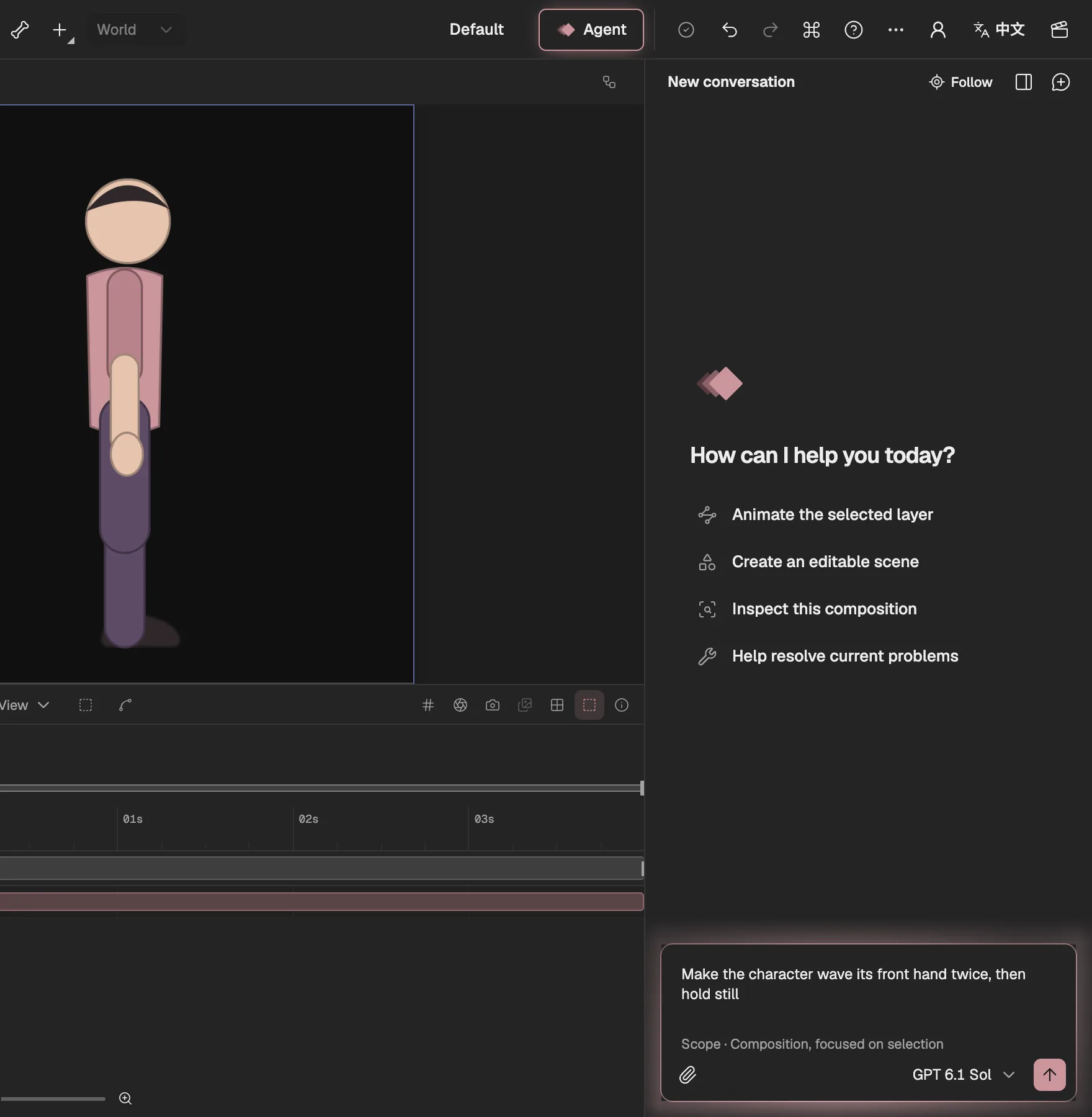
- Opens the Agent panel.
- Ideas to start from.
- Your request, in your own words.
- What the Agent may change.
Drafts: look first, then apply
Changes arrive as a draft. Preview shows it read-only in the viewer, the Timeline and Properties, so you see exactly what would change; Apply makes it part of the project and Discard Draft throws it away. Once applied, what the Agent made is ordinary layers and keyframes: edit them by hand, or undo the whole change with ⌘Z.
Drafts and review (opens in a new tab) covers the rest: a task’s steps, its scope, editing while the Agent works, the steps that ask first, and recovery.
Good to know
- The Agent never installs anything or runs programs on your computer. Code it writes for effects is checked first, runs walled off, and comes to you as a draft like any other change.
- Your project stays in this browser (opens in a new tab). Only what a step needs is sent to the AI model, for that step.