Effects
Layer Styles
Every effect Effects & Presets lists under Layer Styles, generated from the editor’s effect registry: what it does, the layers it works on, and each parameter with its default and range.
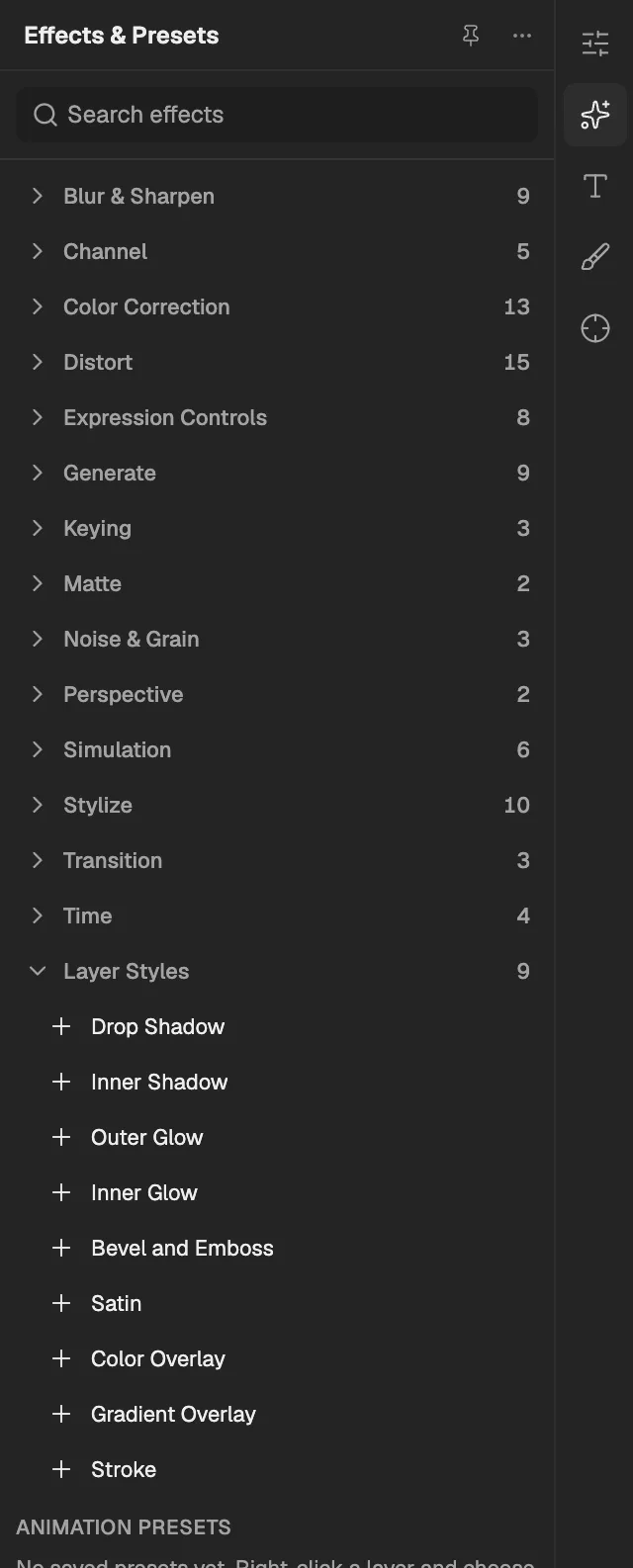
- The category, with the number of effects in it.
- Select an effect to add it to the selected layer. An effect shown greyed out reads another layer, and the composition has none it can use yet.
Drop Shadow
Draws a shadow behind the layer's shape, offset by angle and distance, with adjustable spread and softness; layer styles render after the layer's effects.
- Works on
- Image, Video, Text, Shape, Solid, Composition, and Adjustment
| Parameter | Default | Range or choices |
|---|---|---|
| Color | #000000 | — |
| Opacity | 75% | 0% to 100% |
| Angle | 120° | -36,000° to 36,000° |
| Distance | 5 px | 0 px to 1,000 px |
| Spread | 0% | 0% to 100% |
| Size | 5 px | 0 px to 250 px |
Inner Shadow
Casts a shadow inside the layer's edges, as if the shape were cut into the surface; layer styles render after the layer's effects.
- Works on
- Image, Video, Text, Shape, Solid, Composition, and Adjustment
| Parameter | Default | Range or choices |
|---|---|---|
| Blend ModeNot keyframed | Multiply | Normal, Multiply, Screen, Overlay, Soft Light, Hard Light, Color Dodge, Color Burn, Darken, Lighten, Difference, or Linear Dodge (Add) |
| Color | #000000 | — |
| Opacity | 75% | 0% to 100% |
| Angle | 120° | -36,000° to 36,000° |
| Distance | 5 px | 0 px to 1,000 px |
| Choke | 0% | 0% to 100% |
| Size | 5 px | 0 px to 250 px |
Outer Glow
Surrounds the layer's shape with a soft coloured halo spreading outward from its edges; layer styles render after the layer's effects.
- Works on
- Image, Video, Text, Shape, Solid, Composition, and Adjustment
| Parameter | Default | Range or choices |
|---|---|---|
| Color | #FFFFBE | — |
| Opacity | 75% | 0% to 100% |
| Spread | 0% | 0% to 100% |
| Size | 5 px | 0 px to 250 px |
Inner Glow
Adds a soft coloured glow inside the layer, starting from its edges or from its centre; layer styles render after the layer's effects.
- Works on
- Image, Video, Text, Shape, Solid, Composition, and Adjustment
| Parameter | Default | Range or choices |
|---|---|---|
| Blend ModeNot keyframed | Screen | Normal, Multiply, Screen, Overlay, Soft Light, Hard Light, Color Dodge, Color Burn, Darken, Lighten, Difference, or Linear Dodge (Add) |
| Color | #FFFFBE | — |
| Opacity | 75% | 0% to 100% |
| SourceNot keyframed | Edge | Edge or Center |
| Choke | 0% | 0% to 100% |
| Size | 5 px | 0 px to 250 px |
Bevel and Emboss
Lights the layer's edges with highlights and shadows so the shape looks raised, carved or cushioned; layer styles render after the layer's effects.
- Works on
- Image, Video, Text, Shape, Solid, Composition, and Adjustment
| Parameter | Default | Range or choices |
|---|---|---|
| StyleNot keyframed | Inner Bevel | Outer Bevel, Inner Bevel, Emboss, or Pillow Emboss |
| Depth | 100% | 1% to 1,000% |
| DirectionNot keyframed | Up | Up or Down |
| Size | 5 px | 0 px to 250 px |
| Soften | 0 px | 0 px to 16 px |
| Angle | 120° | -36,000° to 36,000° |
| Altitude | 30° | 0° to 90° |
| Highlight Color | #FFFFFF | — |
| Highlight Opacity | 75% | 0% to 100% |
| Shadow Color | #000000 | — |
| Shadow Opacity | 75% | 0% to 100% |
Satin
Adds soft, wavy inner shading made from offset copies of the shape, like light on polished fabric; layer styles render after the layer's effects.
- Works on
- Image, Video, Text, Shape, Solid, Composition, and Adjustment
| Parameter | Default | Range or choices |
|---|---|---|
| Blend ModeNot keyframed | Multiply | Normal, Multiply, Screen, Overlay, Soft Light, Hard Light, Color Dodge, Color Burn, Darken, Lighten, Difference, or Linear Dodge (Add) |
| Color | #000000 | — |
| Opacity | 50% | 0% to 100% |
| Angle | 19° | -36,000° to 36,000° |
| Distance | 11 px | 1 px to 250 px |
| Size | 14 px | 0 px to 250 px |
| InvertNot keyframed | On | — |
Color Overlay
Covers the layer's shape with one colour at a chosen blend mode and opacity; layer styles render after the layer's effects.
- Works on
- Image, Video, Text, Shape, Solid, Composition, and Adjustment
| Parameter | Default | Range or choices |
|---|---|---|
| Blend ModeNot keyframed | Normal | Normal, Multiply, Screen, Overlay, Soft Light, Hard Light, Color Dodge, Color Burn, Darken, Lighten, Difference, or Linear Dodge (Add) |
| Color | #FF0000 | — |
| Opacity | 100% | 0% to 100% |
Gradient Overlay
Covers the layer's shape with a linear or radial two-colour gradient at a chosen angle and scale; layer styles render after the layer's effects.
- Works on
- Image, Video, Text, Shape, Solid, Composition, and Adjustment
| Parameter | Default | Range or choices |
|---|---|---|
| Blend ModeNot keyframed | Normal | Normal, Multiply, Screen, Overlay, Soft Light, Hard Light, Color Dodge, Color Burn, Darken, Lighten, Difference, or Linear Dodge (Add) |
| Opacity | 100% | 0% to 100% |
| Start Color | #000000 | — |
| End Color | #FFFFFF | — |
| StyleNot keyframed | Linear | Linear or Radial |
| Angle | 90° | -36,000° to 36,000° |
| Scale | 100% | 10% to 150% |
| ReverseNot keyframed | Off | — |
Stroke
Outlines the layer's shape with a coloured line inside, outside or centred on its edge; layer styles render after the layer's effects.
- Works on
- Image, Video, Text, Shape, Solid, Composition, and Adjustment
| Parameter | Default | Range or choices |
|---|---|---|
| Color | #FF0000 | — |
| Opacity | 100% | 0% to 100% |
| Size | 3 px | 1 px to 250 px |
| PositionNot keyframed | Outside | Outside, Inside, or Center |