Expressions
Expression reference
Every name an expression can use, generated from the editor’s expression runtime. Names follow the After Effects expression language, so most After Effects expressions work as they are.
An expression is a short JavaScript (external website, opens in a new tab) script that sets a property’s value at every frame. The value of its last line is the result, and it must match the property: a number, an array such as [x, y], a colour [r, g, b, a] from 0 to 1, a string or a true/false value.
Each run is isolated from the editor and the network: it cannot read files, the clock or the page, and it gets the same answer on every machine. A run may use up to 8 MB of memory and read up to 64 values from the project; an expression that reads another property makes that property work out its value first, and two properties that read each other are an error.
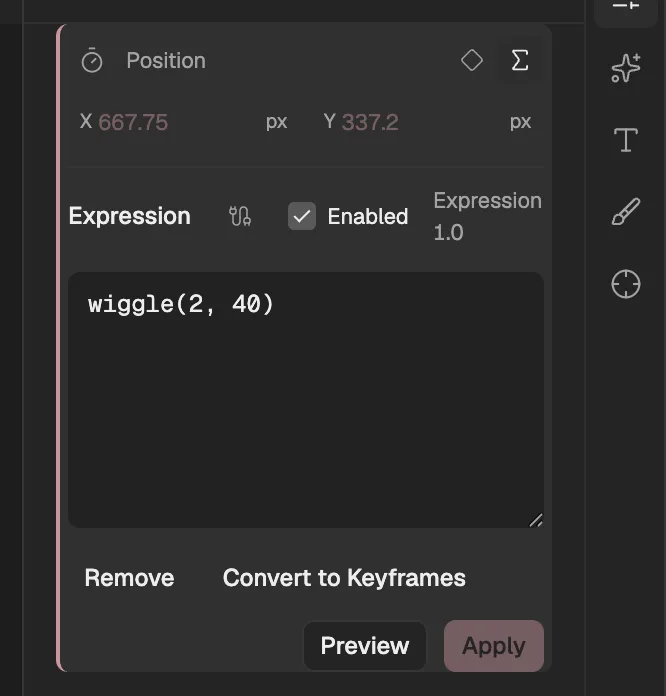
- The expression button beside each property opens its expression.
- With an expression, the property shows the value the expression gives at the current frame.
- The expression. Preview tries it, Apply keeps it, and Convert to Keyframes turns its result into keyframes.
The property
The property the expression is on. These names work on their own, and the same members work on any property you read, such as thisComp.layer("Ball").transform.position.valueAtTime(1).
| Name | What it gives |
|---|---|
value | The property’s value at the current time, before the expression changes it. |
time | The current time of the composition, in seconds. |
thisProperty | The property the expression is on, with the members in this table. |
valueAtTime(t) | The property’s value at time t, in seconds. |
velocity | How fast the value is changing now, per second. |
velocityAtTime(t) | The velocity at time t. |
speed | How fast the value moves now, whatever the direction: the length of the velocity. |
speedAtTime(t) | The speed at time t. |
numKeys | How many keyframes the property has. |
key(index) | A keyframe by number, from 1, with its time, value and index. |
nearestKey(t) | The keyframe closest to time t. |
name | The property’s name. |
wiggle(freq, amp, octaves = 1, ampMult = 0.5, t = time) | The value shaken at random about freq times a second by up to amp; each octave adds finer shaking, ampMult times as strong. |
temporalWiggle(freq, amp, octaves = 1, ampMult = 0.5, t = time) | The value read at a time that wanders around t, so the animation itself speeds up and slows down at random. |
smooth(width = 0.2, samples = 5, t = time) | The value averaged over width seconds around t from samples readings (1 to 32), which irons out jitter. |
loopIn(type = "cycle", numKeyframes = 0) | Repeats the keyframed animation before the first keyframe. type is cycle, pingpong, offset or continue; numKeyframes loops only the first keyframes. |
loopOut(type = "cycle", numKeyframes = 0) | Repeats the keyframed animation after the last keyframe, in the same four ways; numKeyframes loops only the last keyframes. |
loopInDuration(type = "cycle", duration = 0) | Like loopIn, but loops the first duration seconds. |
loopOutDuration(type = "cycle", duration = 0) | Like loopOut, but loops the last duration seconds. |
property("address") | Any property of the project by its address, the way the editor writes it when you link one property to another. |
Layers
A layer, from thisLayer or thisComp.layer(…). The names of this layer also work on their own: position is thisLayer.transform.position.
| Name | What it gives |
|---|---|
thisLayer | The layer the expression is on. |
name | The layer’s name. |
index | The layer’s number in its composition; 1 is the top layer. |
inPoint | When the layer starts, in seconds. |
outPoint | When the layer ends, in seconds. |
startTime | The composition time at which the layer’s own time is 0, in seconds. |
width | The layer’s width in pixels. |
height | The layer’s height in pixels. |
active | True when the layer is switched on and the current time is between its start and its end. |
enabled | True when the layer is switched on. |
hasParent | True when the layer has a parent. |
parent | The layer’s parent; an error when it has none. |
transform | The layer’s transform properties, listed below. |
transform.anchorPoint | The layer’s anchorPoint, read as a property. You may leave out transform.. |
transform.position | The layer’s position, read as a property. You may leave out transform.. |
transform.xPosition | The layer’s xPosition, read as a property. You may leave out transform.. |
transform.yPosition | The layer’s yPosition, read as a property. You may leave out transform.. |
transform.zPosition | The layer’s zPosition, read as a property. You may leave out transform.. |
transform.scale | The layer’s scale, read as a property. You may leave out transform.. |
transform.rotation | The layer’s rotation, read as a property. You may leave out transform.. |
transform.xRotation | The layer’s xRotation, read as a property. You may leave out transform.. |
transform.yRotation | The layer’s yRotation, read as a property. You may leave out transform.. |
transform.zRotation | The layer’s zRotation, read as a property. You may leave out transform.. |
transform.orientation | The layer’s orientation, read as a property. You may leave out transform.. |
transform.opacity | The layer’s opacity, read as a property. You may leave out transform.. |
transform.pointOfInterest | The layer’s pointOfInterest, read as a property. You may leave out transform.. |
transform.zoom | The layer’s zoom, read as a property. You may leave out transform.. |
marker | The layer’s markers (see Markers). |
effect("name")("parameter") | An effect on the layer, by name or number, and then one of its parameters by name or number. .param(…) reads a parameter too. |
layer.property("group-id/property-id") | One of the layer’s properties by its path of group and property ids. |
toComp(point, t = time) | Turns a point in the layer’s space into composition space. The 3D camera’s projection is not applied. |
fromComp(point, t = time) | Turns a point in composition space into the layer’s space. |
toWorld(point, t = time) | The same as toComp, under its After Effects name. |
fromWorld(point, t = time) | The same as fromComp, under its After Effects name. |
toCompVec(vector, t = time) | Like toComp for a direction rather than a point: position is left out, rotation and scale apply. |
fromCompVec(vector, t = time) | Like fromComp for a direction rather than a point. |
toWorldVec(vector, t = time) | The same as toCompVec. |
fromWorldVec(vector, t = time) | The same as fromCompVec. |
Compositions
The composition the layer is in, or another one by name.
| Name | What it gives |
|---|---|
thisComp | The composition the layer is in. |
comp("name") | Another composition of the project, by name. |
thisProject.comp("name") | The project; its comp("name") is the same as comp("name"). |
thisComp.layer("name" | index | otherLayer, relIndex) | A layer by name or number, or the layer relIndex places away from another layer. |
name | The composition’s name. |
width | The composition’s width in pixels. |
height | The composition’s height in pixels. |
duration | How long the composition is, in seconds. |
frameDuration | How long one frame lasts, in seconds. |
numLayers | How many layers the composition has. |
pixelAspect | The composition’s pixel aspect ratio. |
displayStartTime | The time the composition’s timecode starts at, in seconds. |
marker | The composition’s markers (see Markers). |
Markers
A layer’s or a composition’s markers, from its marker.
| Name | What it gives |
|---|---|
numKeys | How many markers there are. |
marker.key(index | "name") | A marker by number, from 1, or by its name or comment, with its time, duration, comment, name and index. |
marker.nearestKey(t) | The marker closest to time t. |
Vector math
Functions for numbers and arrays alike. A missing dimension counts as 0.
| Name | What it gives |
|---|---|
add(a, b) | Adds two numbers or arrays. |
sub(a, b) | Subtracts b from a. |
mul(vector, amount) | Multiplies a number or array by an amount. |
div(vector, amount) | Divides a number or array by an amount. |
clamp(value, limit1, limit2) | Keeps a value, or each part of an array, between two limits. |
dot(a, b) | The dot product of two arrays. |
cross(a, b) | The cross product of two 3D arrays. |
normalize(vector) | The array scaled to a length of 1. |
length(vector) / length(a, b) | The length of an array, or the distance between two points. |
lookAt(fromPoint, atPoint) | The orientation that turns a 3D layer at fromPoint to face atPoint. |
degreesToRadians(degrees) | Degrees in radians. |
radiansToDegrees(radians) | Radians in degrees. |
Interpolation
Turn one range into another. With three arguments, t runs from 0 to 1.
| Name | What it gives |
|---|---|
linear(t, tMin, tMax, value1, value2) | Maps t from tMin–tMax onto value1–value2 in a straight line, holding at either end. |
ease(t, tMin, tMax, value1, value2) | The same, easing in and out. |
easeIn(t, tMin, tMax, value1, value2) | The same, starting slowly and arriving at full speed. |
easeOut(t, tMin, tMax, value1, value2) | The same, starting at full speed and arriving slowly. |
Random numbers and noise
Random numbers are seeded by the property and the frame, so a frame always gets the same numbers: in the preview, in the export and on every machine.
| Name | What it gives |
|---|---|
seedRandom(offset, timeless = false) | Picks another set of random numbers; with timeless true, the numbers stay the same on every frame. |
random() / random(max) / random(min, max) | A random number between 0 and 1, 0 and max, or min and max; arrays give one number per part. |
gaussRandom() / gaussRandom(max) / gaussRandom(min, max) | Like random, but bunched toward the middle: about nine in ten fall inside the range. |
noise(x | [x, y] | [x, y, z]) | Smooth noise between about −1 and 1 that changes gradually as its input changes. |
Time
Convert between seconds and frames, and hold a value for several frames.
| Name | What it gives |
|---|---|
timeToFrames(t = time, fps, isDuration = false) | A time in seconds as a number of frames, at the composition’s frame rate unless you give one. |
framesToTime(frames, fps) | A number of frames as a time in seconds. |
posterizeTime(fps) | Makes the rest of the expression run as if the frame rate were fps, so the value changes in steps. |
Colour
Colours are arrays of four numbers from 0 to 1: red, green, blue and alpha.
| Name | What it gives |
|---|---|
rgbToHsl([r, g, b, a]) | A colour as hue, saturation, lightness and alpha. |
hslToRgb([h, s, l, a]) | Hue, saturation, lightness and alpha as a colour. |
hexToRgb("#RRGGBB") | A hex colour such as #FF8800 (or #AARRGGBB) as a colour array. |
Text selectors
In an expression selector of a text animator, the expression runs once for each character, word or line.
| Name | What it gives |
|---|---|
textIndex | The number of the character, word or line being worked out, from 1. |
textTotal | How many characters, words or lines there are. |
selectorValue | What the selectors above this one give, as a percentage. |
Expression controls
An expression control is an effect that holds values for expressions to read and leaves the picture alone; so do the tracker effects that keep their results for expressions. Add one from Effects & Presets, then read it by the effect’s name and a parameter’s name, as below (each row shows its first parameter); a second copy of a control is numbered (“Slider Control 2”).
| Read it as | What it gives |
|---|---|
effect("Slider Control")("Slider")Slider Control · Slider | A number. |
effect("Angle Control")("Angle")Angle Control · Angle | A number. |
effect("Checkbox Control")("Checkbox")Checkbox Control · Checkbox | 1 when ticked, 0 when not. |
effect("Color Control")("Color")Color Control · Color | A colour [r, g, b, a]. |
effect("Point Control")("Point")Point Control · Point | A point [x, y]. |
effect("Layer Control")("Layer")Layer Control · Layer | The chosen layer, read as a layer. |
effect("Dropdown Menu Control")("Menu")Dropdown Menu Control · Menu | A whole number: the chosen item of the menu, from 1. |
effect("3D Camera Tracker")("Shot Type")3D Camera Tracker · Shot Type | The chosen option, as its value in text. |
effect("Face Track Points")("Left Eyebrow Inner")Face Track Points · Left Eyebrow Inner | A point [x, y]. |
Not supported
sampleImage,sourceRectAtTimeand text style objects.- The 3D camera’s projection in
toComp: it converts between layer and composition space only. - After Effects’ Legacy ExtendScript engine, and anything outside the expression: files, the network, the clock,
evaland modules.