Effects
Keying
Every effect Effects & Presets lists under Keying, generated from the editor’s effect registry: what it does, the layers it works on, and each parameter with its default and range.
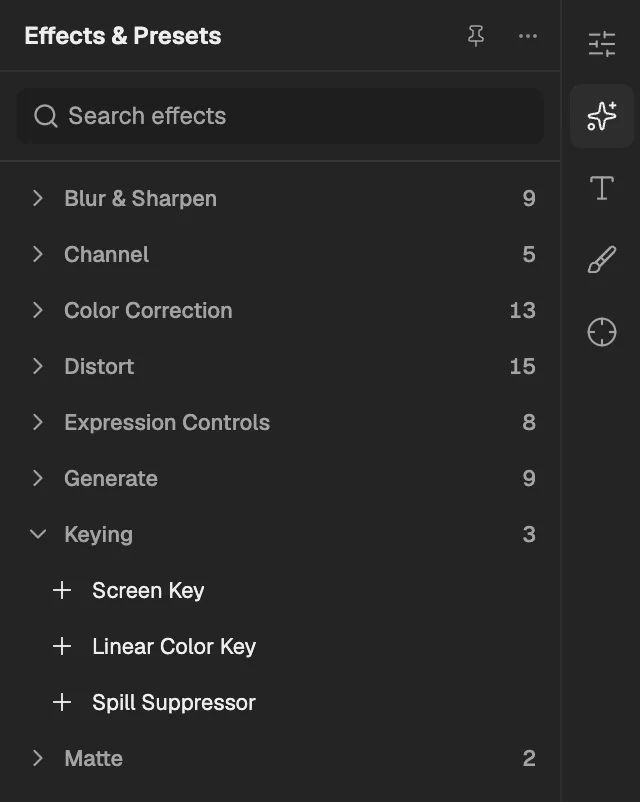
- The category, with the number of effects in it.
- Select an effect to add it to the selected layer. An effect shown greyed out reads another layer, and the composition has none it can use yet.
Screen Key
Removes a green or blue screen background, making it transparent while keeping the subject and cleaning colour spill.
- Works on
- Image, Video, Text, Shape, Solid, Composition, and Adjustment
| Parameter | Default | Range or choices |
|---|---|---|
| ViewNot keyframed | Final Result | Final Result or Combined Matte |
| Screen Color | #00FF00 | — |
| Screen Gain | 100% | 0% to 200% |
| Screen Balance | 50% | 0% to 100% |
| Clip Black | 0% | 0% to 100% |
| Clip White | 100% | 0% to 100% |
| Despill | 100% | 0% to 100% |
Linear Color Key
Makes pixels close to a chosen colour transparent, or keeps only those pixels, with tolerance and softness for the edge.
- Works on
- Image, Video, Text, Shape, Solid, Composition, and Adjustment
| Parameter | Default | Range or choices |
|---|---|---|
| Key Color | #00FF00 | — |
| Match ColorsNot keyframed | RGB | RGB, Hue, or Chroma |
| Matching Tolerance | 10% | 0% to 100% |
| Matching Softness | 0% | 0% to 100% |
| Key OperationNot keyframed | Key Colors | Key Colors or Keep Colors |
Spill Suppressor
Removes the green or blue tint that a coloured screen casts onto the edges and surfaces of a keyed subject.
- Works on
- Image, Video, Text, Shape, Solid, Composition, and Adjustment
| Parameter | Default | Range or choices |
|---|---|---|
| Color To Suppress | #00FF00 | — |
| Color AccuracyNot keyframed | Faster | Faster or Better |
| Suppression | 100% | 0% to 100% |