Effects
Color Correction
Every effect Effects & Presets lists under Color Correction, generated from the editor’s effect registry: what it does, the layers it works on, and each parameter with its default and range.
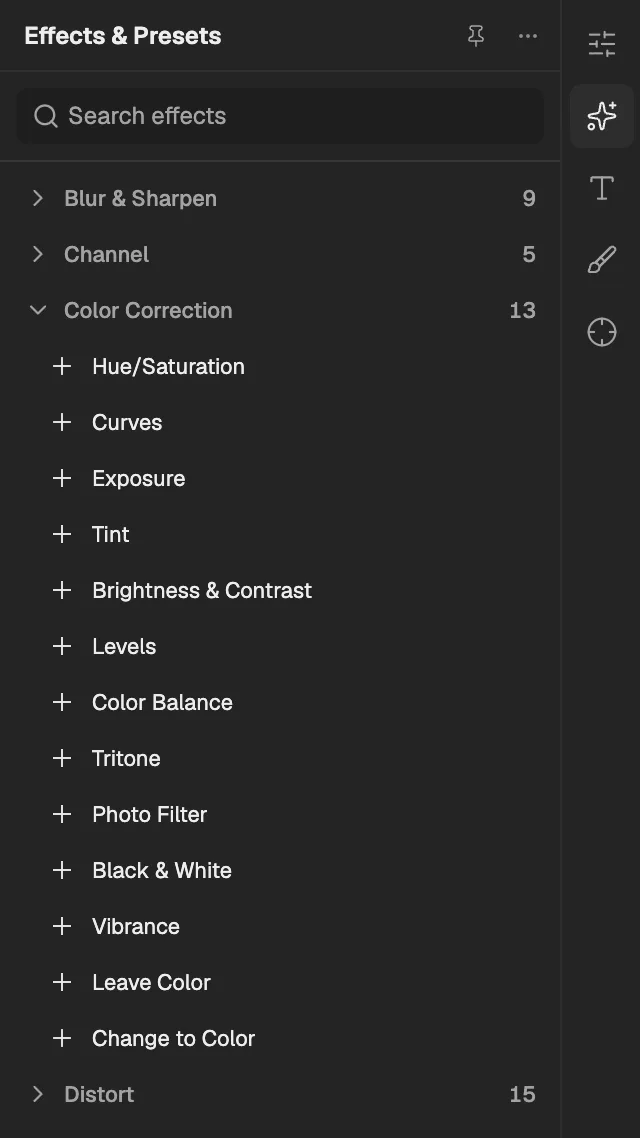
- The category, with the number of effects in it.
- Select an effect to add it to the selected layer. An effect shown greyed out reads another layer, and the composition has none it can use yet.
Hue/Saturation
Shifts colours around the colour wheel and changes their saturation and lightness, or tints the whole layer with one hue.
- Works on
- Image, Video, Text, Shape, Solid, Composition, and Adjustment
| Parameter | Default | Range or choices |
|---|---|---|
| Master Hue | 0° | -180° to 180° |
| Master Saturation | 0% | -100% to 100% |
| Master Lightness | 0% | -100% to 100% |
| ColorizeNot keyframed | Off | — |
| Colorize Hue | 0° | 0° to 360° |
| Colorize Saturation | 25% | 0% to 100% |
| Colorize Lightness | 0% | -100% to 100% |
Curves
Remaps brightness through editable curves, for the whole image and for the red, green and blue channels separately.
- Works on
- Image, Video, Text, Shape, Solid, Composition, and Adjustment
| Parameter | Default | Range or choices |
|---|---|---|
| Master | — | — |
| Red | — | — |
| Green | — | — |
| Blue | — | — |
Exposure
Brightens or darkens the layer in photographic stops, with an offset for the shadows and a gamma setting for the midtones.
- Works on
- Image, Video, Text, Shape, Solid, Composition, and Adjustment
| Parameter | Default | Range or choices |
|---|---|---|
| Exposure | 0 stops | -20 stops to 20 stops |
| Offset | 0 | -1 to 1 |
| Gamma Correction | 1 | 0.01 to 10 |
Tint
Maps the layer's dark tones to one colour and its light tones to another, for duotone or monochrome looks.
- Works on
- Image, Video, Text, Shape, Solid, Composition, and Adjustment
| Parameter | Default | Range or choices |
|---|---|---|
| Map Black To | #000000 | — |
| Map White To | #FFFFFF | — |
| Amount | 1 | 0 to 1 |
Brightness & Contrast
Makes the whole layer lighter or darker and widens or narrows the difference between its light and dark areas.
- Works on
- Image, Video, Text, Shape, Solid, Composition, and Adjustment
| Parameter | Default | Range or choices |
|---|---|---|
| Brightness | 0% | -100% to 100% |
| Contrast | 0% | -100% to 100% |
Levels
Sets the input black point, white point and midtone gamma, then the output range, to correct brightness and contrast precisely.
- Works on
- Image, Video, Text, Shape, Solid, Composition, and Adjustment
| Parameter | Default | Range or choices |
|---|---|---|
| Input Black | 0 | 0 to 1 |
| Input White | 1 | 0 to 1 |
| Gamma | 1 | 0.1 to 10 |
| Output Black | 0 | 0 to 1 |
| Output White | 1 | 0 to 1 |
Color Balance
Shifts the red, green and blue balance separately in the shadows, midtones and highlights to warm, cool or correct colour.
- Works on
- Image, Video, Text, Shape, Solid, Composition, and Adjustment
| Parameter | Default | Range or choices |
|---|---|---|
| Shadow Red Balance | 0 | -100 to 100 |
| Shadow Green Balance | 0 | -100 to 100 |
| Shadow Blue Balance | 0 | -100 to 100 |
| Midtone Red Balance | 0 | -100 to 100 |
| Midtone Green Balance | 0 | -100 to 100 |
| Midtone Blue Balance | 0 | -100 to 100 |
| Highlight Red Balance | 0 | -100 to 100 |
| Highlight Green Balance | 0 | -100 to 100 |
| Highlight Blue Balance | 0 | -100 to 100 |
| Preserve LuminosityNot keyframed | Off | — |
Tritone
Recolours the layer by brightness, mapping its shadows, midtones and highlights to three chosen colours.
- Works on
- Image, Video, Text, Shape, Solid, Composition, and Adjustment
| Parameter | Default | Range or choices |
|---|---|---|
| Highlights | #FFFFFF | — |
| Midtones | #80664D | — |
| Shadows | #000000 | — |
| Blend With Original | 0% | 0% to 100% |
Photo Filter
Tints the layer as if it were shot through a coloured camera filter, such as warming, cooling, sepia or a custom colour.
- Works on
- Image, Video, Text, Shape, Solid, Composition, and Adjustment
| Parameter | Default | Range or choices |
|---|---|---|
| FilterNot keyframed | Warming Filter (85) | Warming Filter (85), Warming Filter (81), Cooling Filter (80), Cooling Filter (82), Red, Orange, Yellow, Green, Cyan, Blue, Violet, Magenta, Sepia, or Custom |
| Color | #EC8A00 | — |
| Density | 25% | 0% to 100% |
| Preserve LuminosityNot keyframed | On | — |
Black & White
Converts the layer to greyscale, with sliders setting how light each original colour range becomes, plus an optional tint.
- Works on
- Image, Video, Text, Shape, Solid, Composition, and Adjustment
| Parameter | Default | Range or choices |
|---|---|---|
| Reds | 40% | -200% to 300% |
| Yellows | 60% | -200% to 300% |
| Greens | 40% | -200% to 300% |
| Cyans | 60% | -200% to 300% |
| Blues | 20% | -200% to 300% |
| Magentas | 80% | -200% to 300% |
| TintNot keyframed | Off | — |
| Tint Color | #E3C499 | — |
Vibrance
Raises or lowers colour intensity; vibrance changes dull colours more than vivid ones, while saturation changes all colours equally.
- Works on
- Image, Video, Text, Shape, Solid, Composition, and Adjustment
| Parameter | Default | Range or choices |
|---|---|---|
| Vibrance | 0 | -100 to 100 |
| Saturation | 0 | -100 to 100 |
Leave Color
Removes colour from everything except one chosen colour, which stays saturated while the rest turns grey.
- Works on
- Image, Video, Text, Shape, Solid, Composition, and Adjustment
| Parameter | Default | Range or choices |
|---|---|---|
| Amount to Decolor | 0% | 0% to 100% |
| Color To Leave | #FF0000 | — |
| Tolerance | 15% | 0% to 100% |
| Edge Softness | 0% | 0% to 100% |
| Match colorsNot keyframed | RGB | RGB or Hue |
Change to Color
Replaces one chosen colour in the layer with another, matching by hue, lightness and saturation within set tolerances.
- Works on
- Image, Video, Text, Shape, Solid, Composition, and Adjustment
| Parameter | Default | Range or choices |
|---|---|---|
| From | #FF0000 | — |
| To | #0000FF | — |
| ChangeNot keyframed | Hue | Hue, Hue & Lightness, Hue, Lightness & Saturation, or Colorize |
| Hue Tolerance | 5% | 0% to 100% |
| Lightness Tolerance | 50% | 0% to 100% |
| Saturation Tolerance | 50% | 0% to 100% |
| Softness | 50% | 0% to 100% |