Effects
Channel
Every effect Effects & Presets lists under Channel, generated from the editor’s effect registry: what it does, the layers it works on, and each parameter with its default and range.
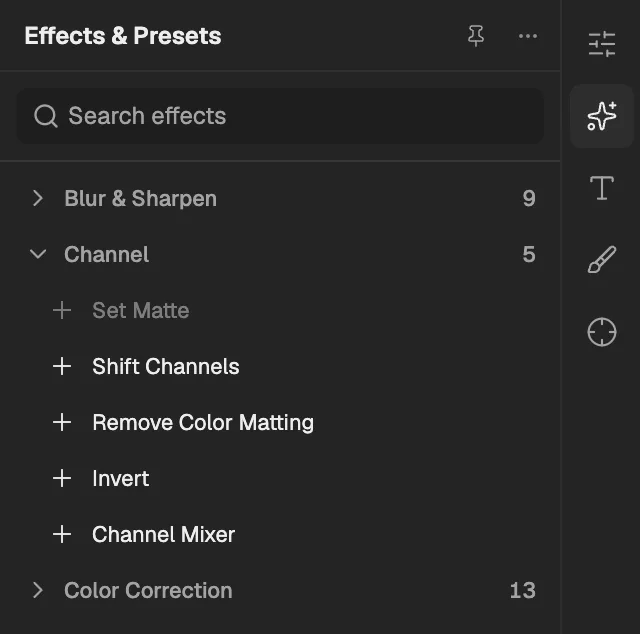
- The category, with the number of effects in it.
- Select an effect to add it to the selected layer. An effect shown greyed out reads another layer, and the composition has none it can use yet.
Set Matte
Replaces the layer's transparency with the alpha or brightness of another layer, so that layer decides what shows.
- Works on
- Image, Video, Text, Shape, Solid, Composition, and Adjustment
- Reads layers
- Take Matte From Layer
| Parameter | Default | Range or choices |
|---|---|---|
| Use For MatteNot keyframed | Alpha | Alpha or Luminance |
| Invert MatteNot keyframed | Off | — |
| Stretch Matte to FitNot keyframed | On | — |
| Composite Matte with OriginalNot keyframed | Off | — |
Shift Channels
Rebuilds the red, green, blue and alpha channels from other channels of the layer, or sets them fully on or off.
- Works on
- Image, Video, Text, Shape, Solid, Composition, and Adjustment
| Parameter | Default | Range or choices |
|---|---|---|
| Take Red FromNot keyframed | Red | Red, Green, Blue, Alpha, Full On, or Full Off |
| Take Green FromNot keyframed | Green | Red, Green, Blue, Alpha, Full On, or Full Off |
| Take Blue FromNot keyframed | Blue | Red, Green, Blue, Alpha, Full On, or Full Off |
| Take Alpha FromNot keyframed | Alpha | Red, Green, Blue, Alpha, Full On, or Full Off |
Remove Color Matting
Removes the fringe of background colour left in the semi-transparent edges of footage premultiplied against a solid colour.
- Works on
- Image, Video, Text, Shape, Solid, Composition, and Adjustment
| Parameter | Default | Range or choices |
|---|---|---|
| Background Color | #000000 | — |
Invert
Flips colours to their opposites, either all of them or one channel such as red, alpha or brightness.
- Works on
- Image, Video, Text, Shape, Solid, Composition, and Adjustment
| Parameter | Default | Range or choices |
|---|---|---|
| ChannelNot keyframed | RGB | RGB, Red, Green, Blue, Alpha, or Luminance |
| Blend With Original | 0% | 0% to 100% |
Channel Mixer
Builds each output colour channel from a mix of the red, green and blue channels plus a constant, or makes a monochrome mix.
- Works on
- Image, Video, Text, Shape, Solid, Composition, and Adjustment
| Parameter | Default | Range or choices |
|---|---|---|
| Red-Red | 100% | -200% to 200% |
| Red-Green | 0% | -200% to 200% |
| Red-Blue | 0% | -200% to 200% |
| Red-Const | 0% | -200% to 200% |
| Green-Red | 0% | -200% to 200% |
| Green-Green | 100% | -200% to 200% |
| Green-Blue | 0% | -200% to 200% |
| Green-Const | 0% | -200% to 200% |
| Blue-Red | 0% | -200% to 200% |
| Blue-Green | 0% | -200% to 200% |
| Blue-Blue | 100% | -200% to 200% |
| Blue-Const | 0% | -200% to 200% |
| MonochromeNot keyframed | Off | — |