Effects
Expression Controls
Every effect Effects & Presets lists under Expression Controls, generated from the editor’s effect registry: what it does, the layers it works on, and each parameter with its default and range.
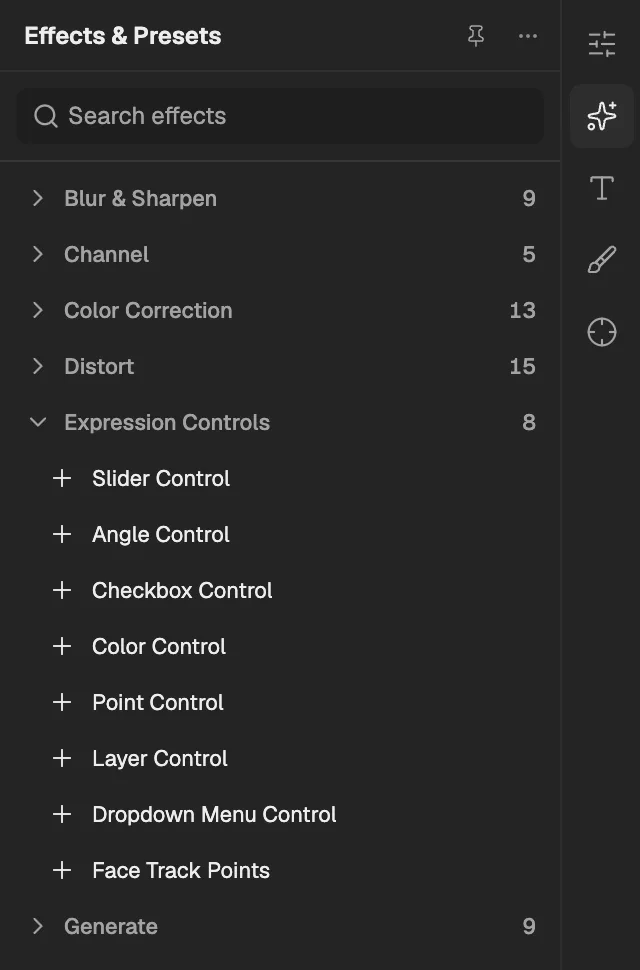
- The category, with the number of effects in it.
- Select an effect to add it to the selected layer. An effect shown greyed out reads another layer, and the composition has none it can use yet.
Slider Control
Holds one number for expressions to read, so several properties can be driven from a single slider; it does not change pixels.
- Works on
- Image, Video, Text, Shape, 3D primitive, Solid, Null, Composition, Adjustment, Camera, Light, Skeleton, and 3D model
| Parameter | Default | Range or choices |
|---|---|---|
| Slider | 0 | — |
Angle Control
Holds one angle, shown as a dial, for expressions to read; it does not change pixels.
- Works on
- Image, Video, Text, Shape, 3D primitive, Solid, Null, Composition, Adjustment, Camera, Light, Skeleton, and 3D model
| Parameter | Default | Range or choices |
|---|---|---|
| Angle | 0° | — |
Checkbox Control
Holds an on or off switch for expressions to read; it does not change pixels.
- Works on
- Image, Video, Text, Shape, 3D primitive, Solid, Null, Composition, Adjustment, Camera, Light, Skeleton, and 3D model
| Parameter | Default | Range or choices |
|---|---|---|
| Checkbox | Off | — |
Color Control
Holds one colour for expressions to read, so several properties can share it; it does not change pixels.
- Works on
- Image, Video, Text, Shape, 3D primitive, Solid, Null, Composition, Adjustment, Camera, Light, Skeleton, and 3D model
| Parameter | Default | Range or choices |
|---|---|---|
| Color | #FF0000 | — |
Point Control
Holds one x and y position for expressions to read; it does not change pixels.
- Works on
- Image, Video, Text, Shape, 3D primitive, Solid, Null, Composition, Adjustment, Camera, Light, Skeleton, and 3D model
| Parameter | Default | Range or choices |
|---|---|---|
| Point | 0 px, 0 px | — |
Layer Control
Holds a reference to another layer for expressions to read from; it does not change pixels.
- Works on
- Image, Video, Text, Shape, 3D primitive, Solid, Null, Composition, Adjustment, Camera, Light, Skeleton, and 3D model
| Parameter | Default | Range or choices |
|---|---|---|
| LayerNot keyframed | — | — |
Dropdown Menu Control
Holds a list of named choices and the selected one for expressions to read; it does not change pixels.
- Works on
- Image, Video, Text, Shape, 3D primitive, Solid, Null, Composition, Adjustment, Camera, Light, Skeleton, and 3D model
| Parameter | Default | Range or choices |
|---|---|---|
| Menu | 1 | 1 to 256 |
| ItemsNot keyframed | Item 1, Item 2, Item 3 | — |
Face Track Points
Holds the eye, brow, nose, mouth and chin positions found by face tracking, for expressions to follow; it does not change pixels.
- Works on
- Image, Video, Text, Shape, Solid, Composition, and Adjustment
| Parameter | Default | Range or choices |
|---|---|---|
| Left Eyebrow Inner | 0.5, 0.5 | -10 to 10 |
| Left Eyebrow Middle | 0.5, 0.5 | -10 to 10 |
| Left Eyebrow Outer | 0.5, 0.5 | -10 to 10 |
| Right Eyebrow Inner | 0.5, 0.5 | -10 to 10 |
| Right Eyebrow Middle | 0.5, 0.5 | -10 to 10 |
| Right Eyebrow Outer | 0.5, 0.5 | -10 to 10 |
| Left Eye Inner | 0.5, 0.5 | -10 to 10 |
| Left Eye Outer | 0.5, 0.5 | -10 to 10 |
| Left Eye Top | 0.5, 0.5 | -10 to 10 |
| Left Eye Bottom | 0.5, 0.5 | -10 to 10 |
| Right Eye Inner | 0.5, 0.5 | -10 to 10 |
| Right Eye Outer | 0.5, 0.5 | -10 to 10 |
| Right Eye Top | 0.5, 0.5 | -10 to 10 |
| Right Eye Bottom | 0.5, 0.5 | -10 to 10 |
| Left Pupil | 0.5, 0.5 | -10 to 10 |
| Right Pupil | 0.5, 0.5 | -10 to 10 |
| Nose Bridge | 0.5, 0.5 | -10 to 10 |
| Nose Tip | 0.5, 0.5 | -10 to 10 |
| Left Nostril | 0.5, 0.5 | -10 to 10 |
| Right Nostril | 0.5, 0.5 | -10 to 10 |
| Mouth Left | 0.5, 0.5 | -10 to 10 |
| Mouth Right | 0.5, 0.5 | -10 to 10 |
| Mouth Top | 0.5, 0.5 | -10 to 10 |
| Mouth Bottom | 0.5, 0.5 | -10 to 10 |
| Chin | 0.5, 0.5 | -10 to 10 |