Effects
Distort
Every effect Effects & Presets lists under Distort, generated from the editor’s effect registry: what it does, the layers it works on, and each parameter with its default and range.
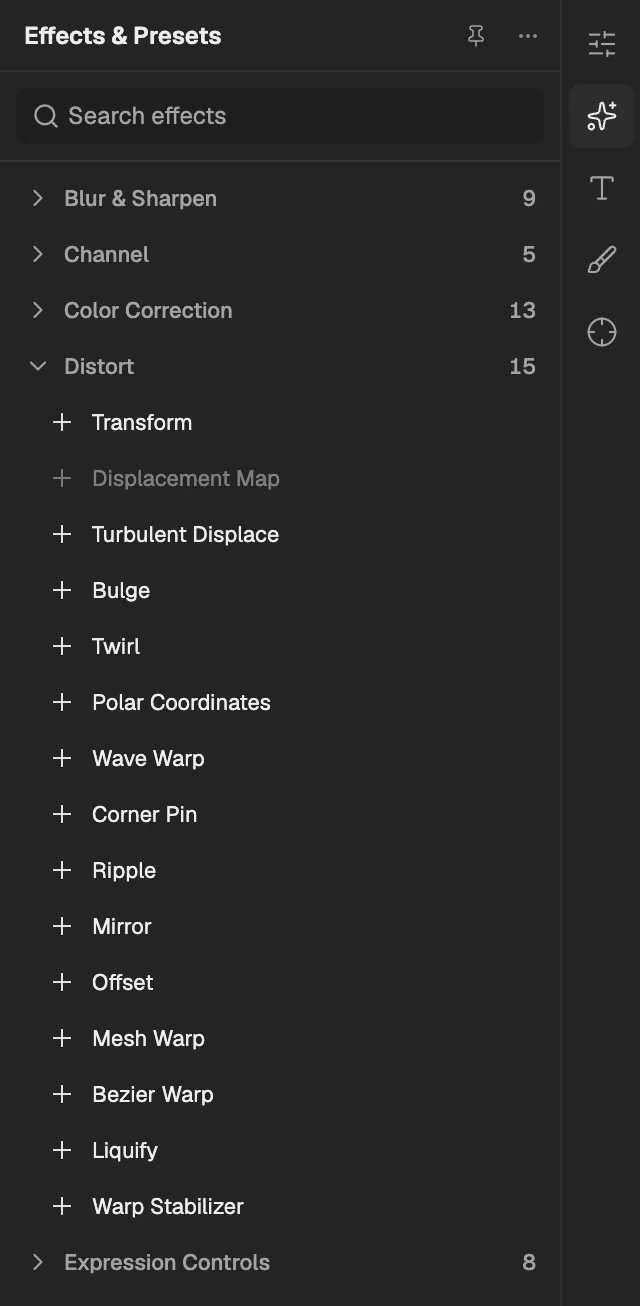
- The category, with the number of effects in it.
- Select an effect to add it to the selected layer. An effect shown greyed out reads another layer, and the composition has none it can use yet.
Transform
Moves, scales, rotates, skews and fades the layer's pixels inside the effect stack, separately from the layer's own transform.
- Works on
- Image, Video, Text, Shape, Solid, Composition, and Adjustment
| Parameter | Default | Range or choices |
|---|---|---|
| Anchor Point | 0 px, 0 px | — |
| Position | 0 px, 0 px | — |
| Scale | 100%, 100% | -10,000% to 10,000% |
| Skew | 0° | -89.9° to 89.9° |
| Skew Axis | 0° | -36,000° to 36,000° |
| Rotation | 0° | -36,000° to 36,000° |
| Opacity | 100% | 0% to 100% |
Displacement Map
Pushes each pixel sideways and up or down by the brightness or a chosen channel of another layer used as a map.
- Works on
- Image, Video, Text, Shape, Solid, Composition, and Adjustment
- Reads layers
- Map Layer
| Parameter | Default | Range or choices |
|---|---|---|
| Horizontal ChannelNot keyframed | Red | Red, Green, Blue, Alpha, or Luminance |
| Vertical ChannelNot keyframed | Green | Red, Green, Blue, Alpha, or Luminance |
| Max Horizontal Displacement | 0 px | -1,000 px to 1,000 px |
| Max Vertical Displacement | 0 px | -1,000 px to 1,000 px |
| Edge BehaviorNot keyframed | Transparent | Transparent, Repeat Edge Pixels, or Wrap Pixels Around |
Turbulent Displace
Warps the layer with moving fractal noise, giving it an organic wobble like heat haze, a flag or water.
- Works on
- Image, Video, Text, Shape, Solid, Composition, and Adjustment
| Parameter | Default | Range or choices |
|---|---|---|
| DisplacementNot keyframed | Turbulent | Turbulent, Turbulent Smoother, Bulge, Bulge Smoother, Twist, Twist Smoother, Vertical, Horizontal, or Cross Displacement |
| Amount | 50 px | -1,000 px to 1,000 px |
| Size | 100 px | 2 px to 1,000 px |
| Offset (Turbulence) | 0 px, 0 px | — |
| Complexity | 1 | 1 to 10 |
| Evolution | 0° | — |
| Cycle EvolutionNot keyframed | Off | — |
| Cycle | 1 rev | 1 rev to 100 rev |
| Random Seed | 0 | 0 to 10,000 |
| PinningNot keyframed | None | None, Pin All, Horizontal, or Vertical |
Bulge
Swells or pinches an oval area of the layer outward or inward, like a lens pressed against the picture.
- Works on
- Image, Video, Text, Shape, Solid, Composition, and Adjustment
| Parameter | Default | Range or choices |
|---|---|---|
| Horizontal Radius | 50 px | 0 px to 10,000 px |
| Vertical Radius | 50 px | 0 px to 10,000 px |
| Bulge Center | 0.5, 0.5 | -10 to 10 |
| Bulge Height | 1 | -4 to 4 |
Twirl
Spins the pixels around a centre, turning more near the middle, like water swirling down a drain.
- Works on
- Image, Video, Text, Shape, Solid, Composition, and Adjustment
| Parameter | Default | Range or choices |
|---|---|---|
| Angle | 0° | -36,000° to 36,000° |
| Twirl Radius | 30% | 0% to 100% |
| Twirl Center | 0.5, 0.5 | -10 to 10 |
Polar Coordinates
Wraps the layer into a circle around its centre, or unwraps a circular picture into a flat strip.
- Works on
- Image, Video, Text, Shape, Solid, Composition, and Adjustment
| Parameter | Default | Range or choices |
|---|---|---|
| Interpolation | 0% | 0% to 100% |
| Type of ConversionNot keyframed | Rect to Polar | Rect to Polar or Polar to Rect |
Wave Warp
Bends the layer into waves of a chosen shape, height, width and direction, like a waving flag.
- Works on
- Image, Video, Text, Shape, Solid, Composition, and Adjustment
| Parameter | Default | Range or choices |
|---|---|---|
| Wave TypeNot keyframed | Sine | Sine, Square, Triangle, or Sawtooth |
| Wave Height | 10 px | -1,000 px to 1,000 px |
| Wave Width | 40 px | 1 px to 10,000 px |
| Direction | 90° | -36,000° to 36,000° |
| Phase | 0° | -36,000° to 36,000° |
Corner Pin
Moves the layer's four corners independently to stretch it into any four-sided shape, such as a screen in perspective.
- Works on
- Image, Video, Text, Shape, Solid, Composition, and Adjustment
| Parameter | Default | Range or choices |
|---|---|---|
| Upper Left | 0, 0 | -10 to 10 |
| Upper Right | 1, 0 | -10 to 10 |
| Lower Left | 0, 1 | -10 to 10 |
| Lower Right | 1, 1 | -10 to 10 |
Ripple
Sends circular ripples outward from a centre point across the layer, like a stone dropped into a pond.
- Works on
- Image, Video, Text, Shape, Solid, Composition, and Adjustment
| Parameter | Default | Range or choices |
|---|---|---|
| Radius | 50% | 0% to 100% |
| Center of Ripple | 0.5, 0.5 | -10 to 10 |
| Wave Width | 20 px | 1 px to 10,000 px |
| Wave Height | 20 px | -1,000 px to 1,000 px |
| Ripple Phase | 0° | -36,000° to 36,000° |
Mirror
Reflects one side of the layer onto the other across a line set by a point and an angle.
- Works on
- Image, Video, Text, Shape, Solid, Composition, and Adjustment
| Parameter | Default | Range or choices |
|---|---|---|
| Reflection Center | 0.5, 0.5 | -10 to 10 |
| Reflection Angle | 0° | -36,000° to 36,000° |
Offset
Slides the layer's picture sideways and up or down, wrapping whatever leaves one edge around to the opposite edge.
- Works on
- Image, Video, Text, Shape, Solid, Composition, and Adjustment
| Parameter | Default | Range or choices |
|---|---|---|
| Shift Center To | 0.5, 0.5 | -10 to 10 |
| Blend With Original | 0% | 0% to 100% |
Mesh Warp
Bends the layer by dragging the points and handles of a grid laid over it, like reshaping soft rubber.
- Works on
- Image, Video, Text, Shape, Solid, Composition, and Adjustment
| Parameter | Default | Range or choices |
|---|---|---|
| Distortion Mesh | — | — |
| Quality | 8 | 1 to 10 |
Bezier Warp
Curves the layer's four edges with corner points and handles, for bending a flat picture like a flag or page.
- Works on
- Image, Video, Text, Shape, Solid, Composition, and Adjustment
| Parameter | Default | Range or choices |
|---|---|---|
| Top Left Vertex | 0, 0 | -10 to 10 |
| Top Left Tangent | 0.333, 0 | -10 to 10 |
| Top Right Tangent | 0.667, 0 | -10 to 10 |
| Right Top Vertex | 1, 0 | -10 to 10 |
| Right Top Tangent | 1, 0.333 | -10 to 10 |
| Right Bottom Tangent | 1, 0.667 | -10 to 10 |
| Bottom Right Vertex | 1, 1 | -10 to 10 |
| Bottom Right Tangent | 0.667, 1 | -10 to 10 |
| Bottom Left Tangent | 0.333, 1 | -10 to 10 |
| Left Bottom Vertex | 0, 1 | -10 to 10 |
| Left Bottom Tangent | 0, 0.667 | -10 to 10 |
| Left Top Tangent | 0, 0.333 | -10 to 10 |
| Quality | 8 | 1 to 10 |
Liquify
Pushes and smears areas of the layer with brush strokes, like wet paint, and the result can be animated.
- Works on
- Image, Video, Text, Shape, Solid, Composition, and Adjustment
| Parameter | Default | Range or choices |
|---|---|---|
| Distortion Mesh | — | — |
| Distortion Percentage | 100% | 0% to 200% |
Warp Stabilizer
Analyses shaky footage and moves, scales and rotates each frame to smooth the camera motion or hold it still.
- Works on
- Image, Video, Text, Shape, Solid, Composition, and Adjustment
| Parameter | Default | Range or choices |
|---|---|---|
| ResultNot keyframed | Smooth Motion | Smooth Motion or No Motion |
| Smoothness | 50% | 0% to 1,000% |
| MethodNot keyframed | Position, Scale, Rotation | Position, Position, Scale, Rotation, or Perspective |
| FramingNot keyframed | Stabilize, Crop, Auto-scale | Stabilize Only, Stabilize, Crop, or Stabilize, Crop, Auto-scale |
| Maximum Scale | 150% | 100% to 1,000% |
| Additional Scale | 100% | 50% to 1,000% |