Effects
Generate
Every effect Effects & Presets lists under Generate, generated from the editor’s effect registry: what it does, the layers it works on, and each parameter with its default and range.
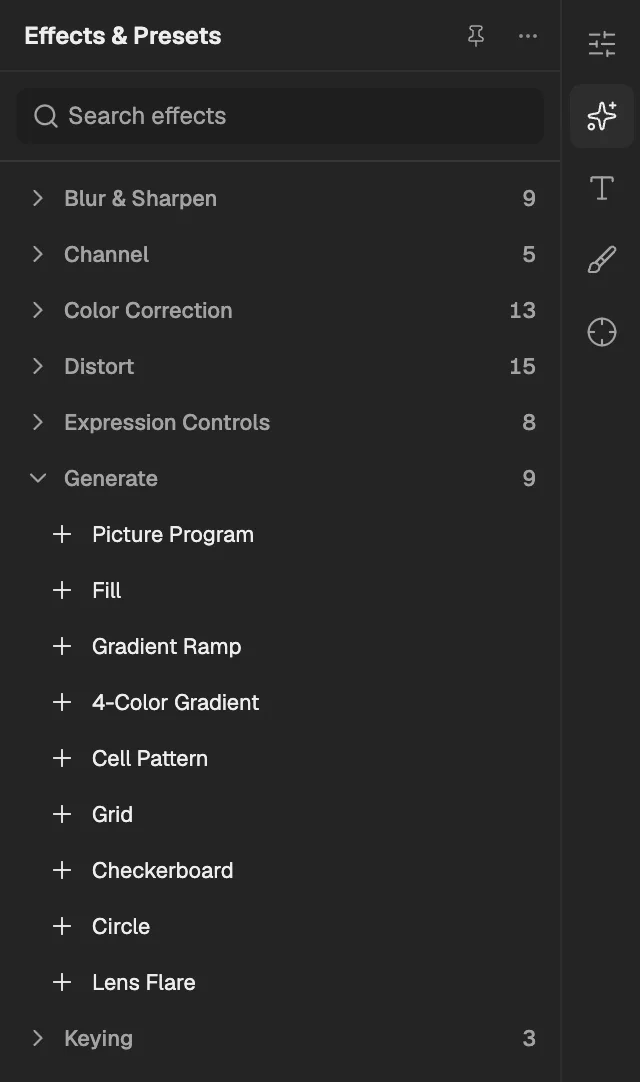
- The category, with the number of effects in it.
- Select an effect to add it to the selected layer. An effect shown greyed out reads another layer, and the composition has none it can use yet.
Picture Program
Draws the layer's whole picture with a WebGPU program written by you or the Agent, run frame by frame in an isolated sandbox.
- Works on
- Image, Video, Text, Shape, Solid, Composition, and Adjustment
Its other parameters are the ones its program declares; they appear in Effect Controls when the program is set.
Fill
Paints the layer's visible shape in one solid colour while keeping its outline and transparency.
- Works on
- Image, Video, Text, Shape, Solid, Composition, and Adjustment
| Parameter | Default | Range or choices |
|---|---|---|
| Color | #FF0000 | — |
| Amount | 1 | 0 to 1 |
Gradient Ramp
Fills the layer's shape with a smooth linear or radial blend between two colours placed at two points.
- Works on
- Image, Video, Text, Shape, Solid, Composition, and Adjustment
| Parameter | Default | Range or choices |
|---|---|---|
| Start of Ramp | 0.5, 0 | -10 to 10 |
| Start Color | #000000 | — |
| End of Ramp | 0.5, 1 | -10 to 10 |
| End Color | #FFFFFF | — |
| Ramp ShapeNot keyframed | Linear | Linear or Radial |
| Blend With Original | 0% | 0% to 100% |
4-Color Gradient
Fills the layer's shape with a soft blend of four colours, each anchored at a movable point.
- Works on
- Image, Video, Text, Shape, Solid, Composition, and Adjustment
| Parameter | Default | Range or choices |
|---|---|---|
| Point 1 | 0.1, 0.1 | -10 to 10 |
| Color 1 | #FFFF00 | — |
| Point 2 | 0.9, 0.1 | -10 to 10 |
| Color 2 | #00FF00 | — |
| Point 3 | 0.1, 0.9 | -10 to 10 |
| Color 3 | #FF00FF | — |
| Point 4 | 0.9, 0.9 | -10 to 10 |
| Color 4 | #0000FF | — |
| Blend | 100% | 0% to 100% |
| Opacity | 100% | 0% to 100% |
Cell Pattern
Fills the layer's shape with a cellular pattern of bubbles, crystals or plates that can evolve over time.
- Works on
- Image, Video, Text, Shape, Solid, Composition, and Adjustment
| Parameter | Default | Range or choices |
|---|---|---|
| Cell PatternNot keyframed | Bubbles | Bubbles, Crystals, or Plates |
| InvertNot keyframed | Off | — |
| Contrast | 100% | 0% to 1,000% |
| Disperse | 1 | 0 to 1.5 |
| Size | 60 px | 1 px to 10,000 px |
| Offset | 0.5, 0.5 | -10 to 10 |
| Evolution | 0° | — |
Grid
Draws a grid of lines with a set cell size and line width over the layer, blended with it or on its own.
- Works on
- Image, Video, Text, Shape, Solid, Composition, and Adjustment
| Parameter | Default | Range or choices |
|---|---|---|
| Anchor | 0, 0 | -10 to 10 |
| Width | 64 px | 1 px to 10,000 px |
| Height | 64 px | 1 px to 10,000 px |
| Border | 2 px | 0 px to 10,000 px |
| Invert GridNot keyframed | Off | — |
| Color | #FFFFFF | — |
| Opacity | 100% | 0% to 100% |
| Blending ModeNot keyframed | Normal | Normal, Add, Multiply, Screen, or None |
Checkerboard
Draws a checkerboard of coloured squares at a chosen size over the layer, blended with it or on its own.
- Works on
- Image, Video, Text, Shape, Solid, Composition, and Adjustment
| Parameter | Default | Range or choices |
|---|---|---|
| Anchor | 0, 0 | -10 to 10 |
| Width | 64 px | 1 px to 10,000 px |
| Height | 64 px | 1 px to 10,000 px |
| Color | #FFFFFF | — |
| Opacity | 100% | 0% to 100% |
| Blending ModeNot keyframed | Normal | Normal, Add, Multiply, Screen, or None |
Circle
Draws a filled disc or a ring at a chosen centre and radius, with an optional soft edge, over or blended with the layer.
- Works on
- Image, Video, Text, Shape, Solid, Composition, and Adjustment
| Parameter | Default | Range or choices |
|---|---|---|
| Center | 0.5, 0.5 | -10 to 10 |
| Radius | 75 px | 0 px to 10,000 px |
| EdgeNot keyframed | None | None or Thickness |
| Thickness | 10 px | 0 px to 10,000 px |
| Feather Outer Edge | 0 px | 0 px to 10,000 px |
| Invert CircleNot keyframed | Off | — |
| Color | #FFFFFF | — |
| Opacity | 100% | 0% to 100% |
| Blending ModeNot keyframed | Normal | Normal, Add, Multiply, Screen, or None |
Lens Flare
Adds a bright camera lens flare with a glowing core, halo, ring and ghost spots, as if light struck the lens.
- Works on
- Image, Video, Text, Shape, Solid, Composition, and Adjustment
| Parameter | Default | Range or choices |
|---|---|---|
| Flare Center | 0.3, 0.3 | -10 to 10 |
| Flare Brightness | 100% | 0% to 300% |
| Lens TypeNot keyframed | 50-300mm Zoom | 50-300mm Zoom, 35mm Prime, or 105mm Prime |
| Blend With Original | 0% | 0% to 100% |