Effects
Noise & Grain
Every effect Effects & Presets lists under Noise & Grain, generated from the editor’s effect registry: what it does, the layers it works on, and each parameter with its default and range.
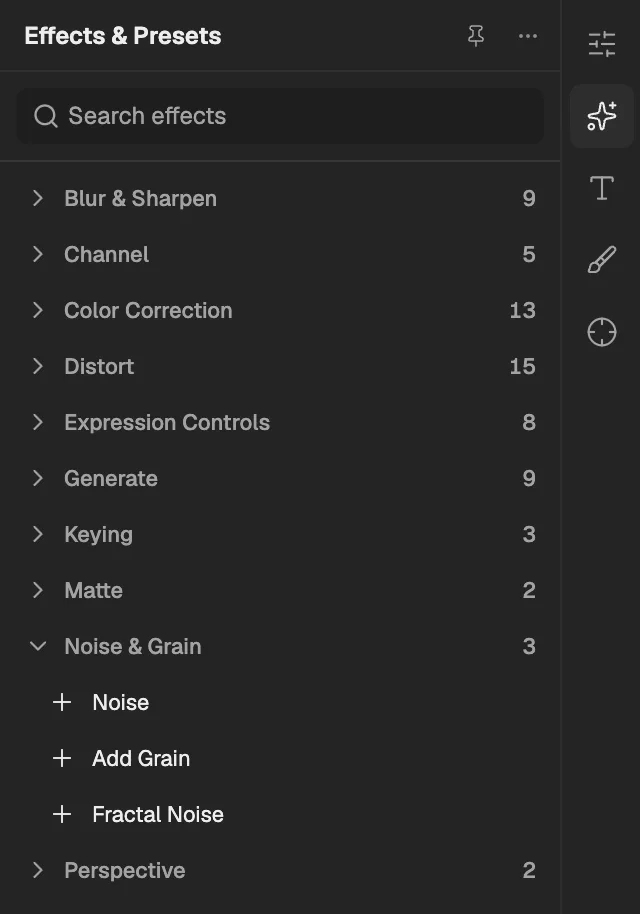
- The category, with the number of effects in it.
- Select an effect to add it to the selected layer. An effect shown greyed out reads another layer, and the composition has none it can use yet.
Noise
Scatters random grey or coloured speckles over the layer; changing the phase or seed gives a different pattern.
- Works on
- Image, Video, Text, Shape, Solid, Composition, and Adjustment
| Parameter | Default | Range or choices |
|---|---|---|
| Amount of Noise | 10% | 0% to 100% |
| Color NoiseNot keyframed | Off | — |
| Noise Phase | 0 | — |
| Random Seed | 0 | 0 to 10,000 |
Add Grain
Adds film-like grain of adjustable size, softness and colour; animating its evolution makes the grain shimmer over time.
- Works on
- Image, Video, Text, Shape, Solid, Composition, and Adjustment
| Parameter | Default | Range or choices |
|---|---|---|
| Intensity | 1 | 0 to 5 |
| Size | 1 px | 0.5 px to 20 px |
| Softness | 0 | 0 to 1 |
| Aspect Ratio | 1 | 0.1 to 10 |
| MonochromaticNot keyframed | On | — |
| Evolution | 0° | — |
| Random Seed | 0 | 0 to 10,000 |
Fractal Noise
Fills the layer's shape with grey, cloud-like noise that can drift and evolve, useful for smoke, textures and maps.
- Works on
- Image, Video, Text, Shape, Solid, Composition, and Adjustment
| Parameter | Default | Range or choices |
|---|---|---|
| Noise TypeNot keyframed | Spline | Block, Linear, or Spline |
| InvertNot keyframed | Off | — |
| Contrast | 100% | 0% to 1,000% |
| Brightness | 0 | -200 to 200 |
| Size | 100 px | 1 px to 10,000 px |
| Offset Turbulence | 0.5, 0.5 | -10 to 10 |
| Complexity | 6 | 1 to 20 |
| Evolution | 0° | — |
| Opacity | 100% | 0% to 100% |