Effects
Time
Every effect Effects & Presets lists under Time, generated from the editor’s effect registry: what it does, the layers it works on, and each parameter with its default and range.
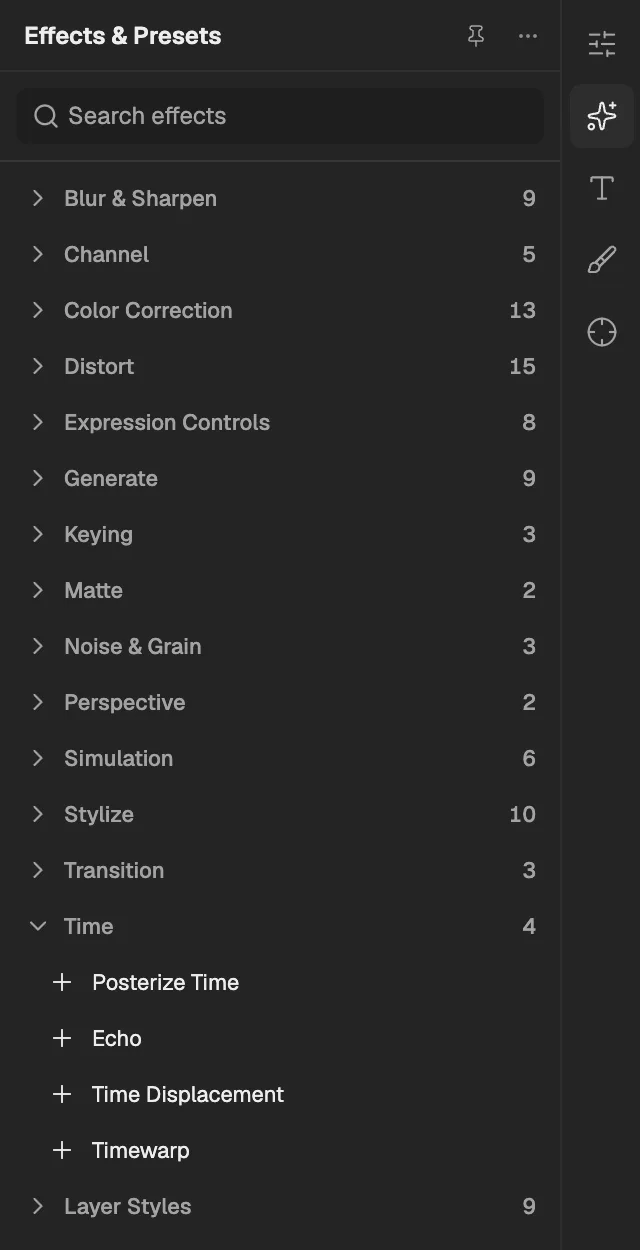
- The category, with the number of effects in it.
- Select an effect to add it to the selected layer. An effect shown greyed out reads another layer, and the composition has none it can use yet.
Posterize Time
Plays the layer at a lower frame rate so its motion steps like stop-motion; it cannot be used on an adjustment layer.
- Works on
- Image, Video, Text, Shape, Solid, Composition, and Adjustment
| Parameter | Default | Range or choices |
|---|---|---|
| Frame Rate | 12 | 1 to 99 |
Echo
Layers copies of the layer from earlier or later frames over it, leaving trails behind moving things; it cannot be used on an adjustment layer.
- Works on
- Image, Video, Text, Shape, Solid, Composition, and Adjustment
| Parameter | Default | Range or choices |
|---|---|---|
| Echo Time (seconds) | -0.033 s | -30 s to 30 s |
| Number Of Echoes | 1 | 0 to 50 |
| Starting Intensity | 1 | 0 to 1 |
| Decay | 1 | 0 to 1 |
| Echo OperatorNot keyframed | Add | Add, Maximum, Minimum, Screen, Composite In Back, Composite In Front, or Blend |
Time Displacement
Shows each part of the layer at a different moment, chosen by another layer's brightness; it cannot be used on an adjustment layer.
- Works on
- Image, Video, Text, Shape, Solid, Composition, and Adjustment
- Reads layers
- Time Displacement Layer (optional)
| Parameter | Default | Range or choices |
|---|---|---|
| Max Displacement Time (seconds) | 1 s | -60 s to 60 s |
| Time Resolution (fps) | 60 | 1 to 120 |
| Stretch Map to FitNot keyframed | On | — |
Timewarp
Speeds up or slows down the layer, blending or interpolating in-between frames for smooth slow motion; it cannot be used on an adjustment layer.
- Works on
- Image, Video, Text, Shape, Solid, Composition, and Adjustment
| Parameter | Default | Range or choices |
|---|---|---|
| MethodNot keyframed | Pixel Motion | Whole Frames, Frame Mix, or Pixel Motion |
| Adjust Time ByNot keyframed | Speed | Speed or Source Frame |
| Speed | 50% | 0% to 1,000% |
| Source Frame | 0 | — |