Effects
Blur & Sharpen
Every effect Effects & Presets lists under Blur & Sharpen, generated from the editor’s effect registry: what it does, the layers it works on, and each parameter with its default and range.
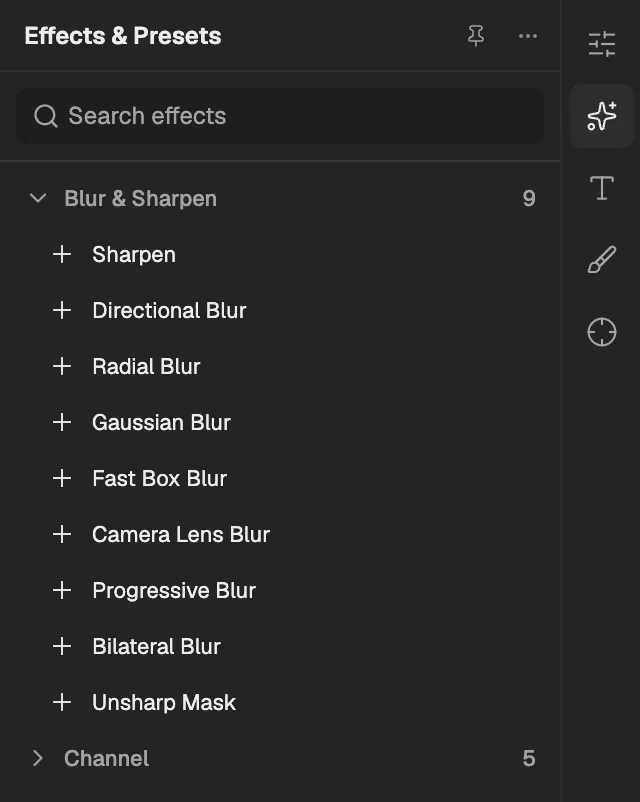
- The category, with the number of effects in it.
- Select an effect to add it to the selected layer. An effect shown greyed out reads another layer, and the composition has none it can use yet.
Sharpen
Increases the contrast between neighbouring pixels so that edges and fine detail look crisper.
- Works on
- Image, Video, Text, Shape, Solid, Composition, and Adjustment
| Parameter | Default | Range or choices |
|---|---|---|
| Sharpen Amount | 0% | 0% to 400% |
Directional Blur
Smears the layer along one direction, like something moving fast past a camera.
- Works on
- Image, Video, Text, Shape, Solid, Composition, and Adjustment
| Parameter | Default | Range or choices |
|---|---|---|
| Direction | 0° | -360° to 360° |
| Blur Length | 0 px | 0 px to 1,000 px |
Radial Blur
Blurs the layer in circles around a centre point, or streaks it outward from that point like a sudden zoom.
- Works on
- Image, Video, Text, Shape, Solid, Composition, and Adjustment
| Parameter | Default | Range or choices |
|---|---|---|
| ModeNot keyframed | Spin | Spin or Zoom |
| Center | 0.5, 0.5 | 0 to 1 |
| Amount | 0% | 0% to 100% |
Gaussian Blur
Softens the whole layer evenly with a smooth blur of adjustable radius.
- Works on
- Image, Video, Text, Shape, Solid, Composition, and Adjustment
| Parameter | Default | Range or choices |
|---|---|---|
| Radius | 0 px | 0 px to 100 px |
| Repeat Edge PixelsNot keyframed | Off | — |
Fast Box Blur
Blurs the layer quickly, horizontally, vertically or both, with more passes giving a smoother result.
- Works on
- Image, Video, Text, Shape, Solid, Composition, and Adjustment
| Parameter | Default | Range or choices |
|---|---|---|
| Blur Radius | 10 px | 0 px to 1,000 px |
| Iterations | 3 | 1 to 5 |
| Blur DimensionsNot keyframed | Horizontal and Vertical | Horizontal and Vertical, Horizontal, or Vertical |
| Repeat Edge PixelsNot keyframed | Off | — |
Camera Lens Blur
Blurs the layer like an out-of-focus camera lens, turning bright spots into shapes of the chosen aperture.
- Works on
- Image, Video, Text, Shape, Solid, Composition, and Adjustment
| Parameter | Default | Range or choices |
|---|---|---|
| Blur Radius | 5 px | 0 px to 500 px |
| Iris ShapeNot keyframed | Hexagon | Triangle, Square, Pentagon, Hexagon, Heptagon, or Octagon |
| Iris Rotation | 0° | -36,000° to 36,000° |
| Repeat Edge PixelsNot keyframed | Off | — |
Progressive Blur
Blurs the layer with a strength that changes from one point to another, along a line or outward from a centre.
- Works on
- Image, Video, Text, Shape, Solid, Composition, and Adjustment
| Parameter | Default | Range or choices |
|---|---|---|
| Start Point | 0.5, 0.5 | -10 to 10 |
| Start Radius | 0 px | 0 px to 500 px |
| End Point | 0.5, 1 | -10 to 10 |
| End Radius | 30 px | 0 px to 500 px |
| TransitionNot keyframed | Smooth | Even, Ease In, Ease Out, or Smooth |
| Blur ShapeNot keyframed | Linear | Linear or Radial |
| MirrorNot keyframed | Off | — |
| Repeat Edge PixelsNot keyframed | Off | — |
Bilateral Blur
Smooths flat areas and fine noise while keeping strong edges sharp, for a cleaner or painted look.
- Works on
- Image, Video, Text, Shape, Solid, Composition, and Adjustment
| Parameter | Default | Range or choices |
|---|---|---|
| Radius | 5 px | 0 px to 100 px |
| Threshold | 10% | 0% to 100% |
Unsharp Mask
Sharpens the layer by raising contrast along edges, with a radius and threshold controlling which details are affected.
- Works on
- Image, Video, Text, Shape, Solid, Composition, and Adjustment
| Parameter | Default | Range or choices |
|---|---|---|
| Amount | 50% | 0% to 500% |
| Radius | 1 px | 0 px to 250 px |
| Threshold | 0 | 0 to 255 |