Why the Agent gives you a draft first: how AI takes part in editing in Keyframe
After Effects’ AI Assistant edits the project directly; Keyframe’s Agent uses the operations you use and makes a draft that you look at before applying.
See it first
Describe a motion; the Agent makes a draft, and you preview it before applying or discarding it.
In After Effects, AI and scripts edit the project directly
After Effects’ new AI Assistant and third-party assistants both change the project directly.
After Effects
- Youin the interface
- ScriptsExtendScript edits the project; whether it undoes in one step depends on the script
- AI Assistantedits directly; undo goes one step at a time
Keyframe
- Youdrag, type, shortcuts
- Agentplans, then calls the same operations
- Registered operationsthe same addresses, type checks and transactions
- Draftthe Agent’s changes wait here until you apply them
- One historyeach draft is one step; one undo takes it all back
Since August 2026, After Effects’ beta builds have an AI Assistant (external website, opens in a new tab): it organizes projects, reads and writes expressions and generates images with Firefly. Its changes go straight into the project and undo one step at a time, not a whole request at once; Adobe describes no preview before it changes things.
Third-party assistants usually have a language model write ExtendScript and run it inside After Effects. How much can be undone depends on how that script is written.
Why it works that way
After Effects’ automation was added beside its interface.
What you do in the interface and what a script does are two separate paths: scripts change the project through ExtendScript’s objects, and an AI assistant can only act from outside too. After Effects’ core has no layer for “make it, show it, and write it only when you agree”, because it was never designed for a second operator.
And how expressions relate is hidden in text: an assistant can read or write one expression, but not see the project’s structure.
In Keyframe: the same operations, a draft first
The Agent has no interface of its own; it calls the operations you use in the editor.
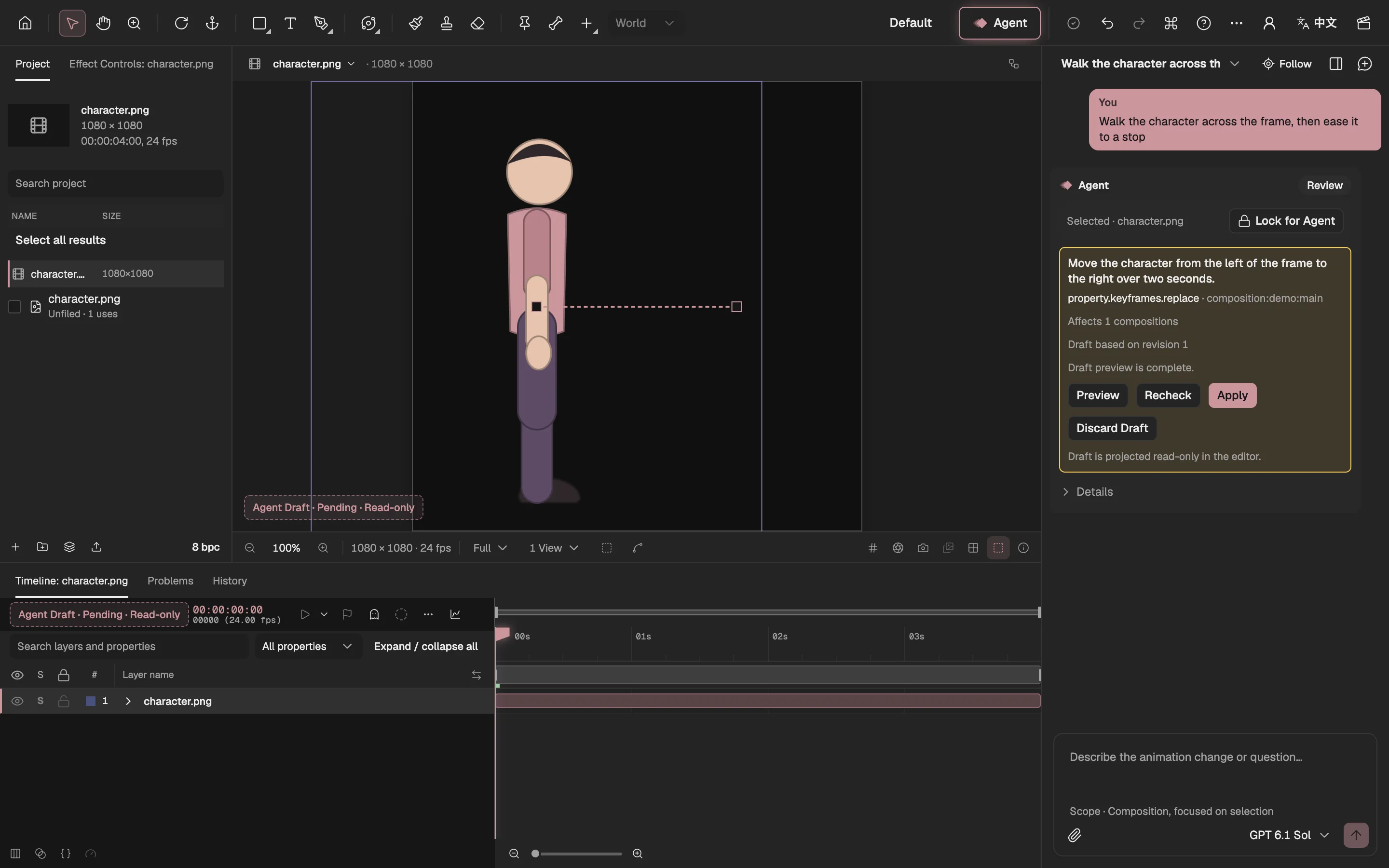
- The draft shows in the viewer.
- The draft’s motion path.
- The draft’s keyframes in the Timeline.
- What the draft changes.
- Preview it first.
- Apply it to the project.
- Throw the draft away.
- The same operations. Every editing feature is a registered operation with type checks and a transaction; you dragging a slider and the Agent changing a value take the same path.
- A draft first. The Agent’s changes show in the viewer, Timeline and Properties; Apply makes them part of the project, Discard Draft leaves nothing behind.
- One draft, one undo. The result is ordinary layers, keyframes and effects, in the same undo history as your own edits; each draft is one step, so one undo takes the whole draft back.
You set what it may touch
The Agent works only on what you selected, and asks before every paid call.
- YouAskwhat you select is what it may change
- AgentPlannamed steps
- YouConfirm paid stepswhen it needs the image model
- The editorMake the draft
- YouApply or discard
- You pick the scope. When a task needs more of the project, the Agent asks you once in the conversation.
- Local first. Jobs a model on your device can do (cutting out a subject, filling a background, small fixes) run free on your device first; the paid image model is an upgrade you pick on the review card, never a silent default.
- Take over any time. Edit while it works; it carries on from your latest change instead of overwriting it with an old copy.
- Or let it ask less. Turn on Auto-apply and the Agent previews and applies its drafts by itself (it is off by default); paid jobs, a wider scope and exports still wait for you.
To be clear
The Agent needs an account and a subscription, opening soon; the rest of the editor is free.
After Effects’ AI Assistant is still in beta and may change; what is written above is what Adobe describes today. What we can promise is our own side: the Agent never runs application code, and the shaders and picture programs it writes are checked, tried in a sandbox and reviewed by you as a draft before they enter the project.