No plug-ins needed: why Keyframe builds its features into the editor
Many of After Effects’ features come from third-party plug-ins; Keyframe builds them into the editor, so a project opens the same on any computer.
In After Effects, plug-ins fill many gaps
Particles, character rigging and your own shaders usually mean installing a third-party plug-in or script.
After Effects
- Trapcode Particularparticles, a third-party plug-in
- Duikcharacter rigging, a third-party script
- PixelsWorldyour own shaders, a third-party plug-in
- Another computer without themthe effect becomes a “Missing” placeholder; the layer renders without it
Keyframe
- Particles and simulationsbuilt in, computed on the graphics card
- Skeletons and mesh skinninga layer type
- Shaders and picture programsproject data, travelling with the project
- Another computeropens in any browser with WebGPU
When After Effects opens a project that uses plug-ins it doesn’t have, it lists the missing effects, keeps each as a “Missing” placeholder with its settings, and renders the layer without it. The project opens, but the picture is no longer what it was.
Why it works that way
A closed core handed extension to a plug-in ecosystem, which is also After Effects’ strength.
Outside developers can’t change After Effects’ core, so new features arrived as plug-ins and scripts, and many became industry standards. That huge ecosystem lets After Effects do almost anything; it is its real strength.
The cost is that features are spread across many vendors: each plug-in installed and updated on its own, and whether a project opens as it was depends on what this computer has.
In Keyframe: features built into the editor
Particles, tracking, keying, rigging and program effects are the editor’s own features.
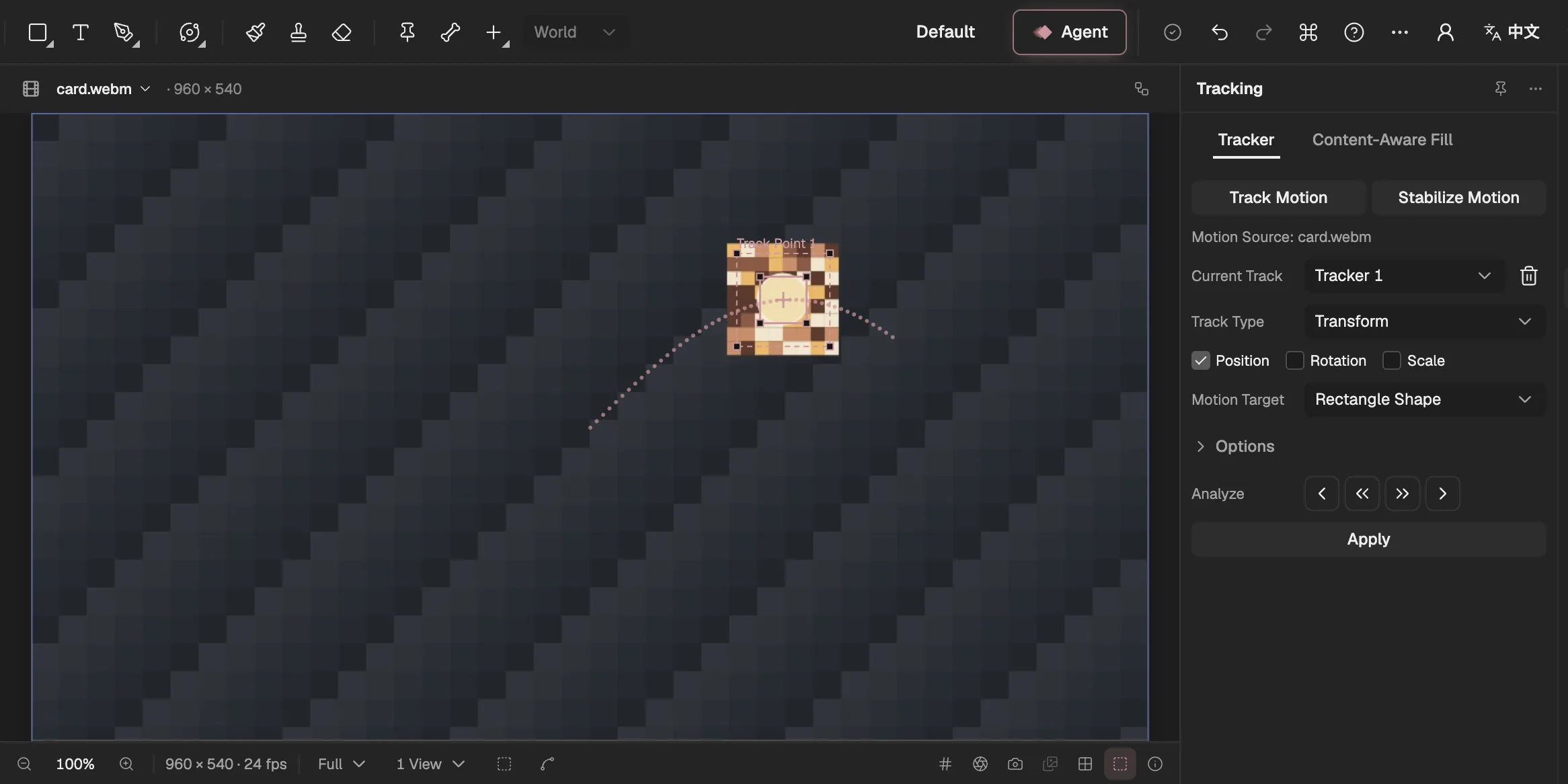
- Adds a tracker to the selected video layer.
- What the tracker follows and how it is applied.
- Track one frame, or to the end, backward or forward.
- The layer the track moves.
- Writes the track as keyframes on the target.
- The track point and its path: the feature region, the search region and the attach point.
- Tracking. Point and planar tracking, mask tracking (faces too), Warp Stabilizer, Content-Aware Fill and the 3D Camera Tracker.
- Keying and roto. Keying effects, Roto Brush and Refine Edge.
- Particles and simulations. Particle World runs in a compute pass on the graphics card.
- Bones and programs. Skeletons, mesh skinning, and shader, simulation and picture programs.
Not reinventing the wheel
The hard algorithms come from mature open-source libraries, behind Keyframe’s own adapters.
- Mature libraries. Tracking and analysis use OpenCV.js and MediaPipe, filling backgrounds uses LaMa; their files are served from Keyframe’s own servers with integrity checks and run on your device, and the fill model downloads only when you first use it.
- Swap a library, keep the project. Each library sits behind an adapter; replacing it doesn’t touch saved projects.
- Results saved as data. A track is written as keyframes or an analysis record checked against its footage; a simulation depends only on its parameters and the frame, however you got there.
What this gives up
No plug-in interface means no third-party plug-ins, and there are still fewer effects than in After Effects.
Leaving out a plug-in SDK and scripting is deliberate: the Agent (opens in a new tab) and the interface share one set of registered operations, and what is missing we build ourselves. After Effects has far more effects today, a gap we will close one by one, and the editor runs only in browsers with WebGPU.