Animate with one sentence
Describe the motion you want. The Agent plans it and builds it with the editor’s own tools, as a draft you can preview. Nothing changes until you apply, and every result is ordinary layers, keyframes and properties you can edit and undo.
What the Agent does
- Makes and prepares artwork. Generates a picture, edits one, separates it into layers or cuts out a subject.
- Builds the scene. Adds and arranges layers, sets properties, effects and masks.
- Animates. Keyframes with easing, Expressions, and motion across several layers at once.
- Writes code where features end. Shader effects, simulations and whole pictures drawn by a program, each run in a sandbox on your graphics card.
- Checks its work. Looks at the layers and at frames of the animation, and fixes what it finds before handing it to you.
- Exports. Renders the result in the formats the editor exports.
What you confirm
- YouAskIn your own words, in the Agent panel
- AgentPlanNamed steps, from what is selected
- The editorBuild a draftShown in the Viewer, Timeline and Properties
- YouPreview and applyOr discard it; Undo works after
- Drafts first. The Agent’s changes show in the Viewer, Timeline and Properties as a draft; Apply makes them part of the project, Discard Draft drops them.
- Its reach is what you selected. When a task needs more of the project, the Agent asks once in that conversation.
- Every paid step asks. A step that calls an image model shows what it will do and waits for your confirmation.
- Take over any time. Edit by hand while it works; it continues from your latest change.
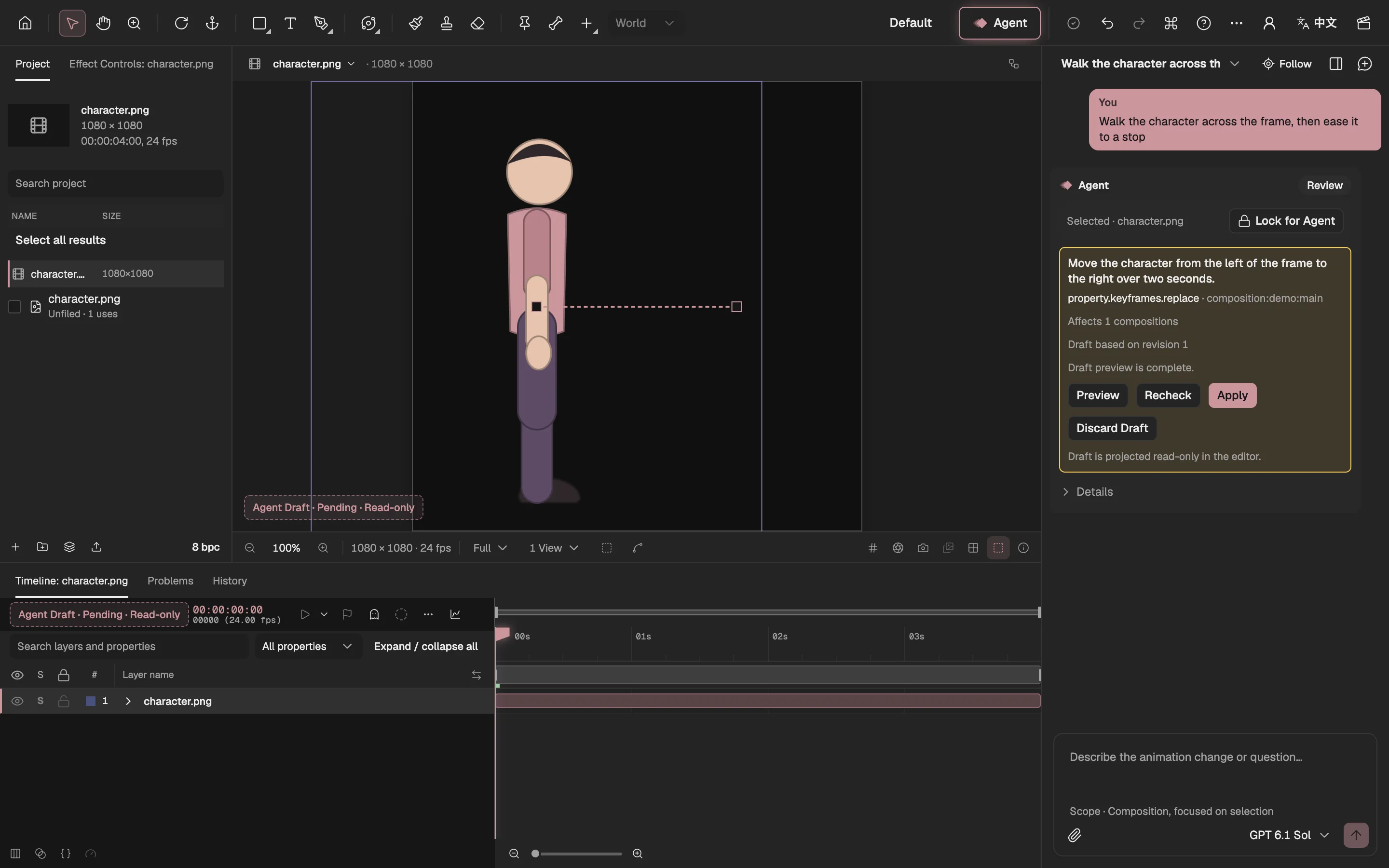
- The Viewer shows the draft, read-only.
- The motion the draft adds.
- The Timeline shows it too.
- What the draft does, and each change.
- Shows the draft in the editor.
- Writes it into the project.
- Throws it away.
Local first, paid only when you choose
Where a model on your own device can do a job, it runs first, for free: cutting out a subject, filling a background with LaMa, estimating a surface for lighting, or small pixel repairs. Its result is reviewed like any other. The paid image model is an explicit upgrade on that same review card, never a silent default.
Pictures written as code
What the editor’s features cannot make, the Agent can write as a program: a Shader effect, a Simulation that keeps thousands of elements moving on the graphics card, or a Picture Program that draws a whole layer. Each program is project data that runs only in its sandbox, and enters the project only after you review its draft. The Agent never runs application code or installs packages.
Who can use it
The Agent uses AI models, so it needs an account and a subscription. Subscriptions open soon. Everything else in the editor is free, with no account.
Questions
- Can I edit what the Agent made?
- Yes. Applied work is ordinary layers, keyframes, properties and effects in your project, in the same Undo history as your own edits.
- Which models does it use?
- GPT 6.1 Sol plans the work; an OpenAI image model draws pictures when you ask for them and confirm. On-device models do the free jobs.
- Does my project leave my device?
- Projects are stored in your browser. A task sends the models only what that step needs, such as a description of the selected layers or the picture being separated.