Shader effects for animation, on a timeline
When no ready-made effect makes what you need, write it as code: a shader (external website, opens in a new tab) that colours each pixel, a simulation whose elements carry on from frame to frame, or a program that draws the whole layer with WebGPU (external website, opens in a new tab). Its settings are ordinary properties you keyframe on the timeline, and what you preview is what you export.
A picture program, drawn live
The water below is a picture program running in your browser now, in the same sandbox the editor uses for its Picture Program effect. It was written by hand for this site, as were the other pieces in the showcase.
Each frame is drawn on your graphics card as you watch; on a device too slow for it, a still stays in its place. How it is drawn · Every piece in the showcase
Three kinds of program
- Shader: WGSL (external website, opens in a new tab) that runs once for every pixel of the layer at this frame, for patterns, colour treatments, distortions and shapes. It reads the layer’s picture, its settings, the time and the frame.
- Simulation: WGSL for a grid of elements the graphics card remembers between frames, such as positions and speeds, for particles, cloth, ripples and trails. You write how elements start, step and are drawn; the editor owns the rest.
- Picture Program: a JavaScript (external website, opens in a new tab) module that draws the whole layer with WebGPU, in several passes if it needs to, for what neither of the others can make. It runs in a sandbox on another origin, with no access to the editor, your projects or the network.
Settings you keyframe like any property
Each setting a program declares, a number with its slider range, an angle, a colour, a point on the layer, a checkbox or a choice, becomes a property of the effect in Effect Controls. Drag it, set keyframes (opens in a new tab) and shape them in the Graph Editor (opens in a new tab), or drive it with an Expression (opens in a new tab). The program reads its value at every frame.
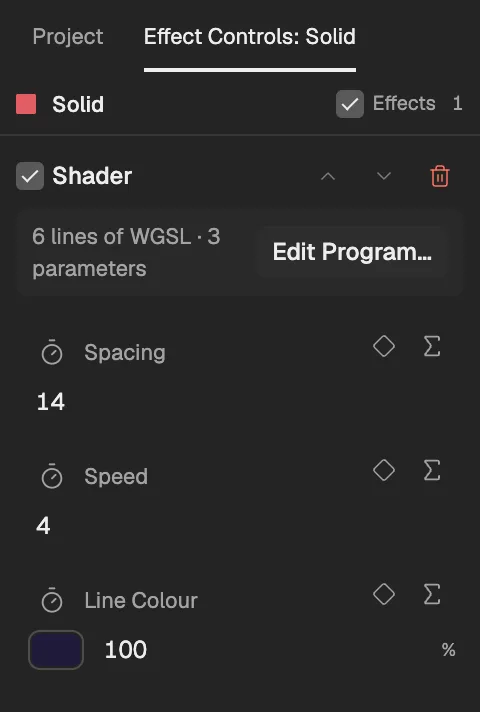
- How many lines and settings the program has.
- Opens the program again.
- A setting the program declares.
- Keyframes the setting, as on any property.
Write or paste a program
Select a layer and add the effect from Effects & Presets.
Open its program with Edit Program in Effect Controls.
Write or paste the source in Source (WGSL), and list the settings it reads in Parameters (JSON).
Apply it. The program is checked, compiled and tried on your computer first; only a program that passes enters the project, as one step you can undo. When one is refused, the dialog says why, with line numbers in your own source where it can.
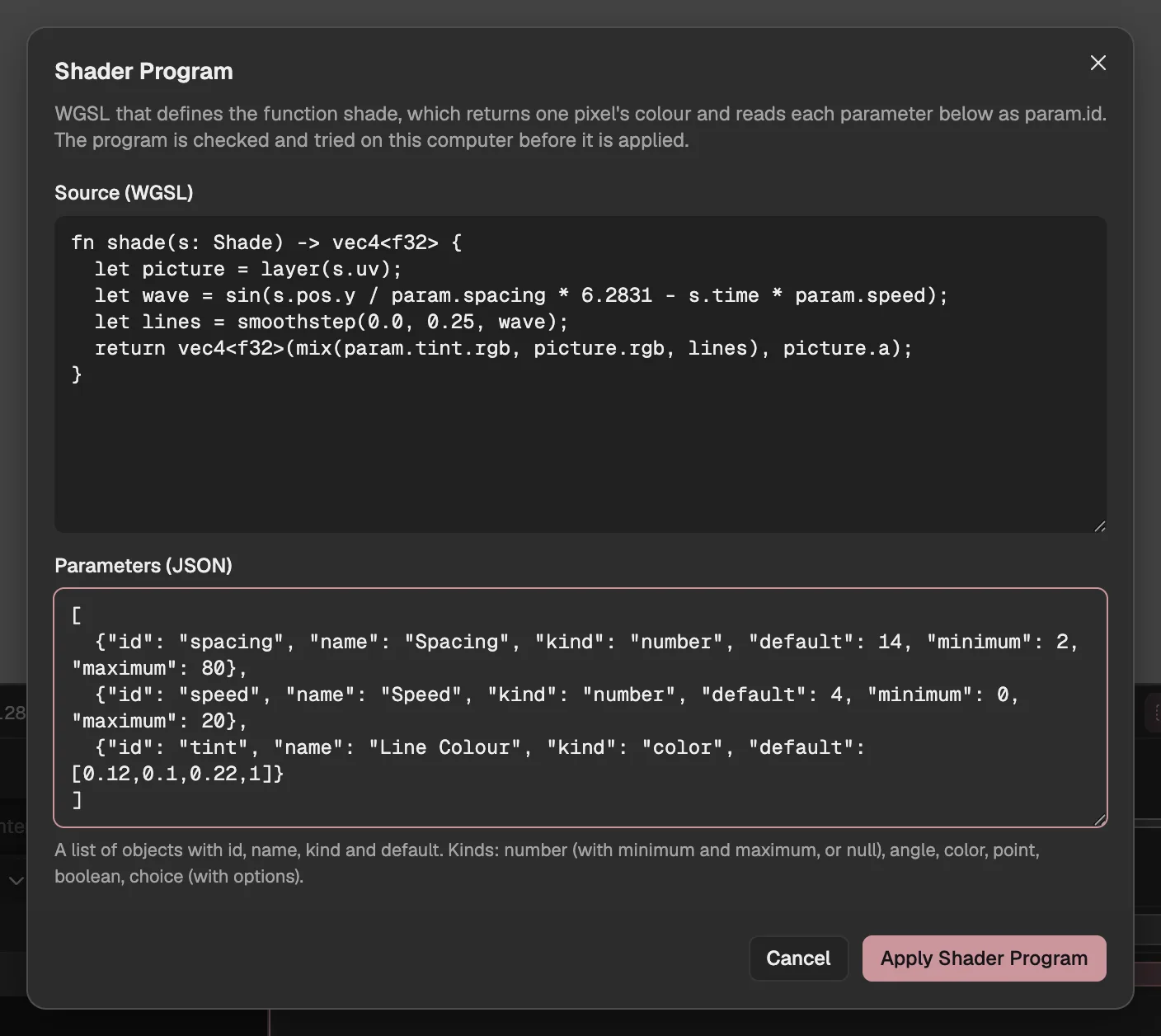
- The program’s source.
- The settings it reads, one per line.
- Checks and tries the program, then applies it.
What you preview is what you export
- The Viewer and an export run the same program and give the same frames on the same computer; jumping to a frame gives what playing up to it gives.
- A program keeps no clock and uses no chance: time comes from the frame, randomness from the library’s noise, so a loop can end exactly where it began.
- The effect stacks with keyframes, masks, Expressions and other effects, and exports (opens in a new tab) like any composition, to video, GIF or image sequences.
- A program that fails while rendering is reported in Problems.
Or describe it to the Agent
Describe the effect to the Agent (opens in a new tab) and it can write any of the three. It tries each version on your computer, looks at the frames it draws and revises the program before it proposes it as a draft (opens in a new tab) you review. Programs written by the Agent belong to the Agent subscription, which opens soon; writing your own is free.
Questions
- Is it free?
- Yes. Writing, pasting, keyframing and exporting programs is free in your browser, with no account. Only having the Agent write a program uses the Agent subscription, which opens soon.
- Which language do I write in?
- Shader and Simulation effects are written in WGSL, the shading language of WebGPU; a picture program is a JavaScript module that draws with WebGPU. A GLSL shader has to be rewritten in WGSL first.
- Which browsers run it?
- A browser with WebGPU, such as a current Chrome or Edge on a computer. Where there is no WebGPU, a program cannot draw.
- Can I make generative art that loops?
- Yes. A program is told only the frame and the time, never a clock or a random seed of its own, so it can end exactly where it began, as every piece in the showcase does.