Editable animation or AI video: which one fits the job
A generated clip is finished pixels. An animation is a project you can keep changing. Which one you want depends on what happens after the first version.
What you get from each
A video generator hands you a clip; Keyframe hands you layers, keyframes and effects you can change one at a time.
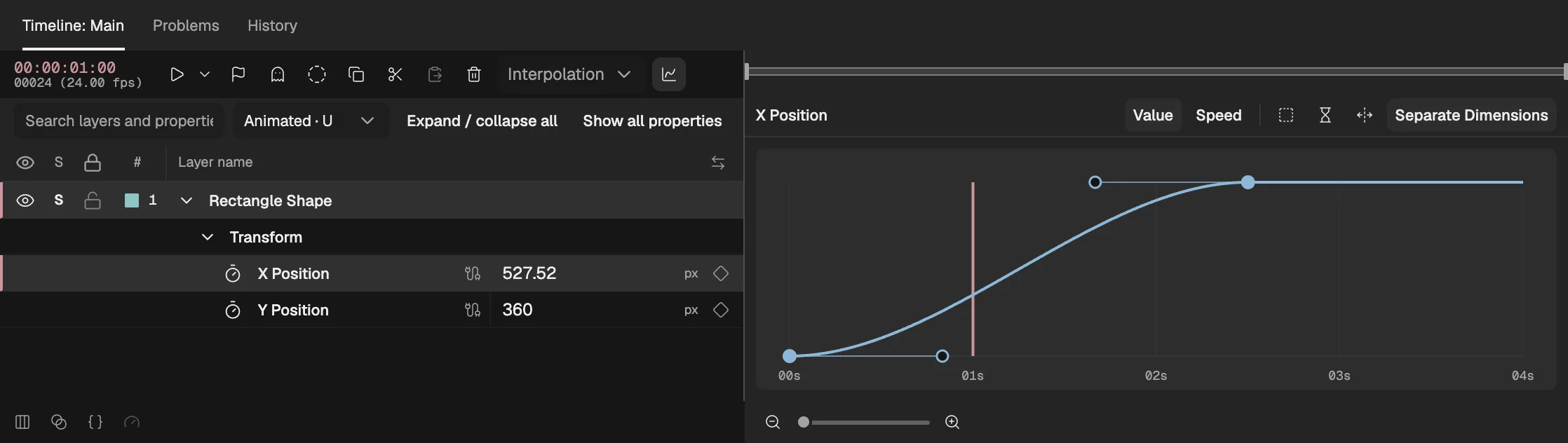
- Each keyframe is a value you can move, on the exact frame you choose.
More detail
| AI video generator | Editable animation in Keyframe | |
|---|---|---|
| What you get | A rendered clip: pixels, with nothing inside to select. | A project of layers, keyframes, Expressions and effects, rendered when you export. |
| Changing one thing | Describe the change and generate again; other parts of the clip can come out different too. | Change that one property, keyframe or layer; nothing else moves. |
| Timing | Described in words; where a motion lands is up to the model. | Set on exact frames, and lined up with sound when you need it. |
| The same character every time | Depends on the model holding the look from clip to clip. | The same artwork and rig in every shot. |
| Text and logos | Drawn by the model, so letters and marks can come out altered. | Typed text in your fonts, and your own artwork as it is. |
| Loops | The last frame has to happen to meet the first. | End on the first frame’s values and it loops exactly. |
| Length, size and transparency | Clip lengths and sizes the model supports. | Any length and size you set; export with transparency in ProRes 4444, WebM or PNG sequences. |
| Cost of a revision | Each new generation usually spends credits. | Editing by hand costs nothing; AI help is part of the Agent subscription. |
When a generated clip is the better choice
For footage that should look filmed, ideas you want to see fast, and one-off shots nobody will revise.
More detail
- Realistic footage. Live-action looks, real-world physics, crowds and camera moves through a whole scene are what video models are built for; Keyframe doesn’t generate video at all.
- Fast exploration. Trying ten looks for a mood board is quicker by prompting than by building ten scenes.
- One-off shots. When the first good take is the final take, there is nothing to revise.
When an editable animation is the better choice
For work that gets revised, reused or has to match something exactly.
More detail
- Work that gets revised. “Slow the second bounce down” or “move the logo up” is one change, not a new generation.
- Brand, product and interface motion. Exact colours, typed text and your own logo stay exact.
- Characters you reuse. Rig a character once, with bones and IK, and animate it in every scene.
- Loops and sync. Seamless loops for sites and apps, and motion that hits the beat of the sound.
- Output that goes into other work. Transparent exports to drop into a site, an app or an edit.
Using them together
Start from a picture made any way you like, and turn it into an animation you control.
More detail
- A picture as the start. Bring a picture drawn by hand, photographed or made with an AI image tool, and separate it into layers (opens in a new tab) on your device.
- A clip as reference. Import a generated or filmed clip as a video layer, and time or track your animation against it.
- The Agent for the repetitive part. Describe a motion and the Agent (opens in a new tab) builds it with the editor’s own layers and keyframes, as a draft you apply or discard; the result stays editable like anything you made by hand.
Which one to use
A video generator when the first good result is the end; Keyframe when it is the start.
More detail
- An AI video generator for realistic footage, quick explorations and shots you won’t revise.
- Keyframe for animation you will revise, reuse, loop or match to a brand, in your browser, with an Agent that drafts the repetitive work.