Rigging shouldn’t need a script
Design note
A leg is three bones and a target. Saying so shouldn’t take five layers and four expressions.
A leg shouldn’t take five layers
Anyone who has rigged a character with Duik (external website, opens in a new tab) knows the moment the Layers panel stops being about the drawing. You start with a dozen pieces of artwork. By the time the rig works, every limb has bones, a controller and pins of its own, each layer carrying its own expression, and the pictures you came to animate sit somewhere near the bottom of the stack.
Duik is open-source and a remarkable piece of work. It also shows exactly what After Effects is missing. There is no bone in After Effects, so a script has to build one out of what the program does have: layers to stand in for bones, and expressions to make them move together.
We think a skeleton shouldn’t be assembled at all. It should be a layer of its own, with bones as data inside it, solved by the editor the way it solves a transform. That is how Keyframe rigs a character, and the fox below is rigged that way. Pull it before reading on.
Drag the tail or a paw: each is an IK target that bends a chain of bones. You can also drag a single bone, or click the picture and move the IK target with the arrow keys.
There is no expression anywhere in that fox. Its legs and tail are chains in one skeleton layer, its body and tail are meshes skinned to those bones with painted weights, and the page draws it from the same meshes, weights and bone positions as the project it was made in.
How is a character rigged in After Effects?
Take one hind leg rigged with Duik Ángela. Each bone is an ordinary shape layer, and the leg’s artwork is parented to the bones so it follows them. A controller layer sits at the paw. IK, the calculation that bends the knee so the paw reaches the controller, is done by expressions on the bones.
Parenting moves a picture as one rigid piece, so a leg that should bend at the knee needs the Puppet tool (external website, opens in a new tab). Its pins follow the bones through more layers, linked by more expressions. Puppet has no per-vertex weights: how softly the leg bends depends only on how many pins there are and where they sit.
Count it up and a single leg is five layers and four expressions, each evaluated on every frame. A four-legged character with a tail is several times that.
After Effects
- Controller · pawƒ IK
- Bone · lower legƒ expression
- Bone · upper legƒ expression
- Pin · kneeƒ expression
- Art · hind legPuppet pins
Why does everything end up as an expression?
It isn’t that rig authors love expressions. After Effects’ core is closed, and it opens to the outside in only three ways. Effect plug-ins draw the pixels of their own layer and nothing else. Scripts, Duik among them, change the project at the moment they run and are then gone. Expressions (external website, opens in a new tab) are the one mechanism that runs on every frame and can read one property to set another.
So when a bone has to follow a controller frame by frame, and parenting can’t describe the relationship, an expression is the only door left. Two properties of that door shape every rig built through it.
First, an expression produces exactly one value: the value of the property it sits on. A leg’s IK is one calculation over the whole chain, but it has to be written onto each bone’s rotation separately, so the same solve runs once per bone.
Second, an expression remembers nothing. Each frame it starts from scratch and can’t see what it produced on the frame before. That is fine for a wiggle or a link, and a real problem for anything with momentum. Here is the kind of spring people write to make a tail or an ear follow through:
// An expression keeps nothing from the last frame, so it starts over
const stiffness = 0.2, damping = 0.8;
let x = thisComp.layer("Paw").transform.position.valueAtTime(0)[0];
let v = 0;
for (let f = 1; f <= timeToFrames(time); f++) {
  const goal = thisComp.layer("Paw").transform.position.valueAtTime(framesToTime(f))[0];
  v = (v + (goal - x) * stiffness) * damping;
  x += v;
}
[x, value[1]];Read the loop. On frame 10 it steps the spring ten times; on frame 300 it steps it three hundred times, and every step asks another layer where it was at that moment. Play a ten-second shot at 30 fps from start to finish and the loop body runs about 45,000 times to make 300 frames. The further into the timeline you scrub, the slower each frame gets.
Nothing is wrong with that expression. In a system with no memory between frames, it is the only correct way to write motion that depends on its own history.
What does a rig made of text cost?
Speed is the first cost, and Duik is candid about it: its own performance notes (external website, opens in a new tab) warn that IK and follow-through expressions are complex and slow previews noticeably. Every bone you add is another expression to evaluate on every frame.
The second cost is harder to see. The relationships between bones live in separate snippets of text, so After Effects itself has no idea that five particular layers make up a leg. Without knowing that, it can’t offer anything at the level of bones, such as giving a bone a new parent without the pose jumping, or carrying an animation over to a different character. Any help with those has to come from scripts again.
The newest reader of that text has the same problem. After Effects’ AI Assistant (external website, opens in a new tab) can read and write expressions, which is genuinely useful, but what it reads is still a set of separate expressions, not a skeleton whose structure it can reason about.
None of this is carelessness. It follows from a choice After Effects made long ago, when a layer with keyframes was the whole model and expressions were the way to extend it. Rigging grew on top of that model and went as far as the model allowed.
What changes when the skeleton is a layer?
Keyframe
- Skeletonone layer
- Upper leg
- Lower legIK
- Paw
- Art · hind legmesh → skeleton, weighted
In Keyframe, Skeleton is a layer type, listed next to images, text and shapes. Its bones are data inside that one layer, in as many chains as the character needs, each starting from its own root bone. Legs, arms and a tail can share a skeleton and still move independently.
Forward and inverse kinematics are solved by the editor’s own code, a whole chain at once. Turn bones one by one, or add IK to a bone and drag its target, and the chain above it bends to reach. Keep angle holds a paw level while the leg moves. No bone has an expression on it.
Parts follow the skeleton in one of two ways: rigidly, by attaching a layer to a bone, or smoothly, by skinning the part’s mesh to bones. Drawing bones, reparenting and binding work the way they do in dedicated skeletal animation tools such as Spine and Moho, rather than the way a compositor would improvise them.
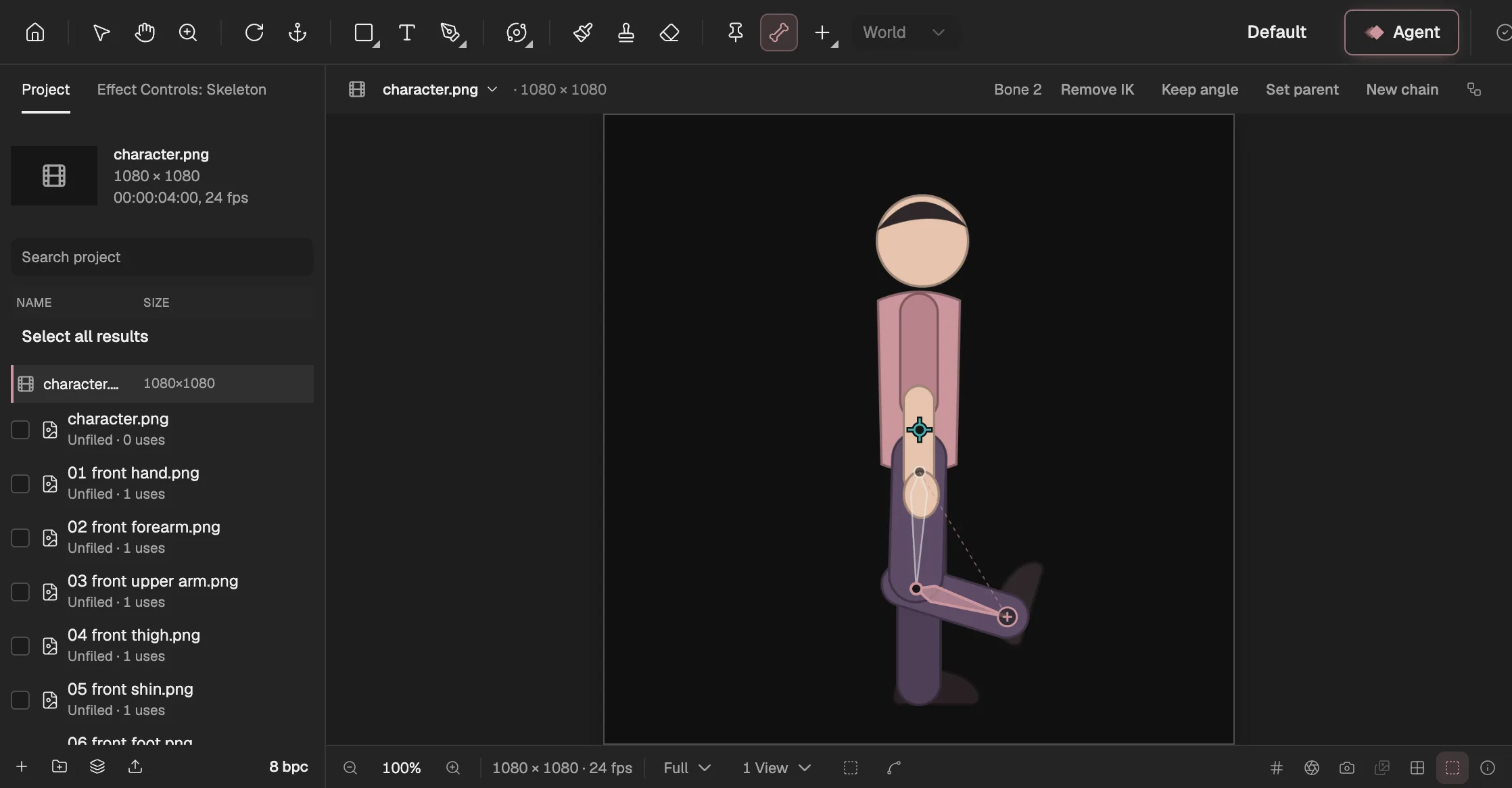
- The Bone tool: draw a bone from joint to joint.
- The selected bone, the lower leg, with IK on.
- Bone options: IK and Keep angle.
- The IK target: drag it and the leg bends.
Why weights instead of pins?
A picture attached to a bone hinges at the joint like a paper puppet. To bend, it needs a mesh. Keyframe builds one from the picture’s own transparency and deforms the layer’s picture before the layer is placed, the same stage at which Puppet works in After Effects.
The difference is in how the mesh is told to move. It is skinned to the bones it should follow, which may come from different chains of the skeleton, and you paint with a weight brush how strongly each bone pulls on each region. A tail bends along its whole length instead of folding at three joints; a shoulder can take a little from the neck and a little from the leg. Free control handles cover the places no bone reaches, and 3D layers can carry a mesh too, bending in their own plane.
A pin can’t say “sixty percent this bone, forty percent that one”. That is why Keyframe has meshes and no Puppet tool.
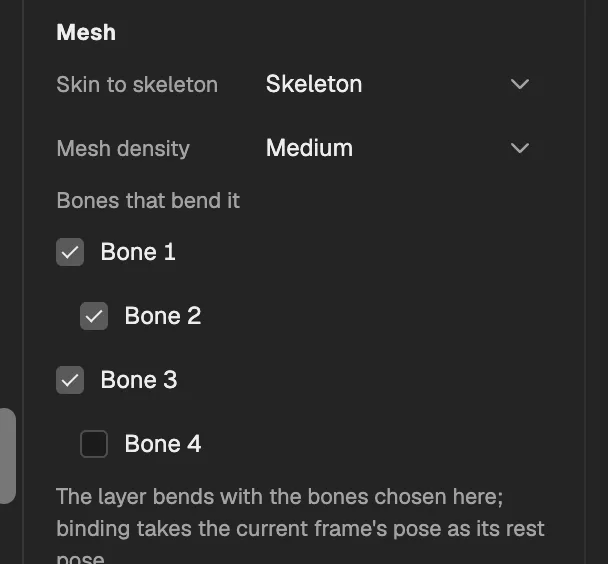
- The skeleton this mesh is skinned to.
- A chain’s root bone.
- A chain’s bones; check the ones that move this part.
- A bone that doesn’t move this part.
Where does the spring go?
Follow-through doesn’t disappear along with the expressions; it becomes a behavior. Secondary Motion sits on a chain of bones and treats each one as a damped spring on its parent, so the chain trails, overshoots and settles after whatever moved it, whether that was keyframes, IK or the whole skeleton layer swinging. You set frequency, damping and strength instead of writing a loop.
It has the memory the expression lacked. The spring starts at rest at the layer’s in-point and is integrated in a fixed number of steps per frame. Each frame’s state is kept, so the next frame continues from it instead of replaying the shot. Because the steps are fixed, the result depends only on the project and the frame number, never on which frames you happened to look at first, and preview and export get the same tail.
What can an editor do once it knows the bones?
- YouDraw bones
- YouAdd IK
- YouSkin the meshpaint weights
- The editorSecondary motiona spring is a behavior
- The editorSave a presetapply it to another character
Once the skeleton is structure the editor can read, operations on bones become ordinary commands. Give a bone a new parent and the editor rewrites its base value and every one of its keyframes, so the pose on screen doesn’t move. Splitting a bone off into a chain of its own works the same way.
Animation becomes portable. Save a skeletal animation as a preset and apply it to another character: the editor matches bones by the shape of their chains, and where the two skeletons don’t line up, it asks you instead of guessing.
The Agent (opens in a new tab) works on the same structure. Building a skeleton, skinning a mesh, painting weights and adding IK are registered editor operations, so the Agent uses the same ones you do, and what it builds is a skeleton you can open and adjust, not a pile of generated text. Each step is in the manual under Rigging (opens in a new tab).
What doesn’t this solve?
The spring keeps its memory only while nothing else computes the pose. If the composition also has an expression, or a behavior other than secondary motion, the editor can’t be sure a kept state is still valid, so it integrates from the in-point again on every frame. That is the same cost as the expression above, and in a long composition you will feel it in preview.
Retargeting is narrower than it sounds. A preset carries bone rotations and the root bone’s position; bone scale and the movement of the other bones stay behind. When several source bones map to one target bone, they are sampled frame by frame into linear keyframes, and the original easing is lost.
A mesh skins to one skeleton only, because two skeletons share no rest pose to bind against. A body, a tail and a prop that should bend together belong in one skeleton as separate chains, which is a different habit from building a rig out of independent pieces.
And if you think in Puppet pins, there is something new to learn. Painting weights is more precise than placing pins, but the first time, it is also more work.
A rig is structure, not text
Expressions are a good tool, and Keyframe keeps expressions (opens in a new tab) for what they do well: linking one property to another. A skeleton is a different kind of thing. It has a rest pose, chains and weights, and it is best kept as structure, where the editor can solve it, preserve it while you change it, carry it to another character and hand it to whoever works on the project next, person or Agent.
The fox you pulled at the top has no script in it. It never needed one.