The missing-plug-in dialog shouldn’t exist
Design note
A project file should open the way it was saved, on any computer. That is why Keyframe leaves no slot for a plug-in, and no computer can find one empty.
What the missing-effects warning is really saying
You know the moment. A colleague sends over a project, or you open last year’s job on a new laptop, and before the first frame appears After Effects warns you that the project uses effects it hasn’t loaded. In the Timeline and Effect Controls those effects now carry “Missing:” in front of their names, and pressing FF shows every one of them in the composition, as Adobe’s help on effects (external website, opens in a new tab) describes.
The project opened. Nothing crashed, and every setting is still there. But the picture is no longer the one that was saved: the particles, the glow, the rig that held a character together are simply not drawn. The only way back is to find, license or reinstall the right plug-in on this machine.
We think that warning points at a design question, not a housekeeping chore. A project file is a promise: open me and you’ll see what I am. If part of what a project is lives in software installed separately on each computer, the file can’t keep that promise on its own. So Keyframe has no plug-in interface at all. Whatever a project needs to draw itself is either part of the editor or part of the project.
After Effects
- Trapcode Particularparticles, a third-party plug-in
- Duikcharacter rigging, a third-party script
- PixelsWorldyour own shaders, a third-party plug-in
- Another computer without themthe effect becomes a “Missing” placeholder; the layer renders without it
Keyframe
- Particles and simulationsbuilt in, computed on the graphics card
- Skeletons and mesh skinninga layer type
- Shaders and picture programsproject data, travelling with the project
- Another computeropens in any browser with WebGPU
That is a strong position, and it costs something real. Before getting to the cost, it’s worth being fair about why plug-ins exist in the first place.
Plug-ins were a good answer to a real problem
None of this is carelessness on Adobe’s part. After Effects took its shape as a closed program a long time ago, and outside developers can’t change its core. It left three ways in: expressions for logic on a property, scripts for automating the program, and compiled effect plug-ins for new ways of processing pixels. Whatever the core didn’t do arrived through one of those doors.
A great deal arrived. Particle systems, character rigging tools such as Duik (external website, opens in a new tab), bridges that let you write your own shaders: many of them became the way the industry works. That ecosystem is why After Effects can do almost anything, and it is a real strength we don’t pretend to match.
The price is that the After Effects on your screen is never quite the same program as the one on your colleague’s. Each plug-in is installed and updated on its own, on its vendor’s terms, so whether a project opens as it was saved depends on what happens to be installed here. The missing-effects warning is that price arriving at the worst possible moment: when the project has left the computer it was made on.
What “built in” means in Keyframe
Keyframe’s core was written from scratch, so it didn’t need doors for others to add what the core lacked. The things people most often install a plug-in for in a motion graphics tool are features of the editor itself, written by us and shipped to everyone at once.
Tracking shows it best. Point and planar tracking, mask tracking (faces included), Warp Stabilizer, Content-Aware Fill and the 3D Camera Tracker all live in the Tracker panel (opens in a new tab) below, and a finished track is written as ordinary keyframes on the layer it moves. Keying effects, Roto Brush and Refine Edge are in the editor too. Particle World runs in a compute pass on the graphics card. Skeletons with FK and IK, and mesh skinning, are a layer type (opens in a new tab), not bones assembled out of shape layers by a script.
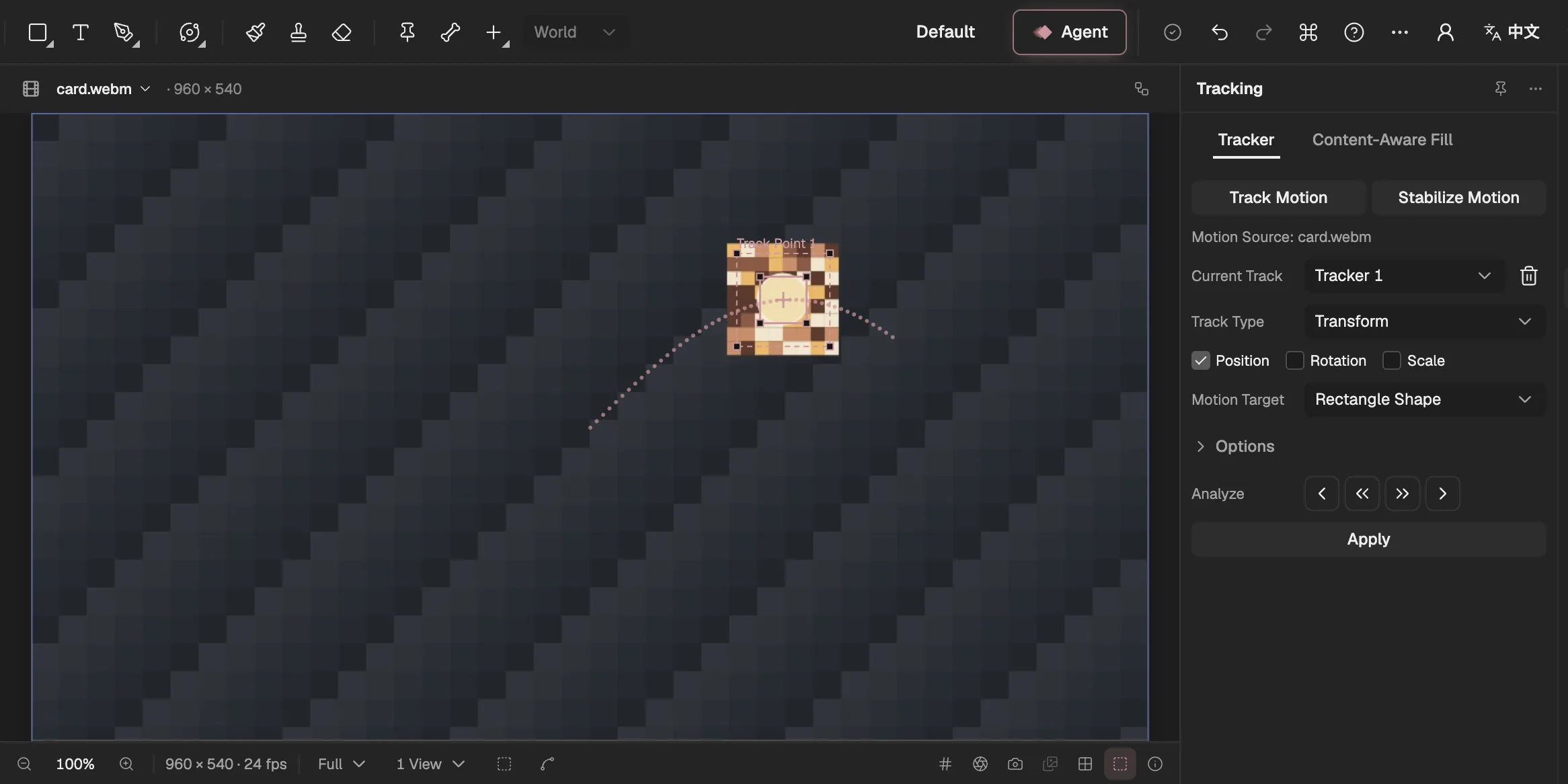
- Adds a tracker to the selected video layer.
- What the tracker follows and how it is applied.
- Track one frame, or to the end, backward or forward.
- The layer the track moves.
- Writes the track as keyframes on the target.
- The track point and its path: the feature region, the search region and the attach point.
Then there is the part no editor can fully predict: the one-off look a job needs and nobody has built. For that, Keyframe has effects written as code (opens in a new tab): shader effects, simulation effects and picture programs, which you can write yourself or ask the Agent to write. What separates them from a plug-in is where the code lives. It is saved inside the project, so it travels with it. It runs only through a versioned interface, and a picture program runs in a sandbox on another origin. And when you open a project that contains code, the editor tells you.
Moving a project is then a single file. A project package (opens in a new tab) holds the compositions, layers and keyframes, the imported files and the undo history. Open it in any browser with WebGPU (external website, opens in a new tab) and every effect is there, because there is nothing else to install: the editor is a web page, so whoever opens the file is running the same editor you are.
Built in doesn’t mean built from scratch
Building features into the editor could be read as a vow to write everything ourselves. It isn’t, and it would be a poor idea if it were. Tracking, segmentation and filling in missing pixels are deep fields, and the best implementations took their authors years. Our rule runs the other way: where a mature library exists, we use it.
Tracking and video analysis use OpenCV.js and MediaPipe. Filling a background uses the LaMa inpainting model. Rendering goes through luma.gl on WebGPU, and expressions run in QuickJS, an isolated JavaScript engine. None of these is a plug-in in the After Effects sense. The difference is who installs them, and when.
- The editorWe choose a mature library and pin its versionIts licence and maintenance are reviewed before it goes in.
- The editorIt sits behind a Keyframe adapterReplacing the library never changes a saved project.
- On your deviceServed from Keyframe’s own servers, checked, and run on your deviceA large model, such as the one that fills backgrounds, downloads only when you first use it.
- The editorIts result is saved as project dataA track becomes keyframes, or an analysis record checked against its footage.
Every library is installed once, by us, for everyone, behind an adapter we own. Its files come from our own servers with integrity checks, so a project never depends on what one computer happens to have. And because a library’s output is saved as plain project data, a project doesn’t depend on the library either. A track is keyframes. A simulation’s result depends only on its parameters and the frame number, however you got to that frame. If a better tracker appears next year, we can swap it in behind the adapter and your saved projects won’t notice.
What we give up
This is a real trade, and it would be dishonest to write about it as if it weren’t. No plug-in interface means no third-party plug-ins. The specialists who spent years perfecting one particle system or one keyer can’t ship their work into Keyframe, and you can’t buy your way past a gap the way you can in After Effects. Leaving out a plug-in SDK, ExtendScript and UXP scripting, MOGRT and Dynamic Link is deliberate, which means those doors are closed to the people who would build great things behind them, too.
It also means features arrive only as fast as we build them. After Effects has far more effects than Keyframe today; we keep the gaps on a public list and close them one at a time, but an editor made by one team won’t match decades of ecosystem by next month. The editor runs only in browsers with WebGPU, with no fallback renderer. And “opens the same” means every effect is present with its settings, not that code effects promise identical pixels on every graphics card: we check that preview and export match on one machine.
After Effects
- Effect plug-inscompiled C++, from many vendors
- ScriptsExtendScript or UXP, automating the program
- Expressionslogic on a property
Keyframe
- Shader, simulation and picture programssaved in the project, run through a versioned interface
- Expressionslogic on a property, in an isolated runtime
- The Agentautomation through the same operations as the interface
- New panels, tools and importersonly from us
For the projects Keyframe is made for, we think the trade is worth it, and we have tried to leave the right escape hatches open. Effects written as code cover the most common reason to reach for a plug-in, a look the editor can’t make, without bringing the missing-effects warning back, because the code is part of the file. Automation goes through the Agent (opens in a new tab), which uses the same registered operations as the interface, every change reviewable and undoable, instead of scripts that each play by their own rules. Neither replaces an ecosystem. What they do is keep a project whole.
A project should carry what it needs
The missing-effects warning is a small dialog, but it records a large choice: whether the things that make your picture belong to the file or to the computer. After Effects chose the computer long ago and gained an extraordinary ecosystem in return. We chose the file.
That means fewer features today and no marketplace tomorrow. It also means that when you send someone a Keyframe project, they get all of it, every effect included, with nothing to hunt down first. In a tool where a person and an Agent work on the same project, that is the promise we would rather keep.