AI should hand you a draft, not edit your project
Design note
Undo takes back the step you saw. It can’t take back the step you never noticed, so our Agent shows you everything it would change before any of it reaches your project.
Undo only takes back what you noticed
Say you ask an assistant to make a bouncing ball land a little softer. A few seconds later the ball does land softer, and you move on. What you didn’t see is that, on the way there, it also retimed the shadow layer, changed an ease on the squash and renamed two layers so an expression could find them. Each of those steps was reasonable. None of them was the thing you were watching.
Undo is the safety net every animation tool offers, and it is a good one for your own mistakes, because you know what you just did. With an assistant the order is reversed: it acts first and you find out later. Undo can take back the step you saw. It can’t take back the step you didn’t notice, because you won’t go looking for it until something looks wrong three shots later.
So here is our position. When an AI works inside a creative tool, its result should come to you as a draft: the whole change, visible at once, in the panels you already read, before any of it is written into the project. You apply it or you throw it away. That is how the Agent in Keyframe works. Below is why we built it that way, what it costs, and when we think a direct edit would be fine.
How do AI assistants edit animation projects today?
The most visible example is After Effects. Since August 2026 its beta builds have included an AI Assistant (external website, opens in a new tab) that can organise a project, read and write expressions, and generate images with Firefly. Its changes go straight into the project. Undo walks them back one step at a time rather than one request at a time, and Adobe describes no preview before the assistant changes anything.
Third-party assistants for After Effects usually take a different road to the same place: a language model writes an ExtendScript, and the script runs inside the application. How much of that you can undo depends on how the script happens to be written.
None of this is carelessness. After Effects’ automation grew up beside its interface. What you do with the mouse and what a script does are two separate paths into the project, and an AI assistant can only take the second one. The core has no layer that means “build it, show it, and write it only when the user agrees”, because it was designed for one person at the controls. That was a sensible choice at the time; it is what limits an assistant there today.
After Effects
- Youin the interface
- ScriptsExtendScript edits the project; how it undoes depends on the script
- AI Assistantedits directly; undo goes one step at a time
Keyframe
- Youdrag, type, shortcuts
- Agentplans, then calls the same operations
- Registered operationsthe same addresses, type checks and transactions
- Draftthe Agent’s changes wait here until you apply them
- One historyeach request is one step; one undo takes it all back
Why is a draft the right unit of AI work?
Other crafts settled this a while ago. Writers send edits as tracked changes; programmers send pull requests. Nobody thinks the review is there to slow things down. A proposed change you can see in full is simply how two people share one piece of work without one of them losing track of it.
Animation makes the case stronger in three ways. First, one request is one intent. “Land softer” is a single idea even when it touches six properties, so it should be seen, kept or rejected as one thing, and undone in one step if you change your mind later.
Second, motion is judged by eye. A line saying “adjusted easing on Squash” tells you nothing about whether the landing feels right. The only review that means anything is watching the change play in the viewer, with its keyframes sitting in the Timeline where you would look for them anyway.
Third, a model can be wrong in ways that look right. Language models are very good at producing plausible work, and plausible is exactly the kind of mistake people miss. A draft doesn’t make the model any smarter. It puts your judgment between its guess and your project.
What does reviewing a draft look like?
Here is the loop in a small, live copy of the editor. Describe a motion and the Agent plans it and prepares a draft. Nothing in the composition has changed yet.
Preview shows the draft read-only in the viewer, the Timeline and Properties, labelled as a draft, so what you see is exactly what would change. Apply writes it into the project; Discard Draft leaves nothing behind. In the full editor, Apply only becomes available once you have previewed, and a check on your own computer can confirm the draft still fits the project as it is now. Review a draft (opens in a new tab) walks through it.
Once applied, the Agent’s work is ordinary layers, keyframes and effects. In History it is a single entry, marked as the Agent’s, so one undo takes back the whole request. Undo and redo stay yours: if the Agent needs to correct something it applied, it makes a new change rather than reaching back into your history.
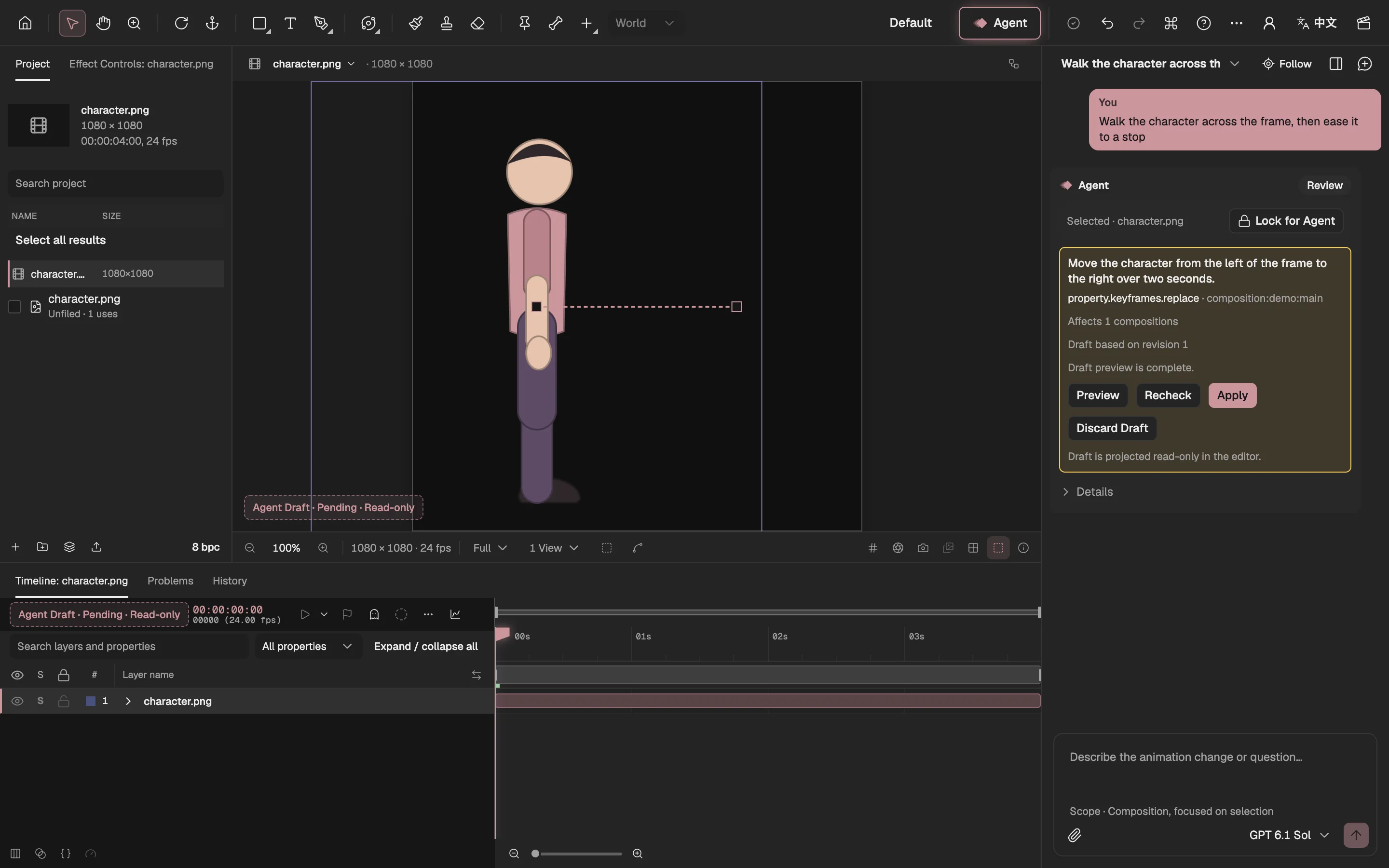
- The draft shows in the viewer, read-only.
- The motion the draft adds.
- Its keyframes in the Timeline.
- What the draft changes.
- Look first.
- Write it into the project.
- Throw it away.
The Agent edits with the same operations you do
A draft is only worth trusting if it is made of the same material as your own edits. So the Agent has no interface of its own. Every editing feature in Keyframe is a registered operation, with an address for what it changes, type checks and a transaction. When you drag a slider and when the Agent sets a value, the same operation runs and the same checks apply. There is no back door that only the AI uses.
This is also where we draw the line on code. The model plans and proposes typed edits; trusted code in the editor checks them, builds the draft and, once you apply it, writes it into the project. The model never writes application code or scripts that run against your project. The exceptions are deliberate and narrow: when no built-in effect does what you ask, the Agent can write a Shader, Simulation or Picture Program effect. That code is project data, like an expression. It is checked, tried somewhere walled off where it can only draw, and reaches you as a draft like everything else (custom code effects (opens in a new tab) has the details).
Sharing one path is also what lets you work alongside the Agent. Because its edits and yours go through one history, Keyframe can tell when they collide. Edits that don’t touch what the Agent is changing don’t stop it. If you change something it was about to change, your version wins: the task stops and shows where your edits and its plan meet, and when you choose Continue from current project it plans again from your version instead of writing over it. A waiting draft that the project has moved past is marked out of date and can’t be applied.
You decide where it may work
Review covers what the Agent did; scope covers where it may go. A task’s scope comes from what is selected when you send it, and the line under the message box says which it is: your selection, the composition or the whole project. Wording a request differently can’t widen it.
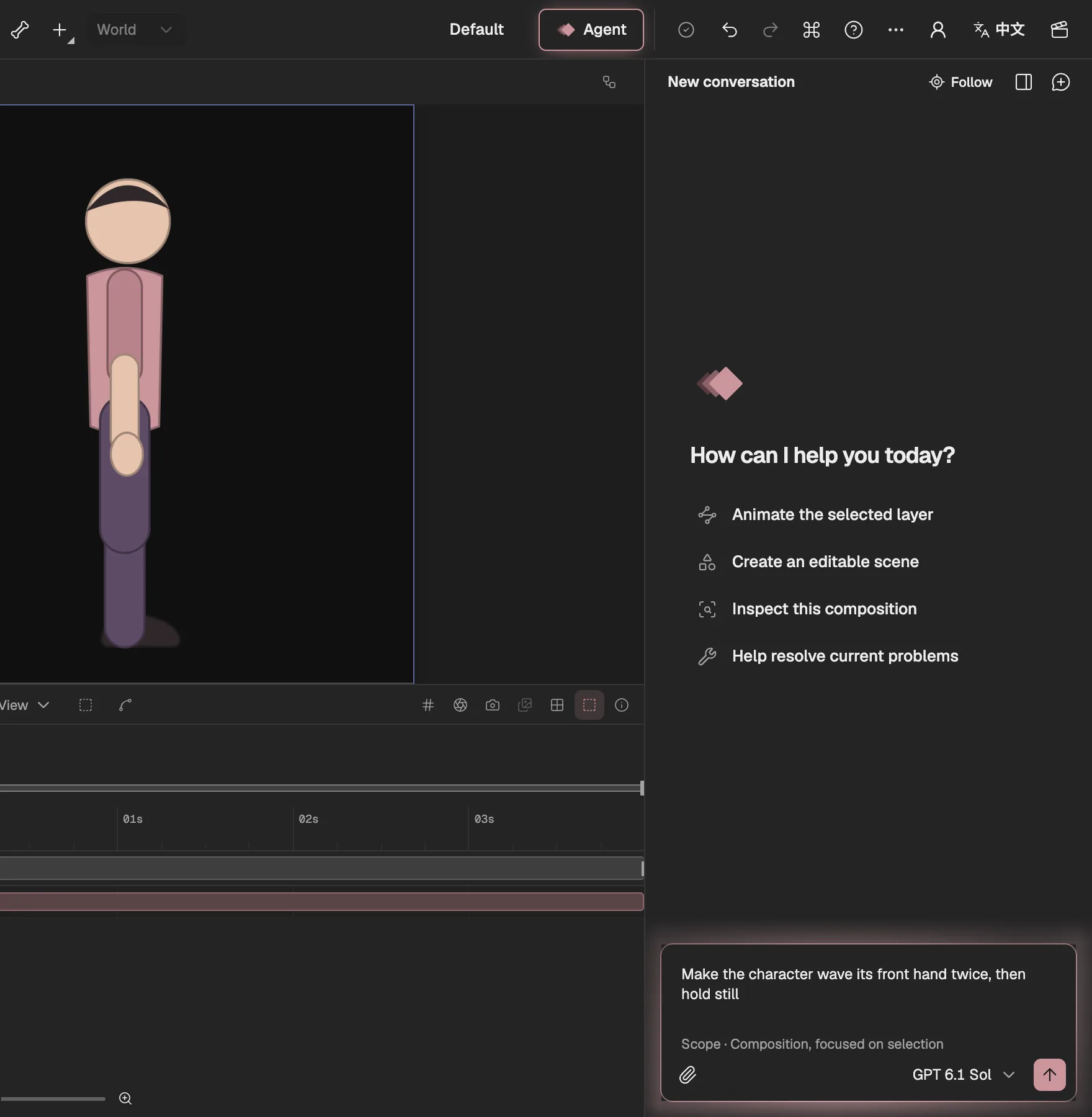
- Your request, in your own words.
- Where the Agent may work.
The selection is a focus, not a fence: the Agent may still change other layers in the same composition, because a softer landing often needs the shadow too. When a task needs more than its scope, it stops and asks, and you choose Allow Project scope or Keep current scope. To keep it off a particular layer or property, lock that layer or property against the Agent; the lock never limits you.
Steps that cost money ask on their own. Work a model on your device can do, such as cutting out a subject or filling in a background, runs there first, for free, and its result is reviewed like any other. The paid image model is an upgrade you choose on that step’s card, never a silent default. A final render waits for its own confirmation as well.
- YouAskwhat you select sets the scope
- AgentPlannamed steps
- YouConfirm paid stepsonly when a step costs money
- The editorMake the draft
- YouApply or discard
What the review step costs, and when it isn’t worth it
A draft is an extra step, every time. For a request like “rename these layers” or “set the opacity to 50%”, previewing a draft is ceremony: you can check the result at a glance, undo it in one step, and nothing else moves. For work like that a direct edit would be perfectly fine, and we won’t pretend otherwise.
There is a subtler cost too. Review only protects you if you actually look. A draft you approve without watching it is no safer than a direct edit, and a tool that asks too often teaches people to stop reading. So the stops should be the ones that matter, and the Agent should do its own looking first: when a result has to be judged by eye, it renders frames before it calls the task done, checks them against what you asked for, and has a separate review pass judge them, so what reaches you has already been watched once.
If you would rather be asked less, there is a setting to apply drafts automatically. It is off by default and belongs to your browser. With it on, the Agent previews and applies changes you can undo without waiting for you. Paid steps, a wider scope and export still ask first, and a draft that runs into problems or goes out of date still waits for you.
Two more honest notes. After Effects’ AI Assistant is in beta, and what we describe above is what Adobe documents today; it may well change. And the Agent is part of a subscription that opens soon, while the rest of Keyframe is free.
The two questions to ask any AI tool
Whatever you use, ours or anyone else’s, two questions tell you most of what you need to know. Can I see everything it will change before it changes it? Can I take the whole request back in one step? If the answer to the first is no, undo is your only review, and undo only works on what you noticed.
We think AI belongs in animation tools. We just think it should behave like a good collaborator: do the work, show it to you, and let you decide.