A shader should travel with the project
Design note
A shader is often twenty lines of text. It should be saved, opened, keyframed and reviewed with the rest of the project, not compiled and installed on every machine that renders it.
Why does a twenty-line shader need an installer?
Anyone who has tried writing a shader for a motion piece knows the moment. The idea fits in twenty lines: a band of light sweeping across a logo, scan lines drifting over a picture, a ripple that bends what is underneath. The maths is short, the language is not hard, and once it runs you could tune it in minutes. Then comes the question of where those twenty lines are supposed to live.
In After Effects the answer has moved over the years, and each move has taken it further from the project.
- 2008 · CS4Pixel Bender shaders can be loaded as effects
- 2012 · CS6Pixel Bender support is removed
- TodayCompile a GPU effect plug-in with the C++ SDK, or install a bridge plug-in such as PixelsWorld
Today the proper route is a plug-in written with the C++ SDK, its CUDA, Metal or DirectX code compiled for each platform and installed on every computer that opens the project. The shortcut is a bridge plug-in such as PixelsWorld, itself a compiled plug-in inside which you write GLSL-style code. Either way, the twenty lines depend on something installed on the machine, and the project renders correctly only where that something is.
This is not carelessness. After Effects’ core is closed, and effect plug-ins are the door it gives outside developers for drawing pixels. A plug-in is native code, and native code can do anything a program on your computer can do, so it is trusted the way software is trusted: compiled, distributed, installed on purpose. A sound decision made long ago now decides where a very small program is allowed to live.
Our view is that the twenty lines are content, not software. They belong in the project file beside the keyframes and expressions that drive them: saved with it, copied with it, opened on another computer without an installer, and reviewed like any other change. The rest of this post is about what it takes to make that safe, and what it costs.
This water is a program running in your browser
The water below is not a video. It is a picture program, the widest of the three kinds of program Keyframe keeps in a project, drawing each frame on your graphics card as you watch. It is told which frame to draw and nothing else, so jumping to a moment and playing up to it give the same picture.
Like the other pieces in the showcase, it was written by hand for this site, not by the Agent. Light on water
What does it mean for a shader to live in the project?
A Shader effect in Keyframe holds its program as data: the source, the version of the interface it was written against, and the settings it declares. Saving the project saves that; sending the project to someone sends the effect with it. Here is the scan-line effect from the screenshot further down, as the project stores it:
"shader": {
  "interfaceVersion": "1.0.0",
  "source": "fn shade(s: Shade) -> vec4<f32> {\n  let picture = layer(s.uv);\n  …",
  "parameters": [
    { "id": "spacing", "name": "Spacing", "kind": "number", "default": 14, "minimum": 2, "maximum": 80 },
    { "id": "speed", "name": "Speed", "kind": "number", "default": 4, "minimum": 0, "maximum": 20 },
    { "id": "tint", "name": "Line Colour", "kind": "color", "default": [0.12, 0.1, 0.22, 1] }
  ]
}The interface version is what makes this possible. The program does not set up the GPU, bind buffers or declare entry points of its own. The host declares all of that before the source, along with a standard library of noise, shapes, colour, blending and blur, and the program fills in a single function, shade, which is given one pixel and returns its colour. A source that tries to step outside that interface is refused before it runs.
That narrow surface is the whole difference from a plug-in. Native code has to be trusted before it is installed; a program written against a small, versioned interface can be checked, tried and kept as part of the document, the way an expression (opens in a new tab) is. And because the code arrives with a project rather than through an installer, the editor tells you when a project you open contains any.
Three kinds of program, from narrowest to widest
One kind of program can’t cover everything a motion designer reaches for, so there are three. Each is an effect in Effects & Presets whose content is a program, and each can do more than the one before it:
- Shader runs once for every pixel of its layer, written in WGSL (external website, opens in a new tab), the shading language of WebGPU (external website, opens in a new tab). It reads the layer’s picture and its settings and returns a colour: patterns, colour treatments, distortions, shapes. It is one pass, and it draws nothing outside the layer.
- Simulation is for anything that depends on what happened before: particles, cloth, ripples, trails. It is a grid of elements whose state the graphics card keeps from frame to frame. You write how an element starts and how it steps; the editor owns the buffers, the bindings and the number of passes, and draws the elements as soft dots or as a sheet that carries the layer’s picture.
- Picture Program is a JavaScript (external website, opens in a new tab) module that draws the layer’s whole picture with WebGPU, in several passes if it needs them, for what the other two can’t make.
The rule is to use the narrowest one that can make the effect. A narrower program has less it can get wrong and less the editor has to guard against, which is also why the widest kind gets the tightest box.
What all three share is that none keeps a clock or uses chance. Time arrives as the frame being drawn, randomness comes from noise of position and time, and whatever a simulation or picture program carries from one frame to the next lives in state the editor keeps for it. A frame comes out the same whether you jump to it or play up to it, which is what an animation tool needs from anything on its timeline.
Nothing enters the project until it has run on your graphics card
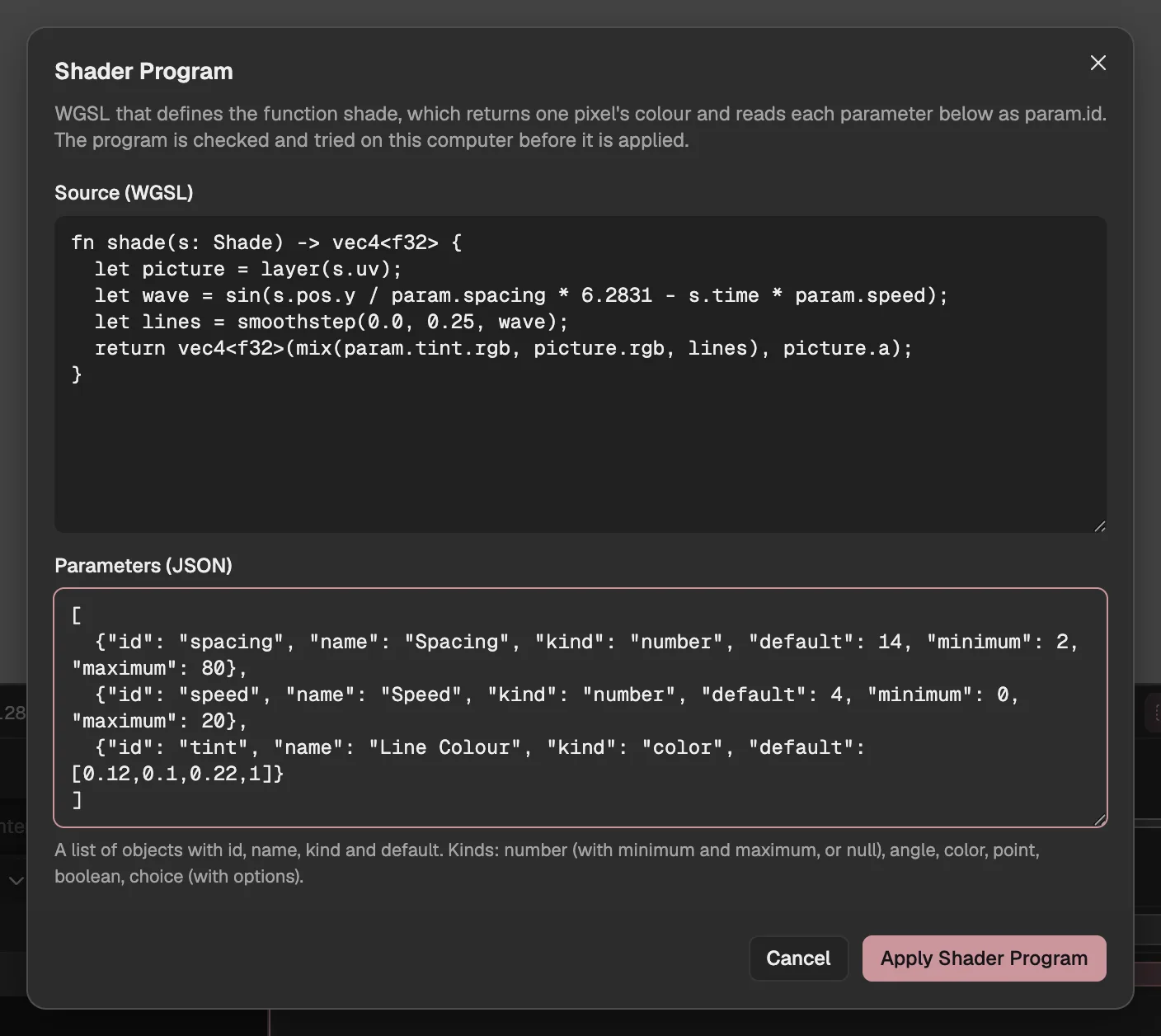
- The program’s source.
- The settings it reads.
- Checks and tries it; it enters the project if it passes.
Writing a program looks like the dialog above: the source, the settings it reads, and a button to apply them. Applying is where the checking happens. The source is first held against the interface, with no bindings or entry points of its own, loops with a fixed number of turns and a size limit. Then it is compiled and tried on this computer, and only a program that passes enters the project, as one step you can undo.
The try grows with the kind. A shader is compiled, timed and drawn. A simulation also runs its first frames to see that its numbers stay sensible instead of running away. A picture program must load, draw its first frames in time, draw something rather than nothing, and draw the same frame a second time identically. When a program fails, the dialog says why, with line numbers in your own source where it can.
This is the gate a plug-in never passes through. A plug-in is trusted because someone installed it. A program here is accepted because it has just run, on your graphics card, inside the interface, and produced a picture.
Why does the widest program run on another origin?
The editor’s page
- Your project and storage
- Your sign-in
- The network
- frame
- parameters
- size
picture
Sandbox (another origin)
- The picture program runs in a worker
- No clock, no chance
A shader or a simulation can only fill in functions the host calls, so the interface itself is their fence. A picture program is a whole JavaScript module with WebGPU at its disposal, and an interface is not enough of a fence for that. So it runs in a worker of a page on another origin, where the browser’s separation between origins keeps it away from the editor’s page, your projects, the browser’s storage and your sign-in, and it has no network.
What crosses the boundary is short: the frame to draw, the values of its settings and the size going in, a picture coming out. Inside, Math.random, Date.now and timers throw, and nothing can be imported, so the module is the whole program. We never run a picture program on the editor’s own origin, and we don’t widen what it is handed. A feature that would need more is one we have chosen not to build.
A setting you declare is a property you can keyframe
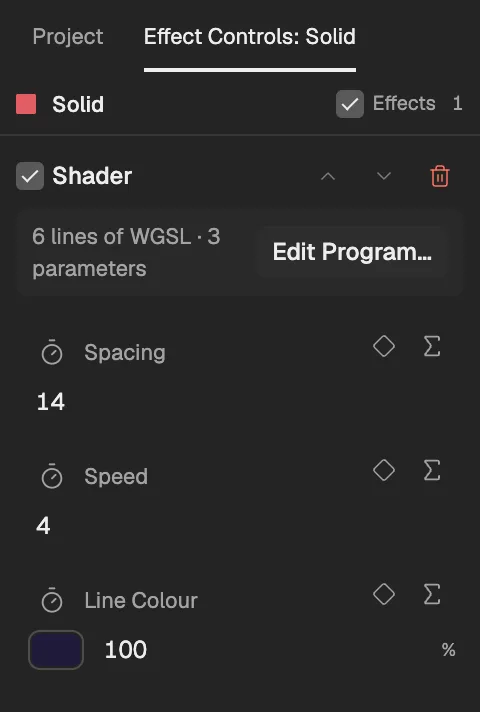
- The program effect.
- Opens the program editor.
- A setting the program declares.
- Keyframe the setting.
On its own, a program would be a black box with one fixed look. What makes it part of an animation is its settings. Each one a program declares, whether a number, an angle, a colour, a point on the layer, a switch or a choice, becomes a property of the effect in Effect Controls under the name you gave it. You drag it, keyframe it (opens in a new tab) and drive it with an expression like any other property, and the program reads its value at every frame.
The spacing and speed of the scan lines are two such numbers. Keyframe the speed and the lines accelerate; link the colour to another layer with an expression and they follow it. Rewrite the program later and the settings whose id and kind stay the same keep their values and keyframes, so improving the code doesn’t throw away the animation built on it. Preview and export run the same program, so on the same computer the frames you keyframed in the Viewer are the frames in the file.
Programs as data are what let the Agent write one
There is a further reason we wanted programs to be data. A model should never write application code into the editor, and it can’t safely write a native plug-in for you to install. It can write a program against the same narrow interface a person uses, under the same checks.
Describe an effect to the Agent (opens in a new tab) and it can write any of the three kinds. It reads the interface the manual (opens in a new tab) describes, tries each version on your computer, looks at the frames it draws and revises the program before proposing it. Before the change reaches you, trusted code runs the same checks again, so a program the Agent never tried can’t slip through.
What you get is a draft (opens in a new tab): preview it, then apply or discard it. Once applied it is yours to edit with Edit Program, like a program you wrote. The Agent’s own checks only make sure you never see a broken program; whether it looks right is your call, and your comments are what it revises from. Having the Agent write programs belongs to the Agent subscription (opening soon); writing your own is free.
What we gave up
The first cost is exactness across machines. The Viewer and an export run the same program and give the same frames on the same computer, but another computer’s graphics card may round a little differently. We promise that a project matches itself where it is rendered, not that it is identical everywhere.
The sandbox has costs of its own. Frames with a picture program are rendered on the editor’s own page rather than in parallel export workers, because only the page can reach the sandbox. And the sandbox walls a program off from your data, not from your graphics card: a very heavy program can still slow the whole browser.
The checks are not proof. A simulation or picture program is tried with its default settings on its first frames, so a value you dial in later, a simulation that diverges only late, or a picture drawn outside the layer won’t show up in that try. If it fails while rendering, it is reported in Problems.
And there is a door we chose not to open. Keyframe has no native plug-in SDK, so existing After Effects plug-ins and C++ effect code don’t come over, and everything a program does has to fit in WGSL or a sandboxed JavaScript module within the interface’s limits. The editor’s own built-in effects are still written by hand and ship with the editor; only programs you or the Agent write live in projects.
Where a program belongs
Where a program lives decides everything else about it. Kept in the project, a shader travels without an installer, its settings sit on the timeline, it is tried before it is accepted, and an Agent can draft one that you review like any other change. Twenty lines of picture should cost twenty lines, not a build, a download and a matching set of plug-ins on every machine.