We kept After Effects’ model and broke from it in five places
Design note
A thirty-year-old tool’s greatest strength is that it keeps the past working. So is the heaviest thing it carries.
After Effects has been the motion designer’s tool for more than thirty years, and much of the trust it has earned comes from keeping the past working. Old projects open in new versions. Expressions keep their meaning. A deep ecosystem of plug-ins and scripts builds on the same core it always has.
That faithfulness has a price. Every new idea has to fit a model settled long ago, without breaking anything built on top of it. When we started Keyframe, a browser animation studio with an Agent built in, we wrote the core from scratch. For once, someone got to choose again.
We mostly chose the same. Compositions, layers and keyframes are not After Effects’ problem; they are why it works. We broke from it in five places, each one where its history, not its model, sets the limit. This post is the map of those choices: what we kept, where the limits come from, the five breaks, what they cost us, and where After Effects is still clearly ahead.
Why keep a thirty-year-old model?
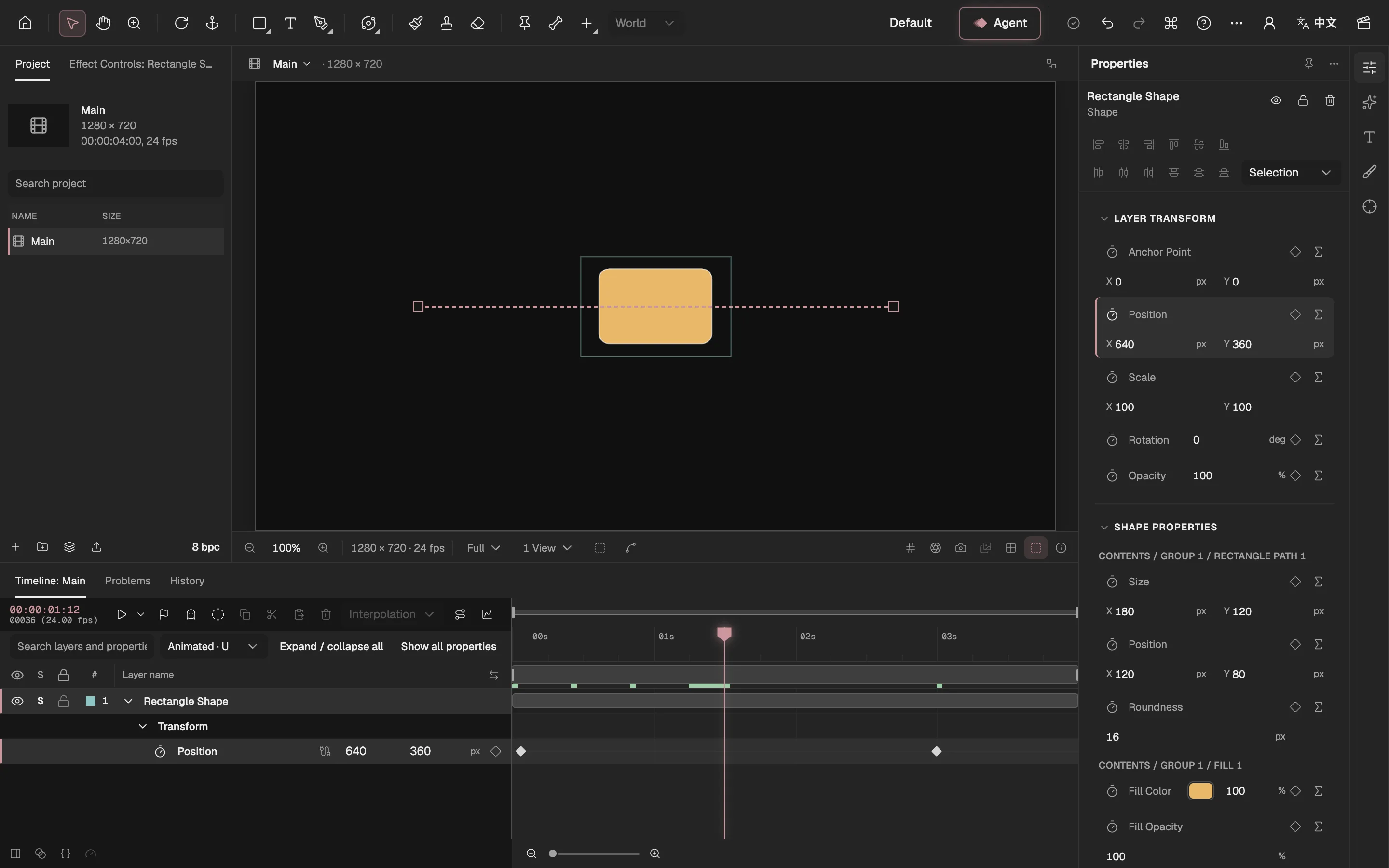
- Tools, as in After Effects’ toolbar.
- The Project panel.
- The Composition viewer.
- The Timeline, with keyframes.
- Properties and effect controls.
- The Agent.
- Export and the Render Queue.
Because it is the language of the trade. A composition is a stage with a size, a frame rate and a duration. It holds layers; layers stack, follow a parent and nest inside other compositions; every property animates with keyframes (external website, opens in a new tab) eased along a curve. Ask a motion designer anywhere to describe a shot and they will describe it in these words.
Keyframe follows that model closely: nested compositions, parented layers, eased keyframes, a graph editor, and expressions named after Adobe’s own expression language (external website, opens in a new tab). The editor is laid out the way you expect, with a Project panel, a viewer, a timeline and Properties. Two areas are new, the Agent panel and Export, because both have to work inside a browser tab. If you know After Effects, you know where to look, and most shortcuts are the ones your hands already know.
We kept it for a plain reason. A new mental model costs every user months, and the model was never what held After Effects back. A different one would have made Keyframe harder to learn without making it any better. Everything below is built on this shared ground.
So where do After Effects’ limits come from?
When people list what After Effects can’t do, the items look unrelated: rigs that slow every preview down, no built-in way to write your own shader, effects that vanish on another computer, pictures that must be split into layers somewhere else first. Traced back, almost all of them come from three choices.
- An early modelA property’s value comes from keyframes or an expression; later features were added on top, and 3D went through several renderers.
- A closed coreOutside developers get in through expressions, scripts and C++ plug-ins, each with its limits.
- A division of workAfter Effects composites: layers are split in Photoshop, editing goes to Premiere.
After Effects’ core (closed)
- ExpressionsRun every frame, but one sets one property and remembers nothing between frames
- ScriptsChange the project, but only at the moment they run
- Effect plug-insDraw their own layer’s pixels; they can’t change the project while rendering
- Photoshop: split layers
- After Effects: composite
- Premiere: edit
An early model that can only grow on top. In After Effects a property’s value comes from keyframes or from an expression, and nothing else. Every later feature had to be added on top of that without disturbing it. 3D shows the pattern: Classic 3D, then a Ray-traced renderer that was later retired, a Cinema 4D renderer in 2016, and only in 2023 the Advanced 3D renderer that is now the default.
A closed core with a few ways in. Outside developers can’t change the core. They use the doors Adobe opens: expressions, ExtendScript scripts and C++ plug-ins. Each door has its shape. Apart from fixed-purpose links such as parenting and track mattes, expressions are the only general way to tie one property to another on every frame, so everything relational ends up written there.
A division of work across the suite. Inside Adobe’s suite, After Effects composites. A picture is split into layers by hand in Photoshop or Illustrator first, then imported; the cut goes to Premiere. Inside the suite that is sensible. If you are animating on your own, it means going back and forth.
None of this is a mistake. After Effects’ stability and its enormous plug-in ecosystem come from exactly this history. Choices made long ago are simply hard to change today, and a tool that starts later doesn’t inherit them.
The deepest break: relationships become objects
The oldest cause runs deepest. Because a property can only take its value from keyframes or an expression, everything that ties one thing to another became an expression: bones, follow-through, springs, constraints. The open-source rigging tool Duik (external website, opens in a new tab) builds each bone from an ordinary shape layer and computes IK with a controller layer and expressions. The Puppet tool (external website, opens in a new tab)’s pins follow those bones through more expressions, and bend the artwork with no per-vertex weights.
It works, and artists have made beautiful films this way. But a rig built like this is many separate snippets of text, one on each property, and the engine can’t see how they relate. It can’t check them before they run, and it can’t explain the rig to anyone, human or model. Duik’s own performance notes (external website, opens in a new tab) warn that IK and follow-through expressions slow previews noticeably.
After Effects
- Keyframes
- ExpressionsBone IK, links, springs and constraints all live here
Keyframe
- Keyframes
- ExpressionsA property’s own logic
- BehaviorsOscillate, aim, IK, secondary motion, with parameters
- Skeletons and mesh skinningA layer type, solved by the editor
- Program effectsShaders, simulations and picture programs, as project data
Keyframe adds three sources beside keyframes and expressions. A skeleton is a layer type, and the editor itself solves its FK, IK and mesh skinning, with weights, the way dedicated rigging tools do. Common motion rules are behaviors with parameters. Shaders, simulations and picture programs are project data. Expressions stay, for a property’s own logic.
Because every relationship is an object, its dependencies are checked before anything is written: a missing target or a loop is refused on the spot instead of surfacing at render time. And the Agent reads a skeleton as a skeleton, not as text. Rigging (opens in a new tab) in the manual shows what that looks like in the editor.
Four more breaks, each traced to a cause
The other four are smaller, and each answers one of the causes above.
Splitting a picture where you animate it. Because After Effects composites inside a suite, a picture arrives already split by hand in another app, and changing your mind about a part means going back there. In Keyframe you select a layer and separate it in the editor. A model on your own device tries first, at no cost; the paid image model is an upgrade you choose on the review card when the free result isn’t good enough. The parts enter review like any other candidate, and the original stays behind as a hidden master you can switch back to (Separating a picture into layers (opens in a new tab)).
Pictures written as code, kept in the project. After Effects once loaded Pixel Bender shaders as effects: support arrived in CS4 and was removed in CS6. Since then, writing your own GPU effect has meant a compiled C++ plug-in or a third-party bridge. In Keyframe a shader (external website, opens in a new tab), a simulation or a whole picture program is part of the project. It is saved with it, reviewed like any change, and run in a sandbox on your graphics card; the Agent can write one for you (Shaders, simulations and picture programs (opens in a new tab)).
Features built in, not bolted on. After Effects’ answer to a closed core is a vast plug-in market, and that is a genuine strength. The cost shows when a project travels: on a computer without one of its plug-ins, the missing effect stays as a placeholder with its settings and the layer renders without it. Keyframe builds particles, tracking and keying into the editor, on mature open libraries where they exist, so a project needs only a browser with WebGPU (external website, opens in a new tab) to look the same anywhere.
An Agent that hands you a draft. Scripts in After Effects change the project at the moment they run. Adobe’s AI Assistant (external website, opens in a new tab), in beta builds since August 2026, also writes straight into the project and undoes one step at a time. Keyframe’s Agent uses the same registered operations as your own clicks, but its work arrives as a draft: you preview it, then apply or discard it, and what you apply lands in the same history as everything else you did (Drafts and review (opens in a new tab)).
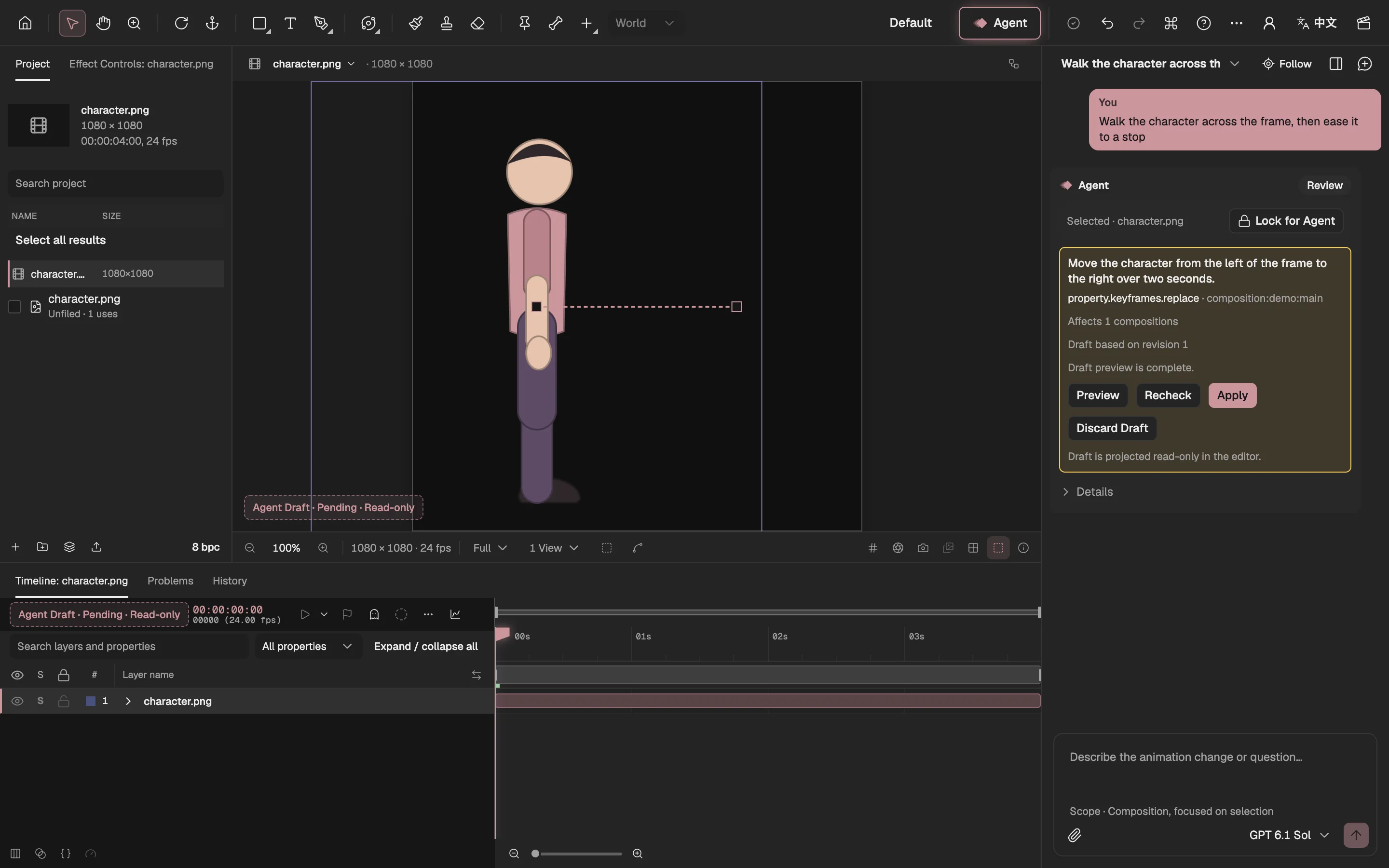
- What the draft changes
- See it in the viewer first
- Apply it to the project
- Or throw it away
What did choosing differently cost?
Each break closes a door After Effects keeps open. Keyframe has no plug-in SDK, no ExtendScript or UXP scripting, no MOGRT templates and no Dynamic Link. Code from outside runs only as project data in the sandbox, never as a native plug-in. If your work depends on a particular third-party plug-in, or on a script your team has refined for years, Keyframe can’t load it, and we aren’t planning a way to.
Living in the browser has a price too. Projects are stored in your browser, on your own computer. Export is limited to what a browser can encode, so formats such as ProRes and EXR are out of reach.
We think these are the right trades for a studio that must open the same way on every machine and let an Agent work safely beside you. They are still trades, and you should know them before you choose.
Where is After Effects still ahead?
Some of the distance isn’t a choice at all. After Effects has far more effects, the Cinema 4D renderer and ray-traced 3D, per-character text styling, Mocha for planar tracking, a plug-in ecosystem decades deep, and its place beside Premiere and Media Encoder. Those are gaps, not design, and we keep an honest, itemised list of them.
The model was never the problem
It is tempting to read a long-lived tool’s limits as proof that its ideas have aged. After Effects shows the opposite. The composition, the layer and the keyframe are as sound now as when they were set down; what ages is everything a tool has promised to keep working on top of them.
Starting fresh let us keep the ideas and leave the promises we didn’t need. If you know After Effects, you already know most of Keyframe. Where it differs, it differs on purpose, and each of the five breaks has a post of its own.