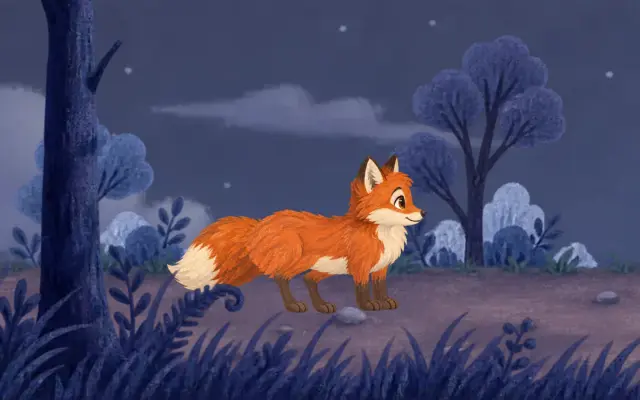
A turn lives in its timing
We kept making the in-betweens of a 360° turn smoother. What fixed it was showing them for less time.
Two turns, the same drawings
Ask an animation program to turn a character all the way round and you usually get the same thing: the figure rotates at an even pace, like a model on a turntable. No single frame is wrong, and the whole still looks off. It does not look like a cartoon.
Both turns below are made of exactly the same drawings, the same parts and the same in-betweens. The one on the left turns at a steady speed. The one on the right holds each key view, gets to the next in half a second, swings a little past it and settles. Only the timing differs, and the timing is the whole difference.
That is the argument of this post: a turn is carried by its timing, not by its in-betweens. The in-betweens only have to keep the drawings from jumping. How long they stay on screen decides whether the turn looks alive.
Exported from the Keyframe editor as it is. Six seconds, no sound.
We started with the in-betweens
Our first turn was made of whole pictures, one every 15 degrees, twenty-four in all, warped and blended into each other. Every picture redrew the whole character, so his face, shoulders and hair drifted a little from one to the next, and twenty-four pictures gave them twenty-four chances to drift.
So we did what character animation programs do and split him into parts. An image model drew eight views, one every 45 degrees, each as separate layers: neck, body, head, ears, hair, a cowlick, eyes, nose and mouth. In Keyframe they became a drawing set: one Turn slider runs through the eight drawings, and every part shows its own drawing for that view.
Switching drawings alone jumps, so the drawing set measures how each part moves between neighbouring drawings and fills the gap. A part slides along with the part it hangs from; a part whose outline changes too much, like the hair as it moves from the edge of the face to the back of the head, is shape-tweened from one outline to the other with its ink line kept the same width. Most of our work went here, into in-between frames that hold up.
Smooth, and still wrong
Once the in-betweens held up, the turn still looked wrong, and smoothing them further changed nothing. At a steady speed the slider spends as long between two drawings as on them, so in-betweens fill nearly the whole film: of its 144 frames, 140 are in-betweens and 4 show a drawing as it was drawn.
That is where an in-between is weakest. A tweened hair shape is a fair guess for a fraction of a second; held on screen, it reads as rubber. A steady turn has no poses either: nothing tells the eye this is the front, this is the side. The whole circle is one long transition.
- One quarter turn, frame by frame
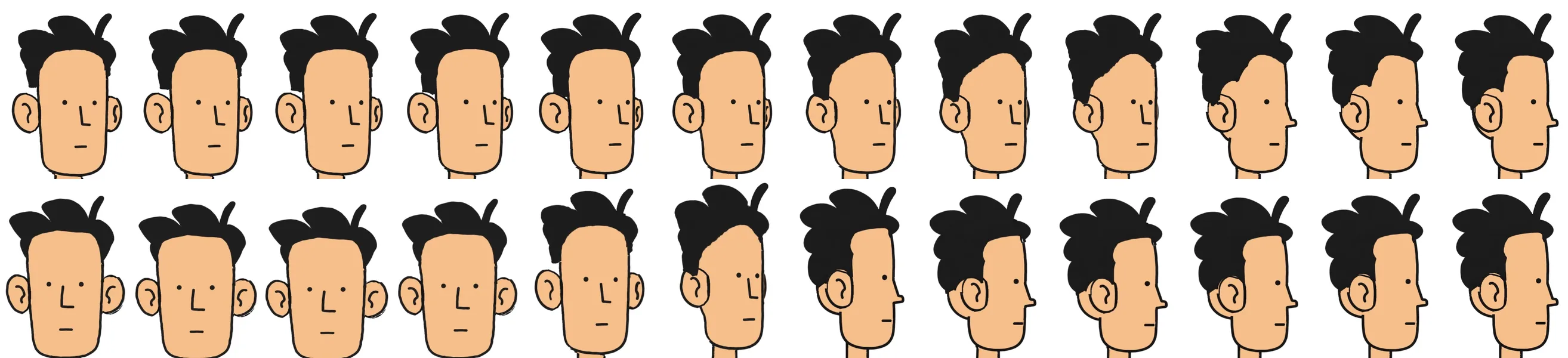
Hold, snap, settle
Hand-drawn animation settled this long ago, and the answer is one of the principles of animation (external website, opens in a new tab): timing. A turn is a few strong poses, front, side and back, each held long enough to be read, with short moves between them. The in-betweens are there so the eye sees no jump, not to be looked at.
So the turn on the right holds the front for a little over half a second, then turns to the side in twelve frames, half a second at 24 frames a second. It starts slowly and speeds up, carries on about seven degrees past the side and settles back over the next six frames. It holds the side for about two thirds of a second and does the same to the back, to the other side and to the front again. The last quarter lands on the drawing it started from, with no swing. Of the same 144 frames, 49 are now in-betweens, about a third.
None of this is a turn feature. It is a few ordinary keyframes and easing (opens in a new tab) on the Turn slider, the same keys any property takes, shaped in the Graph Editor (opens in a new tab) if you like. A slower, heavier turn, or one that lingers on the back, is a different set of keys, not a different preset. The Agent (opens in a new tab) sets the same keys when you describe the timing you want, and you review them before they go in.
Squash on the feet
A turn that only rotates still looks stiff, because a body pushes off before it turns. The timed version adds that with two more principles, anticipation and squash and stretch. Just before each turn he sinks a little, 5% shorter and 4% wider; through the turn he stretches 4% taller; on landing he squashes slightly and is back to his own size six frames later.
The squash is not drawn into the parts. The drawing set sits as one layer in a shot, nested (opens in a new tab) like any other composition, and that layer's scale is keyframed with its anchor point at his feet, so they stay on the ground while the rest of him gives. The turn and the squash stay apart: either can be retimed without touching the other.
What timing does not fix
Timing hides a weak in-between; it does not repair one. Step through the turn on the right frame by frame and the hair still bends like rubber halfway to the back. It is only on screen for two or three frames instead of ten.
The drawings still have to agree with each other. Two of the eight views, three quarters from behind, came back from the image model with the hair too long and the head too wide, and were redrawn to sit between their neighbours. A turn this quick shows a drawing that does not match as a pop.
And the whole figure turns at once. An animator would lead with the eyes and head, let the body follow and the hair drag a frame behind: overlapping action. Here every part follows the one Turn slider, so head and body arrive together. That takes more than timing.
Spend the frames on the poses
It is tempting to treat a turn as an in-between problem, because in-betweens are what software can make. But the eye reads poses. A turn that holds its views and passes quickly between them looks right with modest in-betweens; a turn that never stops looks wrong with perfect ones.
Make the in-betweens good enough not to jump, then spend the time on the poses.
Bones, IK and meshes, the rest of moving a character made of parts, have a page of their own.