Effects
Audio
Every effect Effects & Presets lists under Audio, generated from the editor’s effect registry: what it does, the layers it works on, and each parameter with its default and range.
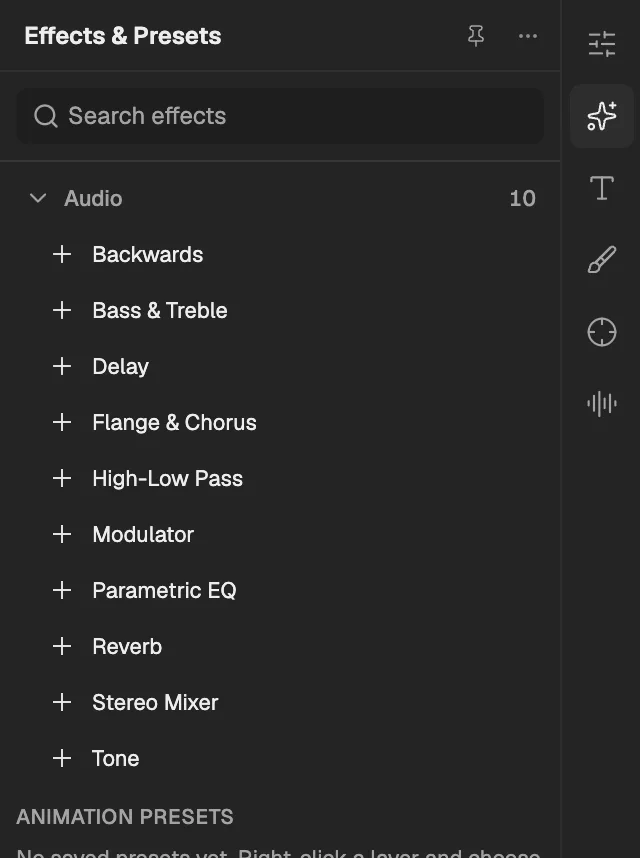
- The category, with the number of effects in it.
- Select an effect to add it to the selected layer. An effect shown greyed out reads another layer, and the composition has none it can use yet.
Backwards
Plays the layer's sound from its last frame to its first, leaving the frames in order; it can swap the left and right channels.
- Works on
- Audio and Video
| Parameter | Default | Range or choices |
|---|---|---|
| Swap ChannelsNot keyframed | Off | — |
Bass & Treble
Boosts or cuts the low frequencies (bass) and the high frequencies (treble) of the sound.
- Works on
- Audio and Video
| Parameter | Default | Range or choices |
|---|---|---|
| Bass | 0 | -100 to 100 |
| Treble | 0 | -100 to 100 |
Delay
Repeats the sound after Delay Time, each echo fed back into the next, like sound bouncing off a wall.
- Works on
- Audio and Video
| Parameter | Default | Range or choices |
|---|---|---|
| Delay Time (milliseconds) | 500 ms | 1 ms to 10,000 ms |
| Delay Amount | 50% | 0% to 100% |
| Feedback | 50% | 0% to 100% |
| Dry Out | 75% | 0% to 100% |
| Wet Out | 75% | 0% to 100% |
Flange & Chorus
Mixes the sound with delayed copies whose delay sweeps over time: short delays give a flange, longer ones a chorus of voices.
- Works on
- Audio and Video
| Parameter | Default | Range or choices |
|---|---|---|
| Voice Separation Time (ms) | 2.5 ms | 0.1 ms to 200 ms |
| Voices | 1 | 1 to 8 |
| Modulation Rate | 0.25 Hz | 0.01 Hz to 20 Hz |
| Modulation Depth | 50% | 0% to 100% |
| Voice Phase Change | 0° | 0° to 360° |
| Invert PhaseNot keyframed | Off | — |
| Stereo VoicesNot keyframed | Off | — |
| Dry Out | 50% | 0% to 100% |
| Wet Out | 50% | 0% to 100% |
High-Low Pass
Lets through only the frequencies above (High Pass) or below (Low Pass) the cutoff, to remove rumble or hiss.
- Works on
- Audio and Video
| Parameter | Default | Range or choices |
|---|---|---|
| Filter OptionsNot keyframed | High Pass | High Pass or Low Pass |
| Cutoff Frequency | 2,000 Hz | 10 Hz to 20,000 Hz |
| Dry Out | 0% | 0% to 100% |
| Wet Out | 100% | 0% to 100% |
Modulator
Adds vibrato and tremolo by sweeping the sound's pitch and level with a sine or triangle wave.
- Works on
- Audio and Video
| Parameter | Default | Range or choices |
|---|---|---|
| Modulation TypeNot keyframed | Sine | Sine or Triangle |
| Modulation Rate | 10 Hz | 0.01 Hz to 100 Hz |
| Modulation Depth | 2% | 0% to 100% |
| Amplitude Modulation | 0% | 0% to 100% |
Parametric EQ
Boosts or cuts up to three frequency bands, each set by its centre frequency, bandwidth and gain.
- Works on
- Audio and Video
| Parameter | Default | Range or choices |
|---|---|---|
| Band 1 EnabledNot keyframed | On | — |
| Band 1 Frequency | 200 Hz | 10 Hz to 20,000 Hz |
| Band 1 Bandwidth | 25% | 1% to 100% |
| Band 1 Boost/Cut | 0 dB | -24 dB to 24 dB |
| Band 2 EnabledNot keyframed | Off | — |
| Band 2 Frequency | 1,000 Hz | 10 Hz to 20,000 Hz |
| Band 2 Bandwidth | 25% | 1% to 100% |
| Band 2 Boost/Cut | 0 dB | -24 dB to 24 dB |
| Band 3 EnabledNot keyframed | Off | — |
| Band 3 Frequency | 5,000 Hz | 10 Hz to 20,000 Hz |
| Band 3 Bandwidth | 25% | 1% to 100% |
| Band 3 Boost/Cut | 0 dB | -24 dB to 24 dB |
Reverb
Simulates a room by adding diffuse reflections of the sound, set by their delay, density, length and brightness.
- Works on
- Audio and Video
| Parameter | Default | Range or choices |
|---|---|---|
| Reverb Time (milliseconds) | 100 ms | 1 ms to 1,000 ms |
| Diffusion | 75% | 0% to 100% |
| Decay | 25% | 0% to 100% |
| Brightness | 10% | 0% to 100% |
| Dry Out | 90% | 0% to 100% |
| Wet Out | 10% | 0% to 100% |
Stereo Mixer
Sets the level and pan of the left and right channels, and can invert the phase of both.
- Works on
- Audio and Video
| Parameter | Default | Range or choices |
|---|---|---|
| Left Level | 100% | 0% to 200% |
| Right Level | 100% | 0% to 200% |
| Left Pan | -100 | -100 to 100 |
| Right Pan | 100 | -100 to 100 |
| Invert PhaseNot keyframed | Off | — |
Tone
Makes up to five tones (or white noise) in place of the layer's sound; on a layer without sound it gives it some.
- Works on
- Image, Video, Text, Shape, Solid, Composition, Adjustment, and Audio
| Parameter | Default | Range or choices |
|---|---|---|
| Waveform optionsNot keyframed | Sine | Sine, Triangle, Saw, Square, or White Noise |
| Frequency 1 | 440 Hz | 0 Hz to 20,000 Hz |
| Frequency 2 | 493.88 Hz | 0 Hz to 20,000 Hz |
| Frequency 3 | 587.33 Hz | 0 Hz to 20,000 Hz |
| Frequency 4 | 659.26 Hz | 0 Hz to 20,000 Hz |
| Frequency 5 | 784 Hz | 0 Hz to 20,000 Hz |
| Level | 20% | 0% to 100% |